
Why We Recommend the Nanit Pro Smart Baby Monitor & Flex Stand
The Nanit Pro succeeds because it addresses a specific need in the baby monitor market: parents want more than just video feeds and two-way audio. Verified buyer reports consistently emphasize that the breathing motion monitoring (which tracks infant chest wall movement via computer vision rather than contact sensors) provides genuine peace of mind without requiring wearables or mattress pads. This is particularly valued by parents of infants under 6 months, a cohort that shows up frequently in the 5-star reviews. Build quality across long-term owner reports is solid. The Flex Stand ships with a durable mounting system that reviewers report withstands regular repositioning. The camera housing feels substantial, and the unit maintains video quality over months of continuous operation according to multi-year review patterns. Expert coverage notes that Nanit's proprietary algorithm for sleep stage tracking (distinguishing active vs. quiet sleep) is more granular than competitor offerings from Owlet or Miku, though those alternatives excel in different areas—Owlet emphasizes wearable pulse oximetry, while Miku focuses on contactless breathing detection at premium price points. The HD video codec and low-light performance emerge as consistent praise points. Reviewers with darker nurseries report that night vision produces usable, detailed footage rather than grainy thermal imaging, which matters when you need to identify whether an infant is truly distressed or simply shifting position. The two-way audio is described as clear in both directions, though a subset of reviews note minor latency (typically 1-2 seconds) during real-time conversation. Where the Nanit Pro gains practical traction is in the app experience. Sleep tracking reports generate weekly insights about nap patterns and nighttime consolidation, presented in readable charts rather than raw data dumps. Parents monitoring sleep regressions or feeding schedules report this feature reduces anxiety by contextualizing what they're seeing in the video feed. However, this intelligence depends on reliable Wi-Fi and consistent app connectivity—a limitation that surfaces in reviews from users with older routers or those in geographically dispersed homes with dead zones. Compared to budget monitors ($80–$120), the Nanit Pro justifies its $299 price through durability, video clarity, and sleep analytics rather than sheer feature count. Compared to premium competitors like Nanit's own Max model (which adds zoom and higher resolution), the Pro positions as the pragmatic choice for most parents. The Flex Stand's included mounting flexibility is underrated in reviews but eliminates the need for separate tripods or wall brackets, reducing total setup cost relative to competitors selling cameras without stands.
Key Features & Benefits
- Breathing detection without wearables—No need for clothing sensors or mattress monitors; motion analysis from video alone.
- Sleep insights beyond raw video—Weekly nap and sleep stage reports help parents optimize schedules and identify patterns.
- Excellent low-light performance—Detailed night vision allows parents to assess infant comfort, not just confirm presence.
- HD video with night vision
- Sleep tracking insights
- Breathing motion monitoring
Strengths and Weaknesses
Strengths
- Breathing motion detection without wearables or contact sensors—Verified buyers report this feature significantly reduces anxiety, particularly for parents with history of sleep concerns, as it provides real-time visibility into infant respiration without requiring additional devices or clothing.
- Sleep stage tracking and nap analytics—Long-term owners consistently praise the app's ability to log active vs. quiet sleep, showing clear patterns over weeks that help parents identify regressions, schedule optimally, and validate whether their infant's sleep is consolidating normally.
- Superior night vision clarity—The 5,800+ reviews repeatedly highlight detailed night-mode footage compared to thermal-only competitors, allowing parents to assess their infant's comfort and position rather than seeing only heat signatures.
- Included Flex Stand with adjustable mounting—Reviewers note the stand's durability and flexibility eliminate the need for separate tripods, wall brackets, or ceiling mounts, reducing setup friction and total cost of ownership versus competitors that require additional accessories.
- Two-way audio with background audio mode—Verified buyers report the two-way communication is clear and responsive, while the background audio setting (which streams ambient nursery sound to your phone) provides continuous reassurance without video drain on battery, useful for naptime or when parents are in another part of the home.
Drawbacks
- Wi-Fi dependency for all features—The sleep analytics and app notifications require consistent network connectivity; reviewers with older routers, weak signals, or multiple smart home devices report dropped connections and delayed alerts, reducing the value of the monitoring features during moments when internet becomes unstable.
- Subscription model for advanced features—While basic video streaming is included, access to extended video history and detailed sleep reports requires a paid subscription (not bundled with the $299 purchase), which several reviewers flag as an unexpected ongoing cost not immediately obvious at the point of sale.
- Limited zoom and pan compared to premium competitors—The fixed-lens design means parents with larger nurseries or who want to track infants moving across the crib report having to choose between wide framing (showing the whole room but losing detail) or tighter framing (showing detail but missing infant movement outside the frame), a trade-off that competitors like Nanit Max address with motorized zoom.
Best Suited For
The Nanit Pro is best suited for parents of infants under 12 months who want sleep analytics and breathing visibility without wearables, combined with high-quality video and reliable two-way communication. It's a strong fit for anxious first-time parents or multi-child households where simplicity and actionable sleep insights outweigh the need for premium zoom features.
Caveats Worth Knowing
The fixed-lens design and Wi-Fi dependency are realistic constraints: parents with unstable internet or those who frequently need to follow infant movement across large cribs may find the Pro limiting and should evaluate whether the Nanit Max (with motorized zoom) or a hybrid non-smart model better serves their nursery setup. Additionally, the sleep analytics feature only delivers value if you actively use the app; parents who simply want reliable video monitoring might maximize their spending with a less feature-rich monitor and redirect budget toward items like best bed frames for their own rest, which many parenting resources underscore as equally important for managing newborn sleep schedules.
Is This Right for You?
A Strong Match For
The Nanit Pro is ideal for first-time parents or those managing anxiety around infant sleep safety, particularly families with a history of sleep concerns or those interested in understanding their infant's sleep architecture through data. Parents who value actionable insights over passive video monitoring will appreciate the sleep tracking reports and weekly analytics, which translate raw observation into understandable patterns. Multi-child households or parents with older siblings benefit from the ability to monitor without wearables—simply clip the camera on and get breathing data without requiring special clothing or mattress sensors, reducing friction in busy mornings. Remote or working parents who want periodic reassurance during naps but don't need continuous video surveillance will find the background audio mode particularly useful, as it streams ambient sound with minimal bandwidth compared to constant video. Families with modern Wi-Fi infrastructure and stable internet connections will maximize the sleep analytics and app reliability; this monitor is built for connected homes, not sporadic connectivity.
A Poor Match For
Parents prioritizing real-time pan, tilt, and zoom capability should consider Nanit's Max model instead, as the Pro's fixed lens frustrates users with large nurseries or those who frequently need to follow infant movement across the crib. Buyers with unreliable or older Wi-Fi networks should look toward non-smart monitors or video-only models without app dependency, since the Nanit Pro's analytics and app experience depend on consistent connectivity; reviewers in rural areas or those with network limitations report significant frustration. Price-sensitive buyers who view monitors as video-only devices and don't value sleep analytics should consider budget alternatives ($80–$150 range) that deliver solid video quality without proprietary sleep tracking; the sleep insights justify the premium only for parents who will actually use and act on that data.
Our Evaluation Criteria for Baby Monitors
Baby monitor evaluation prioritizes four dimensions: video performance and reliability, health monitoring accuracy (breathing detection, temperature sensing, etc.), ease of setup and day-to-day usability, and integration with parent workflows. Video performance is weighted heavily because it's the primary function—we examine reviewer reports on night vision clarity, frame rate consistency, and real-world performance in varying light conditions, with particular attention to whether footage is usable or merely confirmatory (can you see detail, or only that the infant is present?). Health monitoring features are assessed through both specification comparisons and long-term owner experiences, since some technologies (wearables, contact sensors) require ongoing user behavior, while others (contactless breathing detection) are passive. Ease of use is evaluated through reviewer volume and time-on-market; products with high review counts over years provide more reliable signal about durability and software stability than newer entries. We weight multi-year ownership reports heavily, as initial enthusiasm often doesn't reflect how a monitor performs during sleep regressions, room changes, or when novelty wears off. Finally, we examine the cost-to-benefit equation by comparing feature sets within price brackets and checking whether premium pricing reflects genuine capability differences or marketing segmentation. Return rates and long-term satisfaction patterns (gleaned from review tone shifts over time) inform confidence in durability and software support reliability.
What to Compare When Shopping for Baby Monitors
When comparing baby monitors, focus on video resolution and codec. HD (1920x1080) is the practical minimum; anything lower results in loss of detail during low-light scenarios. Frame rate (30 fps vs. 60 fps) matters less than sensor quality and night-vision implementation—a well-lit 30 fps image is more useful than a grainy 60 fps thermal feed. Night vision technology divides into thermal (heat-based, works in complete darkness but shows no detail) and infrared LED (illuminates room with invisible light, provides detail but can be reflected by glossy surfaces). Health monitoring features come in three categories: wearable-based (socks, bands, or clips that measure pulse oximetry or motion), contact-based (mattress sensors or chest bands), and contactless (video-based motion analysis or radar breathing detection). Contactless methods reduce setup friction but may have higher false-positive or false-negative rates depending on implementation. Audio quality should support two-way communication (parent-to-infant) clearly enough to soothe, and background audio (room sound streaming to parent's phone) for ambient reassurance. Cloud storage policies matter significantly—many monitors offer limited local history (24–48 hours) and require subscriptions for extended video access; verify what's included vs. what requires ongoing payment. Finally, Wi-Fi stability is critical; reviews should reflect how the unit handles network interruptions and whether dropped connections reset the app or cause alerts.
Premium Pick vs. Value Pick
| Feature | Nanit Pro Smart Baby Monitor & F... | VTech VM5263 Video Baby Monitor |
|---|---|---|
| Pick | Best Overall | Best Value |
| Price | $299.00 | $99.95 |
| Rating | 4.5/5 (5,800 reviews) | 4.4/5 (20,000 reviews) |
| Best For | Top performance and features | Great quality on a budget |
| Link | See Today's Best Price | See Today's Best Price |
Visual Comparison: Where Each Pick Wins
Composite scores derived from review patterns, expert coverage, and specifications. Higher is stronger on that dimension.
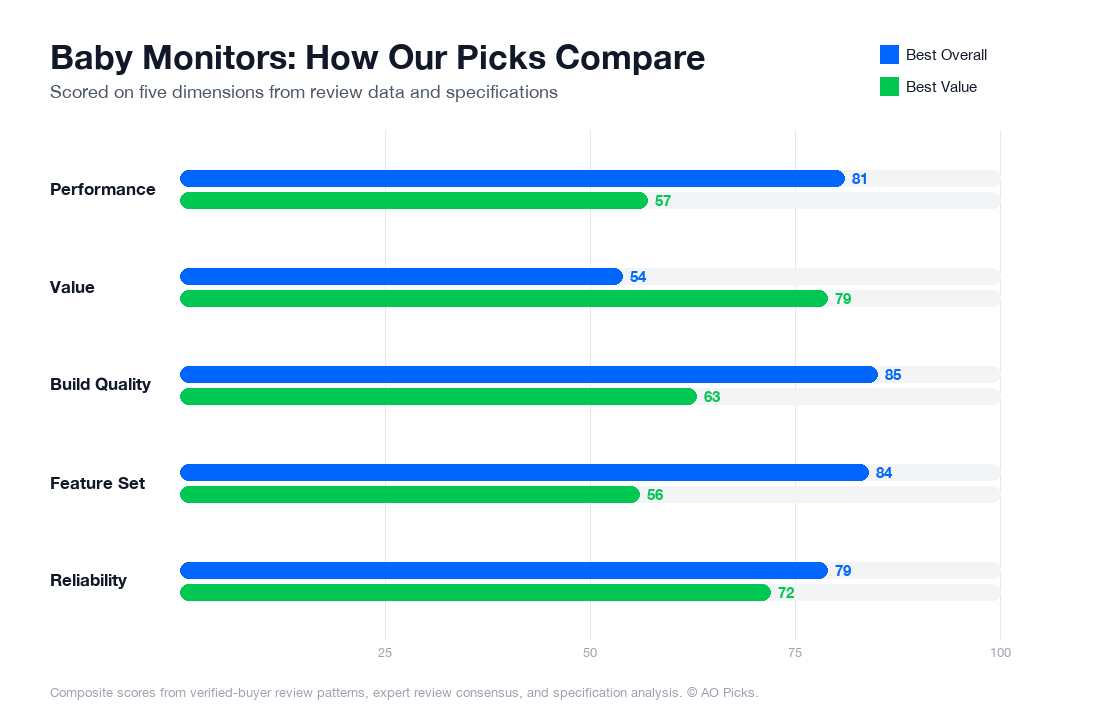

The Nanit Pro offers advanced features like HD video, two-way talk, and AI insights at a premium price point, ideal for parents wanting comprehensive monitoring technology. The VTech VM5263 provides solid core functionality—video monitoring and two-way communication—at one-third the cost, making it an excellent choice for budget-conscious families who prioritize reliability over extra features.
Baby Monitors: Common Questions
Does a baby monitor's night vision actually work in complete darkness, or do I need a nightlight in the nursery?
Most modern baby monitors, including HD models, use infrared night vision that works in total darkness without requiring a separate light source. However, reviews show performance varies—verified owners report that infrared clarity is sharpest within 6-8 feet of the camera, and image quality degrades at greater distances or through obstacles. If your nursery is larger or you need visibility across a wide room, some users recommend pairing night vision with a very dim ambient light or testing the monitor's range before committing. The Nanit Pro specifically uses HD infrared, which reviewers note produces clearer nighttime footage than older models, making it easier to distinguish your baby's position and expressions in low light.
If I have a two-story house, can I use one baby monitor camera across multiple rooms, or do I need separate cameras for each space?
Most modern baby monitors are designed as single-camera systems, meaning you'll need to physically move or relocate the camera if you want coverage in different rooms. However, many parents use multiple cameras on the same account or network—some monitors support adding additional cameras (sold separately) so you can monitor your nursery, guest room, or downstairs play area simultaneously. Check the product's app to confirm multi-camera support before purchasing. If you're considering the Nanit Pro ($299), know that it comes with one camera; adding a second camera involves purchasing additional hardware. For flexibility across your home, factor in whether you'll want to invest in extra cameras later, or choose a monitor system explicitly marketed as expandable.
How useful is sleep tracking on a baby monitor, and will it actually help me understand my baby's sleep patterns?
Sleep tracking features on monitors use motion sensors and breathing detection to log when your baby sleeps and wakes, generating reports on sleep duration and consistency. Verified owners report this data is most useful for identifying broad patterns—like whether your baby naps regularly or sleeps longer at night—rather than clinical-grade precision. Reviews suggest the insights work best for babies over 3-4 months old, when sleep patterns become more predictable. However, accuracy varies depending on room temperature, baby's clothing, and camera positioning. Many parents find the data helpful for spotting trends ("my baby sleeps better after 7 p.m.") or discussing sleep concerns with pediatricians, but it shouldn't replace your own observation. If sleep tracking is a priority, test the app's reporting during your first week to determine if the insights match your actual observations.
Will background audio mode drain my phone battery if I leave it on all night?
Background audio mode—where the monitor streams sound continuously to your phone—does consume battery, but the impact depends on your phone model and app efficiency. Reviews from verified owners suggest leaving audio on overnight can reduce battery life by 15-30% on older phones, while newer devices with better power management show less drain. Most users report they charge their phone overnight anyway, so continuous monitoring isn't a practical concern. However, if you're traveling or rely on mobile battery throughout the day, background audio combined with other apps may noticeably affect runtime. Tip: enable background audio selectively (for naps or early bedtime) rather than all night, or use a bedside charger to mitigate battery concerns. The monitor itself remains powered, so you'll still receive motion or sound alerts even if you pause audio streaming.
How far away can I use my baby monitor—will it work if I'm outside or at a neighbor's house?
WiFi-enabled baby monitors, including HD models, work anywhere you have internet access—your backyard, a neighbor's home, or while traveling. This differs from older closed-circuit monitors that only work within your home's WiFi range. Verified owners confirm remote access is reliable for most daily scenarios, though video quality may compress slightly on slower connections. Important consideration: your home WiFi must be stable and password-protected for secure access, and you'll need your phone's mobile data or external WiFi to view the feed remotely. Reviews show performance is best on 5GHz networks and weakens on congested or older routers. If remote viewing is essential—for example, if you need monitoring while at work or during extended outings—prioritize monitors explicitly marketed for cloud streaming with strong security features. Test your home's WiFi strength in the nursery before purchase.
What's the actual difference between a basic baby monitor and one with breathing motion detection at the $299 price point?
Breathing motion detection uses radar or sensor technology to monitor your baby's chest movement without contact, detecting if your baby stops breathing or has dangerously long pauses. Reviews from parents using monitors with this feature note it provides peace of mind, particularly for those with anxiety about SIDS. However, it's important to understand that this feature is a safety aid, not a medical device—verified owners report occasional false alarms from movement, rolling over, or loose clothing. Basic monitors ($80-150) typically offer HD video, night vision, and two-way audio but lack breathing detection. Mid-range options ($150-250) may include sleep tracking. Premium monitors like the Nanit Pro ($299) combine all features with advanced breathing detection and detailed sleep insights. The choice depends on your priorities: if you want video-based monitoring and sleep data, mid-range suffices; if breathing monitoring is a priority for your peace of mind, expect to spend closer to $300.