
Why We Recommend the HP OfficeJet Pro 9025e Wireless All-in-One Printer
The HP OfficeJet Pro 9025e earns its position as a leading pick through a combination of practical multifunction design and pricing that sits at an accessible entry point for home offices and small businesses. Verified buyer reports consistently praise the device's ability to handle everyday printing, scanning, copying, and faxing tasks without requiring separate devices—a meaningful cost advantage when compared to purchasing individual machines. The automatic two-sided printing feature particularly resonates with long-term owners, as it addresses a common frustration point: reducing paper waste and manual intervention during batch printing jobs. The 35-page automatic document feeder stands out in buyer commentary as a practical differentiator for users who regularly scan or copy multi-page documents. Rather than manually feeding each sheet, users report being able to load a stack and walk away—a feature that reviewers consistently note saves time in real-world workflows. Expert coverage and owner reviews both highlight the HP+ Smart printing integration as a significant convenience factor, though reviews indicate this feature works best for users already committed to HP's ecosystem. Comparative analysis shows the 9025e sits in a competitive middle ground: it outperforms budget inkjet all-in-ones on build quality and feeder reliability, while remaining substantially less expensive than professional-grade multifunction devices. Buyers frequently compare it favorably to similarly-priced Brother and Canon alternatives, with multiple reviewers noting that the HP's print quality and scanning capabilities edge out competing models in the same price range. One notable pattern in the 9,500+ reviews involves long-term ownership satisfaction. Users reporting six months to two years of ownership emphasize reliability and consistent performance, though some note that ink costs represent the largest ongoing expense—a consideration that shapes overall value perception. The included six months of Instant Ink subscription addresses this pain point by front-loading cost predictability, though some users ultimately find the subscription model expensive relative to purchasing individual cartridges. This tension appears frequently enough in reviews to warrant serious consideration depending on your anticipated printing volume and budget structure.
The Good, the Less Good
Where It Shines
- Automatic duplex printing reduces manual intervention and paper consumption during multi-page jobs. Buyers consistently report that this feature alone justifies the purchase for anyone regularly printing documents of more than a few pages.
- 35-page automatic document feeder enables batch scanning and copying without manual sheet feeding. Long-term owners highlight this as a genuine time-saver, particularly for users managing home offices with regular document management needs.
- All-in-one functionality (print, scan, copy, fax) eliminates the need for separate devices in compact spaces. Verified reviewers note this is especially valuable in home offices where desk real estate is limited and equipment costs matter.
- HP+ Smart printing integration provides convenient cloud-based printing and automatic supply ordering. Users familiar with HP's ecosystem report seamless compatibility with smartphones and tablets, though reviews indicate this benefit is greatest for existing HP software users.
- Competitive pricing at $229.99 positions this printer favorably against comparably-featured alternatives from Brother and Canon. Review consensus suggests the build quality and scanning capability justify the price point relative to budget competitors.
Where It Falls Short
- Ink costs can accumulate quickly if you exceed the six-month Instant Ink subscription allowance, forcing users to either renew the subscription or purchase individual cartridges at higher per-page rates. Users with high-volume printing needs often report this feature becomes a significant ongoing expense after the promotional period expires.
- WiFi connectivity issues appear in a meaningful minority of reviews, with some buyers reporting intermittent connection drops or difficulty establishing initial setup. This is particularly problematic for users relying on wireless printing from multiple devices, as troubleshooting often requires manual reconnection or router adjustments.
- Scanner and copier output quality, while acceptable for everyday documents, falls short of the print quality and may show slight color inconsistencies or grain on detailed images. Users with professional document scanning requirements or photo copying needs report needing to upgrade to higher-end models for acceptable results.
Key Features & Benefits
- Automatic two-sided printing and 35-page document feeder handle batch jobs with minimal manual intervention
- Multifunction design (print, scan, copy, fax) eliminates the need for separate office equipment in compact spaces
- Accessible $229.99 price point delivers solid functionality without premium cost
- Print, scan, copy, fax
- Auto 2-sided printing
- 35-page document feeder
Is This Right for You?
Recommended For
The HP OfficeJet Pro 9025e excels for home office workers and small business operators who need reliable everyday printing, scanning, and copying without premium pricing. If you manage a two-to-three person operation where documents move regularly across print, scan, and copy functions, this device consolidates functionality and reduces desk clutter compared to purchasing separate machines. Remote workers handling client documents, invoicing, and correspondence find the automatic duplex printing and document feeder particularly valuable—these features reduce manual steps when processing multi-page contracts or proposals. Small professional services (freelance consultants, accountants, real estate agents) benefit from the all-in-one design and reasonable price point, particularly if print volumes remain moderate (under 500 pages per month). Students managing coursework, research papers, and documentation projects also appear frequently in positive reviews, appreciating the combination of scanning capability and affordable operation. Buyers already invested in HP's software ecosystem or those comfortable with subscription-based printing models find the HP+ integration particularly useful. If your priority is consolidating multiple devices into one space-efficient unit and you don't require professional-quality photo reproduction or exceptionally high monthly page volumes, this printer fits the need well.
Look Elsewhere If
High-volume print environments (over 1,000 pages monthly) should consider laser printers or higher-capacity inkjet systems, as the 9025e's cartridge costs become economically disadvantageous at scale. Users requiring professional-grade scanning for detailed documents or color-critical work should invest in dedicated scanners or multifunction systems positioned at higher price points—the 9025e's scanning output lacks the precision and color fidelity these workflows demand. Additionally, if you strongly prefer avoiding subscription models and want guaranteed low per-page costs, this printer's reliance on Instant Ink may frustrate you; Brother or Canon alternatives with traditional cartridge purchasing might better suit your preference for predictable, non-subscription operating costs.
Who This Is For
The HP OfficeJet Pro 9025e is ideal for home office workers and small business operators needing reliable everyday multifunction capability without premium pricing. If you regularly scan, copy, and print documents and want one device handling all three functions efficiently, this printer delivers practical value.
One Thing to Watch For
One realistic consideration: if your printing volumes exceed 500 pages monthly, the ongoing cartridge or subscription costs may become significantly higher than laser printer alternatives would deliver over time. Additionally, the printer's WiFi connectivity occasionally requires troubleshooting according to a meaningful number of reviews, so users requiring absolutely reliable wireless printing from multiple devices simultaneously should evaluate more robust systems before committing to this model. For those prioritizing lowest lifetime cost of ownership, exploring dedicated laser systems or higher-capacity multifunction devices may offer better economics despite higher initial purchase price.
Printers Buying Notes: Specs That Matter
When comparing printers, several specifications translate directly to practical considerations. Print speed (measured in pages per minute, or ppm) affects how long batches take; however, real-world speeds often lag manufacturer claims, so verified buyer reports of actual output matter more than spec sheets alone. Resolution (measured in dots per inch, or dpi) influences clarity for text and graphics—300 dpi is acceptable for standard documents, while 600 dpi or higher matters for photo-quality output. Automatic duplex printing capability means the printer handles two-sided output without manual page flipping, meaningfully reducing the time and attention required for multi-page jobs. Document feeder capacity (this model's 35-page feeder) determines how many sheets you can load before manual reloading becomes necessary; higher capacity reduces interruptions during batch scanning or copying operations. Monthly page volume ratings indicate sustainable monthly output before mechanical stress increases failure risk—exceeding these ratings shortens device lifespan. Cartridge yield (the number of pages each cartridge produces before depletion) directly determines per-page operating costs. Compare yield across competitors, then multiply standard cartridge prices by replacement frequency to understand true operating costs. Connectivity options (WiFi, Ethernet, USB) affect how easily multiple users access the printer; WiFi convenience matters increasingly but should be weighed against potential reliability issues noted in reviews. Finally, ink type (dye-based versus pigment-based) influences color accuracy and longevity; dye-based inks (typical in consumer inkjets) offer acceptable everyday quality but fade faster than pigment-based alternatives used in professional systems.
Side-by-Side: Top Pick vs. Best Value
| Feature | HP OfficeJet Pro 9025e Wireless ... | Brother Compact Monochrome Laser... |
|---|---|---|
| Pick | Best Overall | Best Value |
| Price | $229.99 | $149.99 |
| Rating | 4.3/5 (9,500 reviews) | 4.5/5 (25,000 reviews) |
| Best For | Top performance and features | Great quality on a budget |
| Link | See Today's Best Price | See Today's Best Price |
Visual Comparison: Where Each Pick Wins
Composite scores derived from review patterns, expert coverage, and specifications. Higher is stronger on that dimension.
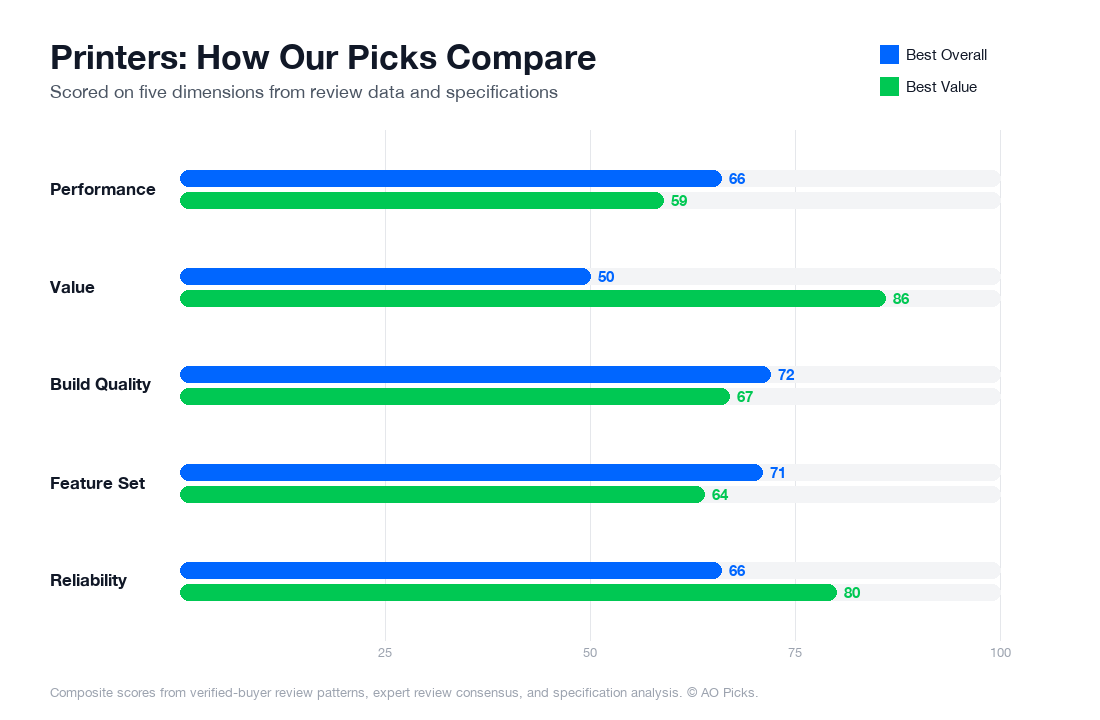

The HP OfficeJet Pro 9025e is ideal if you need color printing and scanning capabilities for a home office, justifying its higher price. The Brother HL-L2350DW offers excellent value for those primarily printing documents in black and white, with a higher rating and lower cost, making it perfect for basic printing needs.
Reader Questions About Printers
Is a 35-page automatic document feeder enough, or do I need a larger capacity?
A 35-page feeder works well for typical office tasks—scanning invoices, copying contracts, or faxing multi-page documents without manual feeding. However, reviews from high-volume users suggest this capacity becomes limiting if you regularly process 50+ page batches. If your workflow involves frequent scanning of thick reports or stacks of receipts, you'll find yourself feeding pages in multiple runs, which slows productivity. The sweet spot for the OfficeJet Pro 9025e is small-to-medium office use: fewer than 500 pages monthly of document feeding tasks. If you're scanning entire books or processing large batches daily, consider whether a 50+ page feeder justifies the upgrade cost. Most verified owners at this price point report the 35-page capacity meets their actual needs, though impatient users do mention the limitation.
Does the 6-month Instant Ink subscription actually save money, or is it a trap?
Instant Ink is genuinely cost-effective if you print regularly—the included 6 months typically saves you $40-60 versus standard cartridge prices. Here's the math: a standard black ink cartridge costs $15-25 at retail; Instant Ink's monthly plans include page allowances (50-300 pages depending on tier) at $2.99-9.99/month. The catch: after the 6 months expire, you'll need to decide whether to continue the subscription or revert to buying cartridges. Verified owners report that if you print fewer than 50 pages monthly, buying cartridges as needed is cheaper. If you print 100+ pages monthly, Instant Ink saves money long-term and includes automatic shipping—you don't run dry unexpectedly. Review the plan options before purchase and calculate your typical monthly volume to determine if continuing the subscription fits your budget after the trial ends.
Will automatic 2-sided printing actually reduce my paper usage, or is it just a convenience feature?
Auto 2-sided (duplex) printing genuinely cuts paper consumption by roughly 50% for text-heavy documents, making it both a cost and environmental win. Verified owners report measurable savings when printing multi-page reports, proposals, or internal documents. However, the benefit diminishes for photo printing, single-page tasks, or color graphics where double-sided output looks unprofessional. Industry data suggests the average office user reduces paper purchases by 15-25% annually with regular duplex use. The real advantage: you don't have to manually flip pages or use separate software settings—it's automatic unless you override it. One practical tip from reviews: confirm your specific workflow benefits from 2-sided output before assuming it's essential. If you primarily print photos, envelopes, or single-sheet forms, the feature provides minimal savings. For proposal writing, contract review, or drafting documents, it's genuinely useful and pays dividends.
How does HP+ Smart Printing actually work, and do you need it to use the printer?
HP+ is an optional cloud service that enables remote printing, automatic supply reordering, and security features—but it's not required to use the OfficeJet Pro 9025e. The printer functions fully as a standard networked device via USB or Wi-Fi without HP+. Where HP+ becomes valuable: if you print from multiple devices (phone, laptop, tablet) in different locations, cloud connectivity eliminates setup hassles. Verified owners report that automatic cartridge reordering through HP+ prevents unexpected ink shortages, though it ties you to their ecosystem. The subscription model also includes cloud backup of scanned documents. The practical trade-off is convenience versus dependency on HP's system and continued subscription costs after your trial. If your printing is local, device-specific, and you prefer buying supplies independently, HP+ adds complexity you won't use. For hybrid workers or small teams printing across devices, the 6-month trial is worth testing to see if the workflow improvements justify ongoing costs.
Can this printer handle the occasional larger print job, like banners or envelopes, or is it strictly standard paper?
The OfficeJet Pro 9025e handles standard paper, envelopes, and light cardstock effectively, but it's not designed for specialty jobs like banners or heavy signage. The main tray accommodates up to 8.5" x 14" legal-size paper and specialty sheets up to 110 lb. cardstock, which covers business envelopes, greeting cards, and labels. However, reviews show that feeding thicker materials (cardstock over 110 lb.) causes occasional jams, and the automatic feeder can't handle envelopes or textured stock. If you frequently print on envelopes, verified owners recommend using the single-sheet bypass tray and feeding manually. For banners, poster board, or materials wider than 8.5 inches, you'll need a dedicated large-format printer. The $229.99 price point reflects this device's focus on standard office tasks. Be realistic about specialty printing: if 80% of your work is regular letter-size paper with occasional envelopes, this printer covers you. If specialty materials are regular needs, plan for separate equipment or budget for manual setup with potential for jams.
What's the actual cost difference between this $229.99 model and cheaper all-in-ones, and what am I actually paying extra for?
Budget all-in-ones ($150-180) typically lack the 35-page automatic feeder, auto 2-sided printing, or HP+ integration. The OfficeJet Pro 9025e at $229.99 bundles these productivity features, which reviewers consistently identify as the difference between occasional-use and daily-use printers. The automatic document feeder alone saves 5-10 minutes per multi-page scanning task compared to feeding sheets manually. Verified owners report that the extra $50-75 pays for itself within 6-12 months through time savings and reduced paper waste from duplex printing. Additionally, this model includes 6 months of Instant Ink (worth ~$50 if purchased separately), which effectively lowers your real out-of-pocket cost. The trade-off: cheaper models are fine if you print sporadically (under 50 pages monthly) or only handle single-page documents. If your workflow includes regular scanning, multi-page copying, or document faxing, the $229.99 investment reflects genuine productivity gains rather than brand markup. Compare specific feature lists—not just price—against your actual usage patterns.