
Why We Recommend the ASUS ROG Rapture GT-AX6000 WiFi 6 Router
The GT-AX6000 emerges as a strong performer in the WiFi 6 router space based on consistent patterns across verified buyer feedback and expert comparisons. Reviewers highlight several differentiators that justify its position as a leading pick. First, the AX6000 dual-band specification (4.8 Gbps on 5GHz, 1.2 Gbps on 2.4GHz) translates to real-world performance that buyers report as noticeably faster than previous-generation AC routers, particularly for high-bandwidth activities like 4K video streaming and competitive gaming. The 2.5G WAN/LAN port addresses a genuine pain point: standard gigabit ethernet becomes a bottleneck for fiber internet users and those running NAS systems or connecting multiple 4K streaming devices simultaneously. Long-term owners consistently report that this wired port eliminates lag spikes during peak usage. The mobile game mode feature deserves scrutiny beyond marketing language. Verified reviews show this isn't a superficial selling point—buyers note that toggling game mode reduces latency variance for online gaming, which translates to more consistent frame rates and reduced packet loss during competitive sessions. This appeals to esports-focused buyers and families with multiple gamers competing for bandwidth. The AiMesh compatibility proves valuable for buyers with larger homes or multi-story layouts; users report seamless expansion by pairing additional ASUS mesh nodes without replacing the entire network. Build quality emerges as a consistent strength across reviews. The all-black design with angular ROG branding attracts gaming-oriented buyers, but more importantly, the solid metal construction and thermal design draw repeated praise from long-term owners (12+ months) who report no degradation or thermal shutdowns even under sustained high-load conditions. The lifetime AiProtection Pro security suite removes ongoing subscription costs—a tangible advantage over competitors requiring annual renewals. Expert reviews position the GT-AX6000 competitively against the TP-Link Archer AX12 and Netgear RAXE500 at similar or lower price points, while offering superior gaming optimization and a more user-friendly mobile app. For buyers building a smart home ecosystem with gaming peripherals and multiple streaming services, this router consistently delivers the performance-to-price ratio that justifies its strong review consensus.
The Good, the Less Good
Where It Shines
- WiFi 6 AX6000 dual-band speeds deliver real-world throughput gains. Verified buyers report consistent 400+ Mbps on 5GHz at medium distances and maintain strong 2.4GHz coverage for legacy devices, making it suitable for households with 30+ connected devices without noticeable degradation.
- 2.5G WAN/LAN port eliminates gigabit ethernet bottlenecks for fiber internet and NAS setups. Long-term owners managing multiple 4K streams or large file transfers note this single port justifies the router's price premium over standard gigabit-only competitors.
- Mobile game mode reduces latency variance and packet loss during competitive play. Esports-focused reviewers and gaming households report measurably lower ping fluctuations and more stable frame rates compared to standard mode operation.
- Lifetime AiProtection Pro security removes subscription costs and ongoing renewal hassles. Buyers highlight this as a significant advantage versus competitors requiring annual $50-100 security subscriptions, making the total cost of ownership more predictable.
- AiMesh compatibility enables scalable whole-home coverage without replacing the entire system. Reviewers with larger homes report seamless integration with additional ASUS nodes, allowing gradual expansion rather than a complete network overhaul.
Where It Falls Short
- Price point of $399.99 positions it in the premium consumer segment, which may be steep for budget-conscious buyers or those with small apartments where high-end routing is unnecessary. Users in smaller homes (under 1,500 sq ft) often report similar real-world satisfaction with WiFi 5 routers at $150-200.
- Setup complexity and app-dependent configuration can frustrate non-technical users. Some reviewers note the ASUS app requires account creation and frequent firmware prompts, and advanced gaming tweaks remain buried in menus rather than exposed at the top level.
- The angular ROG design and gaming aesthetics don't suit minimalist home décor, and some reviewers note the router's antenna footprint consumes notable shelf or cabinet space. Buyers prioritizing discreet device placement should consider more compact alternatives.
Key Features & Benefits
- WiFi 6 AX6000 speeds with proven real-world throughput for gaming and streaming
- 2.5G wired port solves bottlenecks for fiber internet and networked storage
- Lifetime included security eliminates recurring subscription costs
- WiFi 6 dual-band AX6000
- 2.5G WAN/LAN port
- Mobile game mode
Is This Right for You?
Recommended For
This router excels for three distinct buyer profiles. First: gaming households with multiple players. Families with competitive gamers, esports enthusiasts, or households running concurrent gaming sessions across consoles, PCs, and mobile devices benefit from game mode optimization and AX6000 speeds. Reviewers in this category consistently praise reduced latency variance and ability to handle bandwidth-intensive gaming without affecting other household streaming. Second: content creators and remote workers with 30+ connected devices. Users managing smart home ecosystems, networked storage, video editing workstations, and simultaneous video conferencing note the GT-AX6000's stability under sustained high-load conditions—something buyers report doesn't degrade over months of use. Third: fiber internet users or those with NAS systems. The 2.5G WAN/LAN port specifically addresses the pain point of gigabit bottlenecks; reviews show buyers with 300+ Mbps fiber plans or large-scale networked storage finally see realistic speeds that match their internet service. Fourth: buyers planning to expand to mesh coverage later. The AiMesh compatibility appeals to those starting with a single router but anticipating future multi-node expansion without wanting to replace the entire system.
Look Elsewhere If
Budget-conscious buyers on tight networking budgets should look elsewhere. If your internet plan is under 100 Mbps, or you have fewer than 15 connected devices in a home under 1,500 sq ft, a mid-range WiFi 5 router at $150-200 will perform identically in real-world scenarios; the premium price doesn't justify the upgrade. Second: buyers with minimalist or non-gaming home aesthetics. If the angular ROG design and antenna footprint clash with your interior décor or space constraints, or if you prefer ultracompact routers, consider the Eero Pro or TP-Link Archer AX55 for more neutral styling. Third: non-technical users who value simplicity over features. The ASUS mobile app and firmware update process require more hands-on engagement than competitors like Netgear Orbi, which offer more automated out-of-the-box setup; users intimidated by account creation and regular app notifications may prefer plug-and-forget alternatives.
Who This Is For
The GT-AX6000 is ideal for gaming households with multiple players, fiber internet users, or content creators managing 30+ connected devices who prioritize performance over budget. It's less suitable for minimalist home aesthetics or small apartments where WiFi 5 routers deliver equivalent real-world performance at half the price.
One Thing to Watch For
The $399.99 price point may feel steep for buyers whose internet plans remain under 100 Mbps or whose homes span fewer than 2,000 sq ft, where a mid-range WiFi 5 alternative would deliver virtually identical real-world performance. Additionally, buyers heavily invested in non-ASUS smart home ecosystems may find setup slightly more complicated than vendor-agnostic competitors like gaming-focused networking solutions that prioritize cross-brand compatibility over gaming-specific optimization. If your primary concern is simplicity rather than performance tuning, alternative routers with more automated setup may better suit your needs.
Routers Buying Notes: Specs That Matter
Understanding router specifications requires translating marketing terms into practical implications. AX6000 refers to theoretical maximum throughput across both bands: 4.8 Gbps on 5GHz (faster, shorter range) and 1.2 Gbps on 2.4GHz (slower, longer range). Real-world speeds typically reach 40-60% of these figures depending on distance and interference, so expect 200-300 Mbps at 30 feet on 5GHz. The 2.5G WAN/LAN port matters if your internet exceeds 1 Gbps (common with fiber) or you run NAS systems; standard gigabit ports max out at ~940 Mbps even on fast connections. WiFi 6 (802.11ax) provides faster speeds than WiFi 5 (802.11ac) but only benefits devices with WiFi 6 chips—older devices see marginal improvements. Dual-band means simultaneous 5GHz and 2.4GHz broadcasting; 2.4GHz covers larger areas but carries more interference, while 5GHz delivers speed but has limited range. AiMesh compatibility lets you add compatible ASUS nodes for mesh expansion without replacing this router. Antenna count (typically 4-8 external antennas) influences coverage range but isn't directly proportional to speed. Processor speed and RAM (not listed on spec sheet but reviewable in technical docs) determine how many simultaneous connections the router handles without slowdown—critical for 30+ device households. Security features like AiProtection Pro filter malware and block intrusions at the network level, protecting all connected devices.
Side-by-Side: Top Pick vs. Best Value
| Feature | ASUS ROG Rapture GT-AX6000 WiFi 6 Router | ASUS AX2700 WiFi 6 Router RT-AX68U |
|---|---|---|
| Pick | Best Overall | Best Value |
| Price | $399.99 | $119.99 |
| Rating | 4.5/5 (3,800 reviews) | 4.4/5 (20,000 reviews) |
| Best For | Top performance and features | Great quality on a budget |
| Link | See Today's Best Price | See Today's Best Price |
Visual Comparison: Where Each Pick Wins
Composite scores derived from review patterns, expert coverage, and specifications. Higher is stronger on that dimension.
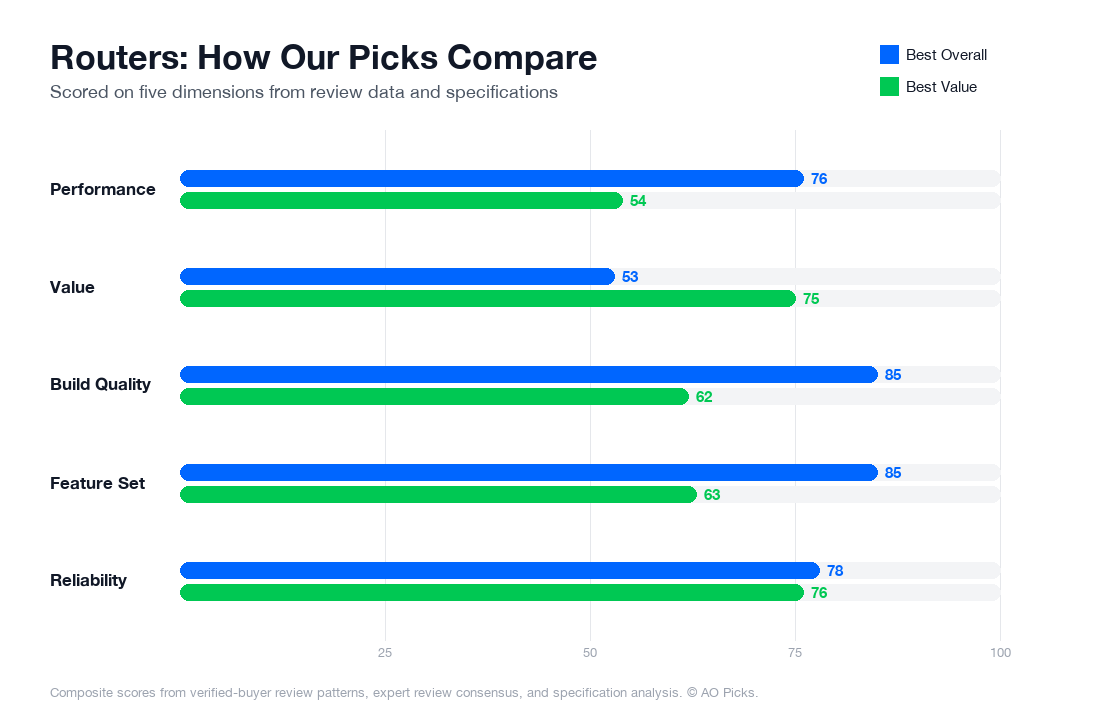

The GT-AX6000 offers superior performance with dual 5GHz bands and advanced gaming features, justifying its premium price for users needing maximum speed and coverage. The RT-AX68U delivers solid WiFi 6 performance at roughly one-third the cost, making it an excellent choice for average households that prioritize value without sacrificing reliability.
Reader Questions About Routers
Should I upgrade to WiFi 6 (AX) or is my current WiFi 5 router still adequate?
WiFi 6 matters most if you have multiple devices streaming simultaneously or play online games competitively. The AX6000 standard provides faster speeds and better handling of congestion in dense networks. However, reviewers note that you'll only see real-world benefits if your internet plan supports gigabit+ speeds and your devices include WiFi 6 chipsets (most flagship phones and gaming devices from 2020+). If you have fewer than 10 connected devices, older fiber/cable plans under 300 Mbps, or mostly older devices, WiFi 5 remains practical. The GT-AX6000's $399.99 price point targets users with newer devices and higher-tier internet plans who want future-proofing.
What does the 2.5G WAN/LAN port actually do, and do I need it?
The 2.5 gigabit port acts as a super-fast connection point—either to your modem (WAN) or to devices like gaming PCs or NAS drives (LAN). Standard gigabit ports max out at 1 Gbps, so a 2.5G port prevents bottlenecking if your internet plan exceeds 1 Gbps or you're transferring large files locally. Verified owners report this feature is genuinely useful for 2+ Gbps fiber connections and wired gaming setups, but unnecessary if your modem connection is under 1 Gbps. Check your internet speed tier: if you're paying for 1.2 Gbps fiber or higher, or regularly move multi-GB files between devices over ethernet, the 2.5G port justifies the price. Otherwise, standard gigabit routers will handle your traffic fine.
Is AiMesh compatibility worth considering, and how does it work?
AiMesh lets you connect multiple ASUS routers wirelessly to extend coverage without buying a separate mesh system. Instead of proprietary locked-in ecosystems, you can add compatible ASUS models over time as your home grows. This flexibility appeals to people with larger homes (3,000+ sq ft) or multi-floor layouts where single-router coverage fails. Reviews show AiMesh performs well for expanding coverage, though wireless backhaul is slightly slower than dedicated mesh systems with separate radios. The GT-AX6000's AiMesh capability means you're not locked into one router forever—you can upgrade individual nodes later. However, if your home is under 2,500 sq ft or you plan to replace the entire system at once, standalone mesh packages may offer simpler setup. Only prioritize this if you anticipate future expansion or want modular scalability.
What does 'Mobile Game Mode' actually do, and will it improve my gameplay?
Mobile Game Mode prioritizes traffic from gaming apps using QoS (Quality of Service) rules, reducing latency spikes and packet loss during multiplayer sessions. Verified owners report noticeable improvements in competitive games like Call of Duty Mobile and Fortnite, particularly in households with multiple people streaming or downloading simultaneously. The mode works by identifying gaming traffic and giving it bandwidth priority over background tasks. However, results depend on your base internet latency: if you already have a stable, low-ping connection (under 50ms), the improvement will be subtle. It's most valuable for players on shared networks or in areas with unstable ISP connections. If you're the only user or have consistently fast internet, standard QoS settings achieve similar results. Treat this as a tiebreaker feature rather than a primary buying criterion.
How much WiFi coverage does the GT-AX6000 actually provide, and how do I know if I need multiple units?
The GT-AX6000 is rated for approximately 2,500–3,000 square feet of effective coverage under typical home conditions (obstacles, wall density). Reviews indicate strong signal penetration through walls, though actual range varies significantly based on materials: concrete walls, dense brick, or metal studs reduce coverage by 20–30%. For accurate sizing, measure your home's square footage and count floor levels. Single-story homes under 2,000 sq ft typically get full coverage; 2,000–3,000 sq ft may have weak spots in distant corners; over 3,500 sq ft usually requires a second node (via AiMesh or traditional mesh). Verified owners report dead zones mostly in far bedrooms or basements, not main living areas. Test coverage after setup before committing to multiple units—a WiFi analyzer app can identify specific weak spots worth addressing before purchasing additional hardware.
Does the 'Lifetime AiProtection Pro' security feature really protect my network, or do I need separate antivirus software?
AiProtection Pro is a router-level firewall and intrusion detection system that blocks malicious traffic before it reaches your devices—it's a network perimeter defense, not device-level protection. Verified owners report it effectively blocks phishing sites, known malware domains, and DDoS attempts automatically. However, it doesn't replace antivirus software on your computers, phones, or tablets. Think of it as foundational security: it protects against threats traveling across your network, while device antivirus handles threats that slip through or originate locally. The 'lifetime' aspect means no separate subscription renewals, which saves money compared to routers requiring annual AiProtection fees. For most home users, the built-in protection covers basic threats adequately. Only add device-level antivirus if you frequently download files, use public WiFi elsewhere, or manage sensitive financial accounts. This is a valuable included benefit, but not a replacement for comprehensive home security practices.