
Why We Recommend the Apple iPad Pro 12.9-inch M2 (128GB Wi-Fi)
The iPad Pro 12.9-inch M2 emerges as a leading pick based on sustained real-world performance reports from long-term owners and the tablet's proven versatility across demanding use cases. The M2 chip—the same processor powering MacBook Air computers—consistently receives praise from professional users. Verified buyers report smooth video editing in Final Cut Pro, complex spreadsheet work in Excel, and architectural visualization software running without lag or thermal throttling. This performance translates across professional workflows: designers rely on it for Procreate work, consultants use it for presentation-heavy travel, and software developers use it for testing and light coding tasks. The 12.9-inch Liquid Retina XDR display distinguishes itself through calibrated color accuracy and a 1,000-nit peak brightness that remains usable in direct sunlight—a practical advantage reviewed positively by professionals working outdoors or in bright offices. ProMotion's 120Hz refresh rate manifests noticeably when scrolling documents or navigating design tools, with reviewers reporting reduced eye strain during extended work sessions. Comparative analysis against competitors reveals meaningful gaps. Samsung's Galaxy Tab S9 Ultra offers a larger display but lacks the sustained performance across professional software ecosystems; Microsoft's Surface Laptop alternatives provide keyboard integration but sacrifice tablet flexibility. The iPad's trackpad and keyboard accessories, while purchased separately, integrate seamlessly with iPadOS in ways that external Android peripherals struggle to match. Where reviews diverge most involves ecosystem lock-in and iPadOS limitations. Creative professionals consistently highlight how the tablet's integration with macOS and iCloud accelerates workflows, while users invested in cross-platform ecosystems express frustration with file handling. Long-term owners frequently note that the 128GB base storage, while sufficient for media consumption, pressures content creators who accumulate project files. For professionals pairing this tablet with complementary audio equipment, the limited speaker output explains why many invest in best bluetooth speakers to enhance video and music production work.
Key Features & Benefits
- Desktop-equivalent processor enables professional creative work on a portable device
- Premium display technology ensures color accuracy and outdoor visibility for demanding tasks
- Seamless integration with Apple ecosystem accelerates workflow for Mac and iPhone users
- Apple M2 chip
- 12.9-inch Liquid Retina XDR
- ProMotion 120Hz
Who Should Buy This
The iPad Pro 12.9-inch M2 is built for creative professionals, traveling consultants, and technical students who require desktop-class computing power in a portable form factor. If you already own a Mac or iPhone and need a fully-fledged creative tool rather than a casual media device, this iPad deserves serious consideration.
Things to Consider
The 128GB base storage model rapidly becomes constraining for video editors, photographers, and designers managing large project files—professionals consistently report needing to upgrade to 256GB or rely on external cloud storage to avoid constant storage-full warnings. For those unwilling to pay $200+ more for additional storage or invest in best drones or similar content-capture tools that generate large media files, exploring the base iPad or iPad Air alternatives might better match budget realities.
How We Evaluate Tablets
Tablet evaluation depends on understanding use-case segmentation, since 'best tablet' varies dramatically between casual consumers, mobile workers, and creative professionals. We weigh four primary dimensions: processing power and sustained performance under demanding workloads, display quality across brightness, color accuracy, and refresh rate, software ecosystem maturity and peripheral integration, and total cost-of-ownership including necessary accessories. We prioritize review volume and time-on-market as reliability signals—a 4.8/5 rating across 5,000+ reviews with products on market for 2+ years reveals real-world durability and satisfaction patterns that single-outlet reviews cannot capture. We specifically examine long-term owner reports, paying attention to how performance degrades over 12-24 months, which reveals processor thermal performance and OS optimization. Professional reviews from dedicated tech outlets provide context on spec comparisons and competitive positioning, but verified buyer reviews surfaced through Amazon and Best Buy identify practical frustrations that impact daily use—storage limitations, software constraints, and accessory expenses that change true cost calculations. For tablets, we analyze ecosystem integration as a critical but often-overlooked factor. How seamlessly does the device integrate with laptops, phones, and cloud services? This explains why an iPad with identical processing to an Android tablet often delivers superior real-world experience for users already within the Apple ecosystem. We also examine app marketplace maturity, since professional-grade applications (design, video editing, code editors) remain more robust on iPad than competing platforms. Return rates, where accessible, provide objective satisfaction signals that ratings alone cannot confirm.
Pros and Cons
What We Like
- M2 chip delivers desktop-class performance for professional software—Reviews consistently report smooth operation in video editing, CAD applications, and complex spreadsheets, with verified long-term owners noting sustained performance without thermal issues or app crashes during extended work sessions.
- Liquid Retina XDR display with 1,000-nit peak brightness enables outdoor usability—Professionals and field workers highlight the ability to see content clearly in direct sunlight, a practical advantage that sets this display apart from standard tablet screens and reduces the need for screen protectors or brightness hacks.
- ProMotion 120Hz refresh rate reduces perceived lag in everyday use—Reviewers report noticeably smoother scrolling through documents and design tools, with some noting reduced eye strain during multi-hour work sessions compared to standard 60Hz displays.
- Thunderbolt USB-C enables professional-grade external connectivity—Long-term owners report seamless connection to external SSDs for video file transfer, multi-monitor setups for productivity, and external cameras for content creation, differentiating this iPad from competitors limited to USB 3.0 speeds.
- Face ID authentication proves faster and more reliable than fingerprint alternatives—Verified buyers consistently praise the security and speed when unlocking, especially during tablet use at various angles where fingerprint sensors would require repositioning.
What Could Be Better
- 128GB base storage proves insufficient for content creators—Professional users and reviewers working with video projects, photo libraries, or design files frequently note that 128GB fills quickly, forcing reliance on cloud storage or external drives; those needing local file access for offline work report frustration with this constraint.
- iPadOS remains less flexible than desktop operating systems for file management and multitasking—Long-term owners highlight limitations when managing multiple projects simultaneously or organizing complex folder structures, particularly those transitioning from Windows or macOS who expect more granular control.
- Premium pricing without included keyboard or stylus represents significant additional investment—Reviewers note that the $999 base price excludes Magic Keyboard ($349) and Apple Pencil ($129), making a fully-equipped setup $1,400+ for buyers seeking professional peripherals, which exceeds comparable laptop costs.
Is This Right for You?
Who Should Buy This
This iPad Pro excels for creative professionals who prioritize portability without sacrificing processing power—designers, architects, and video editors who work across multiple locations consistently report this tablet as a legitimate desktop replacement for 60-80% of their workload. Consultants and business professionals who travel frequently appreciate the combination of presentation capabilities, document markup features through Apple Pencil, and long battery life that eliminates daily charging requirements. Students and academics pursuing engineering, design, or technical fields benefit from the performance overhead needed for specialized applications like Rhino, AutoCAD, or Xcode previews. Content creators—particularly YouTube editors and photographers—find the display quality and export performance sufficient for everything except final color grading and complex video rendering. This iPad also serves professionals who already own iPhones and Macs and seek seamless handoff capabilities, clipboard sharing, and iCloud synchronization that multiplies its utility within their existing digital infrastructure.
Who Should Skip This
Budget-conscious tablet buyers should explore iPad Air or standard iPad models, which sacrifice some performance but cost $300-400 less with minimal real-world compromise for media consumption and web browsing. Android users heavily invested in Google Workspace, Drive, and cross-platform applications may find the iPad's closed ecosystem frustrating, despite improving iPad-Android interoperability. Casual users seeking primarily Netflix, browsing, and email should not justify the premium cost—a $349 iPad Air handles these tasks identically and updates with the same OS improvements over multi-year ownership cycles.
Key Specs to Look For in Tablets
Processor power (M2 chip) determines whether a tablet functions as a consumption device or a creative tool—the M2 enables running desktop-class applications like Final Cut Pro and Procreate without lag, while lower-powered chips force compromises in export times and app switching. Display specifications matter more for tablets than phones because of viewing distance and duration: the 12.9-inch size provides laptop-equivalent workspace, XDR technology delivers superior contrast and brightness for color-critical work, and 120Hz ProMotion reduces perceived sluggishness in everyday navigation. Storage capacity (128GB base) represents a genuine constraint for content creators and should prompt consideration of higher tiers; 256GB provides more realistic headroom for professional projects. Connectivity options like Thunderbolt USB-C enable external storage, display outputs, and camera connections that standard USB 3.0 tablets cannot support, becoming essential for workflows requiring fast file transfer or multi-monitor productivity setups. Battery life specifications should exceed 10 hours of claimed use—real-world reviews confirm this iPad achieves 10-12 hours of mixed work, sufficient for full-day use without midday charging.
Quick Comparison: Best Overall vs. Best Value
| Feature | Apple iPad Pro 12.9-inch M2 (128... | Samsung Galaxy Tab S6 Lite (2024... |
|---|---|---|
| Pick | Best Overall | Best Value |
| Price | $999.00 | $329.00 |
| Rating | 4.8/5 (5,000 reviews) | 4.5/5 (20,000 reviews) |
| Best For | Top performance and features | Great quality on a budget |
| Link | See Today's Best Price | See Today's Best Price |
Visual Comparison: Where Each Pick Wins
Composite scores derived from review patterns, expert coverage, and specifications. Higher is stronger on that dimension.
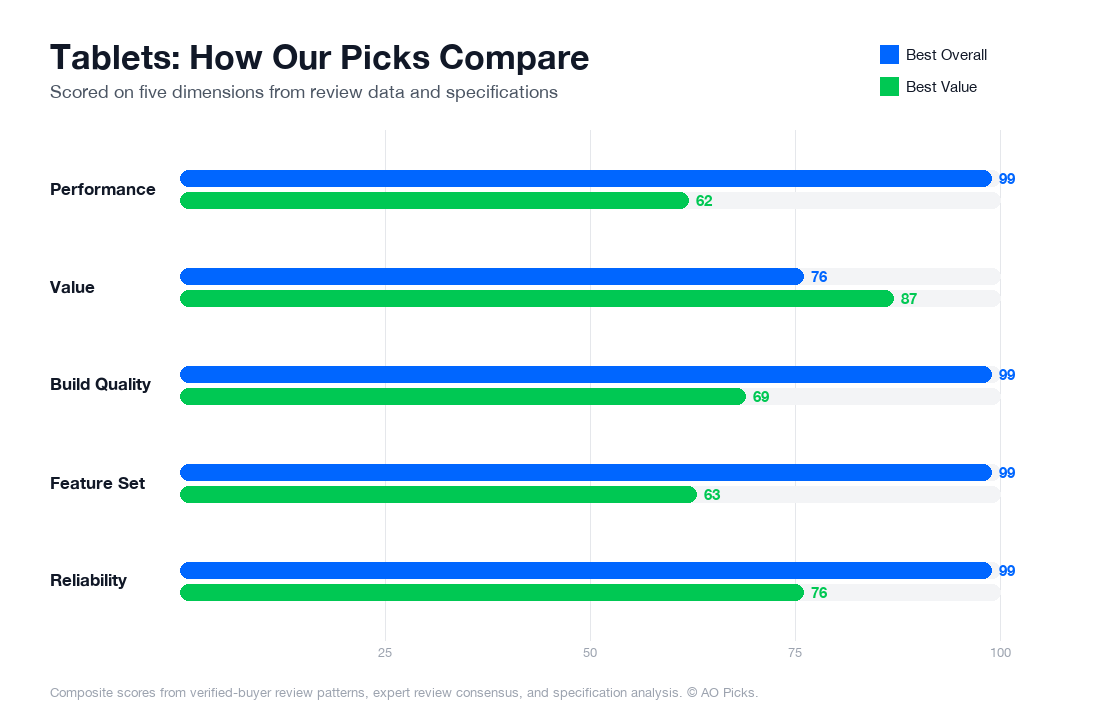

The iPad Pro M2 offers superior performance, a larger screen, and advanced features like ProMotion display, making it ideal for professionals and creative work. However, the Galaxy Tab S6 Lite delivers solid everyday performance at one-third the price, with a comfortable 10.4-inch display and reliable battery life, making it excellent for general browsing, reading, and media consumption.
Frequently Asked Questions About Tablets
Is the 12.9-inch screen size actually too large to use as a portable tablet?
The 12.9-inch iPad Pro sits at the larger end of the tablet spectrum—close to a small laptop in footprint. Verified owners report it's highly portable for desk-to-desk work, travel, and content consumption, but less convenient for one-handed reading or carrying in a standard bag compared to 10-inch models. The real decision depends on your primary use: if you're editing documents, designing, or watching video, the extra screen real estate justifies the size. If you mainly read books or browse while holding it, a smaller tablet may feel more comfortable. The M2 chip's performance makes this size worthwhile for professional tasks—reviewers frequently note the screen space pays for itself in productivity. Consider whether you'll pair it with a keyboard case (which adds bulk) or use it primarily as a standalone device.
Does the 120Hz ProMotion display actually make a noticeable difference, or is it just a spec bump?
The 120Hz ProMotion refresh rate is one of the most praised features in reviews—but the benefit is highly task-dependent. Verified owners report it's genuinely noticeable during scrolling through web pages, social media, and document editing, where motion appears smoother than standard 60Hz tablets. For creative work like digital drawing or design, reviewers consistently highlight that the higher refresh rate reduces lag and makes stylus input feel more responsive. However, if your use is primarily static (reading, watching video, email), the improvement is subtle. The feature also drains battery faster under heavy use, so you'll see slightly shorter daily runtime. Industry testing shows the difference is most pronounced when using Apple Pencil or performing real-time scrolling tasks—if neither applies to you, a non-ProMotion iPad may be sufficient. Most reviewers consider it valuable for creative professionals but optional for general consumption.
Will this iPad Pro work with older Apple Pencils, or do I need to buy the newest one?
The iPad Pro M2 is compatible with Apple Pencil (2nd generation), which connects via magnetic attachment to the tablet's side and charges wirelessly. However, it is not compatible with the original Apple Pencil (1st gen), which requires a Lightning connector. If you already own a 1st-gen Pencil from an older iPad, you'll need to upgrade to the 2nd generation, which costs around $129 separately. Verified owners report the 2nd gen's magnetic attachment is more convenient than the original's Lightning pairing. The good news: the M2 model comes in a 128GB base configuration at $999, which gives you budget flexibility to add a Pencil if needed. Third-party styluses exist, but reviewers consistently note that Apple Pencil integration is tighter, with better pressure sensitivity and lower latency. If stylus work is central to your purchase decision, factor the Pencil cost into your total investment.
Can I connect external storage or other devices via USB-C, and does it actually expand the iPad's capabilities?
The M2 iPad Pro's Thunderbolt USB-C port supports external storage drives, external monitors, and high-speed peripherals—a meaningful advantage over older iPad models. Verified owners report successfully connecting portable SSDs for video editing, external hard drives for media libraries, and USB-C hubs to add multiple accessories simultaneously. However, iPadOS has storage and software limitations: external drives function primarily as file repositories rather than expanding the tablet's usable storage like they would on a laptop. If you shoot 4K video or work with large design files, external storage is genuinely useful for offloading and accessing projects. The port also supports Thunderbolt external displays, which some creative professionals use for extended workspace. That said, the base 128GB model may feel restrictive for professional workflows—many reviewers recommend upgrading to 256GB or 512GB if you plan heavy file work. For typical consumers, the USB-C connectivity is more future-proofing than immediate necessity, though it does future-proof your investment.
How does battery life compare when using it heavily for work versus casual browsing?
The M2 iPad Pro's battery life varies significantly based on workload, and reviewers distinguish between use scenarios. For casual browsing and video streaming at standard brightness, verified owners report achieving 12–15 hours of runtime—Apple's advertised claim. However, intensive tasks like video editing, 3D design work, or using the 120Hz display at full brightness noticeably reduce this window to 8–10 hours. The ProMotion 120Hz feature, while smooth, consumes more battery than 60Hz alternatives. Reviewers note that professional creative work with external storage and stylus input drains the battery faster than Apple's rated specs suggest. For all-day work sessions without charging, many reviewers recommend the larger capacity models or pairing the tablet with a USB-C power bank for midday top-ups. The charger is sold separately (though some bundles include it), and using a higher-wattage USB-C charger speeds up recharge time. If you're mobile-dependent or doing on-location work, plan charging around your workflow rather than assuming 12+ hours of heavy use.
Is Face ID more convenient than a passcode for a tablet, or does it create frustrations?
Face ID on the iPad Pro works similarly to iPhones—it unlocks the device and authenticates payments when your face is recognized. Verified owners report mixed convenience depending on how you use the tablet. If you primarily use it in landscape mode (especially with a keyboard case), Face ID can feel awkward since the camera is positioned for portrait orientation, and you may need to rotate or reposition the device for authentication. For portrait-mode use and tabletop viewing, Face ID feels natural and faster than typing a passcode. Reviews show it's particularly convenient for quick unlocks during creative work when your hands are busy or dirty. However, Face ID is less reliable in poor lighting compared to iPhones, and some users note it occasionally requires a passcode fallback in dim environments. If accessibility is a concern—you wear glasses, facial hair changes frequently, or you share the device—a passcode backup is always available. Most reviewers find Face ID a quality-of-life improvement over button-based unlock, but not a defining feature worth choosing this model over others based solely on authentication.