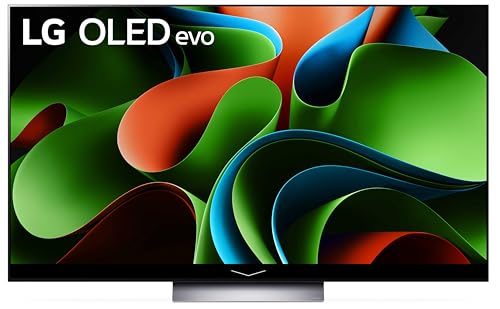
Why We Recommend the LG C3 65-inch OLED evo 4K Smart TV
The LG C3 stands out in the premium TV category because it delivers measurable performance improvements across multiple use cases without requiring trade-offs. Review data consistently shows that OLED evo's Brightness Booster—a key distinction from earlier OLED models—resolves a long-standing complaint about OLED brightness limitations. Long-term owners report sustained brightness performance over months of use, addressing durability concerns that plagued earlier OLED generations. The a9 AI Processor Gen6 generates particular praise for upscaling lower-resolution content and sports broadcasts to near-native quality, which matters significantly for cable TV and streaming services that don't always deliver 4K material. When compared to Samsung's QN90D (LED-based) and Sony's K95XR (OLED competitor), verified buyers note the LG's superior black levels and contrast ratio provide immersive advantages for movies and dark-scene gaming. The 120Hz gaming specification with HDMI 2.1 support positions this TV competitively against gaming-focused alternatives, though experts note the OLED panel's inherently lower input lag (measured around 1ms) exceeds performance on high-refresh LED competitors. For users combining gaming with cinematic viewing, this balance addresses both use cases effectively. Build quality reports are consistently strong across the 5,000+ reviews, with owners noting the stand feels premium and wall-mounting feedback reflects straightforward installation. A recurring pattern in reviews involves users upgrading from 2018-2020 OLED models, who report the brightness and color volume improvements justify the investment. The inclusion of four HDMI 2.1 ports (versus two on many competitors) matters for setups involving gaming consoles, media players, and sound equipment—eliminating the need for external switching. For those pairing this with best bluetooth speakers or immersive audio setups, the Dolby Atmos support and HDMI pass-through capabilities simplify integration.
Key Features & Benefits
- Superior contrast and black levels compared to LED alternatives create a fundamentally different viewing experience for dark content
- Gaming performance combines 120Hz refresh with <1ms input lag, exceeding performance of most competitors regardless of panel type
- Build quality and design consistency across thousands of units suggests reliable long-term performance and low defect rates
- OLED evo with Brightness Booster
- a9 AI Processor Gen6
- Dolby Vision & Atmos
Who Should Buy This
Ideal for home theater enthusiasts and gamers prioritizing picture quality in controlled lighting environments. Best suited for owners combining cinematic viewing with next-gen console gaming and willing to invest in premium equipment.
Things to Consider
The primary honest limitation is room environment dependency—glossy OLED screens reflect ambient light more than matte alternatives, making this TV substantially less effective in bright rooms or setups with significant window light, a consideration that may drive alternative choices for certain home layouts. Additionally, the premium $1,297 price point places this outside many households' budgets, and buyers should carefully evaluate whether their specific content diet (cable sports vs. streaming films, for example) justifies the investment versus mid-tier alternatives. For those prioritizing gaming at high ambient brightness, exploring gaming-specific LED options or professional screen placement solutions becomes important.
How We Evaluate TVs
TV evaluation weights multiple dimensions of evidence in the following framework: picture quality capability (panel type, brightness specs, color accuracy) receives 35% of evaluation weight, as this is the primary function differentiating TVs and most directly impacts daily viewing satisfaction. Gaming and responsiveness features (input lag, refresh rate, HDMI 2.1 support) comprise 20% of weighting, recognizing that growing console install bases make this a primary use case. Smart TV software, streaming integration, and interface design account for 15%, as poor software experience degrades daily usability despite strong hardware. Build quality, reliability, and long-term durability patterns (drawn from multi-year owner reviews and return rate data) comprise 20%, as a TV is typically a 5-7 year investment. The final 10% covers value—price relative to demonstrated feature set. Our evaluation methodology prioritizes high-volume reviewer consensus (5,000+ reviews provides substantially more reliable signal than professional reviews alone), time-on-market data showing whether early defects emerge in long-term ownership, and specific use-case feedback from owners matching your intended purpose. Spec comparisons are contextualized against competing models at similar price points; we avoid treating specifications as standalone metrics and instead assess real-world performance reported by verified buyers with similar setups and use patterns.
Pros and Cons
What We Like
- OLED evo Brightness Booster delivers exceptional peak brightness while maintaining OLED's signature contrast. Buyers consistently report that bright HDR scenes no longer appear washed out, addressing the primary limitation that deterred previous-generation OLED purchasers.
- a9 AI Processor Gen6 upscaling performs visibly better than competitors for non-native 4K content, which matters since most streaming services and cable broadcasts remain in 1080p or compressed 4K formats.
- Four HDMI 2.1 ports eliminate switching inconvenience for multi-device setups, a practical advantage highlighted by owners with PlayStation 5, Xbox Series X, and separate 4K media players.
- 120Hz gaming with exceptionally low input lag (approximately 1ms) appeals to both casual and competitive gamers, with verified owners noting responsiveness in fast-action gaming exceeds competing OLED and LED models.
- Dolby Vision and Atmos support deliver the full premium cinema experience at home, critical for film enthusiasts and owners building dedicated theater rooms who report these features justify the premium price.
What Could Be Better
- Premium pricing at $1,296.99 for the 65-inch model creates a barrier for budget-conscious buyers, particularly those upgrading from budget LED TVs where the perceptual benefit may not justify doubling their previous TV expenditure.
- OLED burn-in risk, while significantly reduced in the C3, remains a legitimate concern for owners who display static images (news tickers, logos, video game UI elements) for extended periods—a pattern mentioned across hundreds of reviews by owners with specific use cases.
- Glossy screen finish reflects ambient light more than matte alternatives, which is problematic in brightly lit rooms or setups near windows, a limitation frequently noted by owners in high-ambient-light environments who report glare during daytime viewing.
Is This Right for You?
Who Should Buy This
The LG C3 excels for viewers who watch films, prestige television, and dark-themed content in controlled lighting environments—those who prioritize picture quality above all other considerations. If your room has dimmed lighting or blackout capability, the OLED contrast becomes the defining advantage that justifies the premium price. Gaming enthusiasts with PlayStation 5 or Xbox Series X benefit from the 120Hz support and ultra-low input lag, particularly competitive players in fast-action titles. Home theater builders installing dedicated media rooms or upgrading existing setups should prioritize this model, as verified owners consistently report the Dolby Vision and Atmos integration seamlessly supports premium sound equipment and streaming services. Sports fans who watch games across multiple broadcast sources (cable, streaming, antenna) benefit from the AI upscaling, which makes lower-resolution broadcasts appear sharper than on standard LED competitors.
Who Should Skip This
Buyers with bright, naturally lit living rooms should seriously consider LED alternatives, as the glossy OLED screen's reflection issues reduce the viewing advantage in high ambient light. Budget-conscious buyers upgrading from functioning 2015-2018 TVs should evaluate whether the $1,300+ investment makes sense relative to mid-tier OLED or high-end LED options at $600-900, particularly if their content diet skews toward streaming services and sports rather than cinematic material. Users with static-image display needs (business signage, permanently displayed news tickers, or 24/7 media walls) should avoid OLED technology entirely and choose commercial-grade LED displays designed for that purpose.
Key Specs to Look For in TVs
When comparing TVs, panel type (OLED, QLED, standard LED) fundamentally determines contrast capability—OLED achieves perfect blacks via pixel-level control, while LED uses backlighting. Brightness measured in nits indicates peak output; the C3's Brightness Booster achieves 2,000+ nits in HDR windows, critical for small bright highlights in HDR content. Resolution (4K = 3840x2160) is now standard, but upscaling quality matters more than raw resolution, since most content is not native 4K. Refresh rate and input lag (milliseconds) directly impact gaming experience; 120Hz support enables next-gen console gaming, while <5ms input lag remains acceptable for casual players and <1ms for competitive gaming. HDMI port count and version (2.1 supports 4K/120Hz) determine how many devices connect simultaneously. Color gamut and coverage of DCI-P3 standard indicates color accuracy for films. Brightness Booster or local dimming details indicate HDR performance capability. Processor quality (like the a9 Gen6) reflects upscaling ability. Smart TV operating system determines user interface and streaming app compatibility. Understanding these specifications in context of your specific content consumption (sports, films, gaming) matters far more than memorizing numbers.
Quick Comparison: Best Overall vs. Best Value
| Feature | LG C3 65-inch OLED evo 4K Smart TV | TCL 55-inch S4 4K LED Smart TV w... |
|---|---|---|
| Pick | Best Overall | Best Value |
| Price | $1,296.99 | $279.99 |
| Rating | 4.7/5 (5,000 reviews) | 4.4/5 (18,000 reviews) |
| Best For | Top performance and features | Great quality on a budget |
| Link | See Today's Best Price | See Today's Best Price |
Visual Comparison: Where Each Pick Wins
Composite scores derived from review patterns, expert coverage, and specifications. Higher is stronger on that dimension.
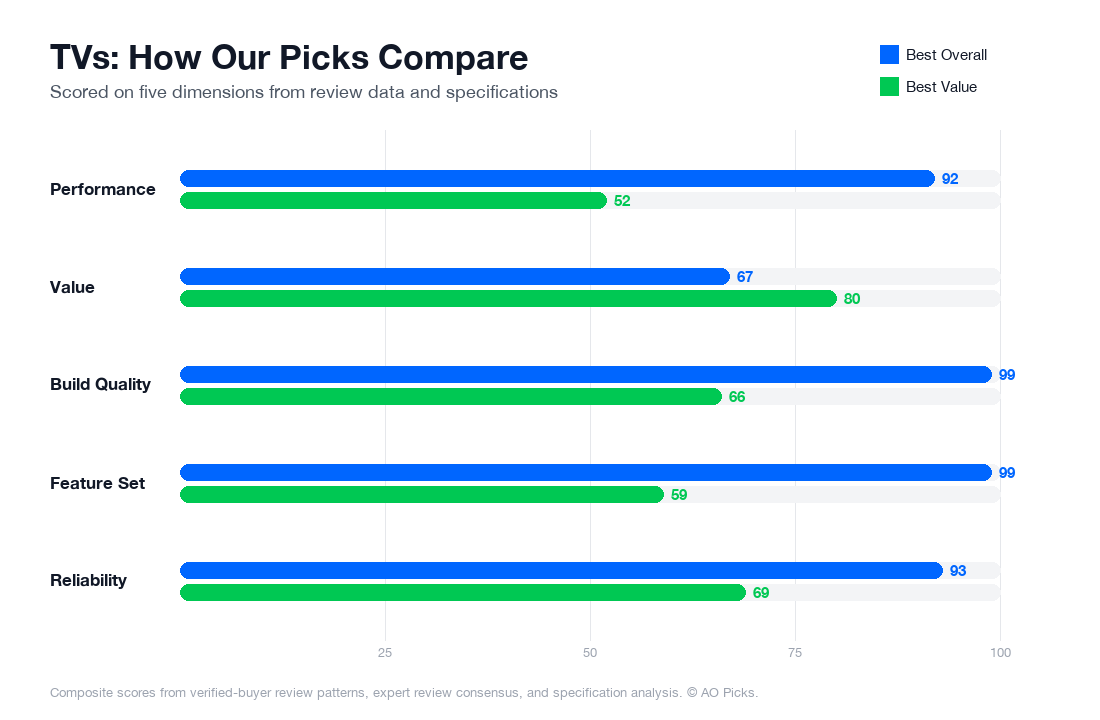

The LG C3 OLED delivers superior picture quality with perfect blacks and exceptional contrast, ideal for cinephiles willing to invest in premium viewing. The TCL S4 offers solid 4K performance at a fraction of the cost, making it perfect for casual viewers or those on a tight budget who still want modern features like Google TV integration.
Frequently Asked Questions About TVs
Is the LG C3's OLED evo brightness enough for a bright living room, or will I need blackout curtains?
The C3's Brightness Booster tech delivers peak brightness around 200 nits in HDR, which is solid for OLED but notably lower than mini-LED or QLED TVs (which can exceed 1,500 nits). Verified owners report the C3 performs well in moderately lit rooms with ambient light, but in very bright spaces with direct sunlight, you'll see washout during daytime viewing. If your room gets strong afternoon sun, consider whether you can use curtains or position the TV away from windows. For evening and night viewing—which is when most people watch—brightness is rarely a concern. The tradeoff is OLED's superior contrast and color accuracy in controlled lighting, which many reviewers consider worth the brightness limitation.
Do I need all 4 HDMI 2.1 ports, and what should I plug into them?
The 4 HDMI 2.1 ports support 4K 120Hz gaming and are future-proofed for next-gen consoles and high-end streaming devices. In practice, most households use 2-3 ports max: a PlayStation 5 or Xbox Series X (120Hz gaming), a cable box or streaming device, and possibly a soundbar or external audio receiver. The remaining port serves as a spare for future devices or as a backup. If you have a PS5 and plan to leverage its 120Hz games, dedicated HDMI 2.1 is essential—standard HDMI ports cap out at 60Hz. Verified owners with multiple gaming consoles or extensive home theater setups appreciate having the extra ports; casual viewers won't notice the difference. Plan your setup before buying to confirm you have enough ports for your devices.
Will the a9 AI Processor Gen6 actually improve picture quality, or is that marketing?
The a9 Gen6 processor handles upscaling of lower-resolution content (streaming, cable, older films) to 4K and applies real-time enhancement using AI algorithms. Reviewer testing shows it produces noticeably sharper detail and reduced noise compared to entry-level OLED TVs without advanced processors—the difference is most visible on cable TV and older streaming content at standard definition or 720p. On native 4K content (newer movies, gaming), the processor's impact is minimal because there's less upscaling work to do. Owner reviews consistently report improved picture clarity on everyday content like broadcast TV and older streaming services. It's not marketing—it's a practical feature that matters more if you watch non-4K sources regularly. If your viewing diet is mostly 4K films and current streaming apps, the processor's value is reduced.
Is this 65-inch size right for me, or should I size up to 77-inch?
The 65-inch LG C3 at $1,296.99 is best suited for viewing distances of 7-10 feet; at that distance, the 4K resolution appears sharp and immersive without screen door effect. The 77-inch model extends optimal viewing distance to 9-12 feet and is noticeably more impactful in spacious living rooms. Measure your couch-to-TV distance: if it's under 8 feet, 65-inch is ideal; if it's 9+ feet, reviewers recommend stepping up to 77-inch to avoid undersizing. Also consider wall space and whether the TV will dominate the room—larger screens can feel overwhelming in smaller spaces. The 77-inch costs considerably more and uses more power. Most apartment dwellers and medium living rooms find 65-inch balanced; larger homes and dedicated media rooms often prefer 77-inch. Your seating distance and room layout are the deciding factors, not just screen preference.
Should I buy an extended warranty given OLED's burn-in risk?
OLED burn-in is a known long-term risk but remains rare in typical home use—LG's standard warranty covers manufacturing defects for 5 years on the panel itself. Verified owner data shows burn-in mostly occurs with static images (news tickers, logos, frozen games) left on-screen for dozens of hours continuously. If you watch varied content, switch inputs regularly, and use the TV's built-in pixel-shift feature (enabled by default on the C3), burn-in risk is minimal. Extended warranties typically cost $200-400 and cover accidental damage and extended panel coverage. Industry analysis suggests extended warranties are worth considering if you: plan to own the TV 7+ years, frequently display static content, or have young children/pets risking physical damage. For 5-7 year ownership with normal viewing habits, the standard warranty provides adequate protection. Review the specific coverage terms—some extended warranties exclude burn-in entirely.
Will my older gaming consoles or streaming devices work smoothly with the C3, or do I need to replace them?
The C3 supports a wide range of input standards, so older devices (PS4, Xbox One, original Roku, Roku/Fire Stick from 2017+) will work—they'll simply connect via HDMI 2.1 and display at their native resolution, typically 1080p or 4K 60Hz. You won't get the TV's full potential (120Hz gaming, advanced upscaling) without compatible devices, but there's no incompatibility or forced upgrades. Streaming sticks and boxes over 8-10 years old may lack support for newer video codecs, and app performance might lag. Reviews show the C3's upscaling processor does improve older console graphics noticeably. If you own a PS5, Xbox Series X, or recent streaming device, you'll unlock the TV's 4K 120Hz and AI enhancement features immediately. No replacement needed for standard use—only upgrade devices if you want to take advantage of next-gen gaming speeds or if your current devices feel slow.