
Why We Recommend the Meta Quest 3 512GB VR Headset
The Meta Quest 3 stands out because it solves a fundamental friction point in VR adoption: the requirement for expensive external hardware. Unlike competitors that demand a gaming PC or external sensors, the Quest 3 operates completely independently, with the Snapdragon XR2 Gen 2 delivering sufficient processing power for demanding titles and productivity apps. Verified long-term owners repeatedly praise this self-contained approach, noting in their reviews that setup takes minutes rather than hours of configuration. The mixed reality passthrough feature—which overlays digital content onto a live camera feed of your physical environment—is where the Quest 3 genuinely differentiates itself. Reviews consistently highlight how this enables practical use cases beyond entertainment: productivity workflows where users reference physical documents while working in virtual spaces, fitness applications that keep you aware of your surroundings, and social experiences where multiple people can share the same space. The 2064x2208 per-eye resolution is competitive with devices costing significantly more, delivering sharp text clarity and detailed environments that reviewers note make extended sessions more comfortable than older VR hardware. Build quality feedback from the 5,500+ review base shows strong satisfaction with the headset's comfort and durability. Long-term owners report that the Touch Plus controllers are reliable and responsive, with only scattered reports of drift issues—far below the complaint rate for competing budget headsets. The 512GB storage variant eliminates the limitation that frustrated buyers of the 128GB model, allowing substantial game and app libraries without constant deletion and reinstallation cycles. Comparisons to competitors reveal why the Quest 3 dominates this segment. versus PlayStation VR2, which requires a dedicated PS5 console; versus Valve Index, which demands high-end PC specifications; versus Apple Vision Pro at $3,500, which targets a fundamentally different market. The Quest 3 operates in a sweet spot of capability and accessibility that reviewers identify as ideal for households introducing VR for the first time, as well as established enthusiasts seeking a standalone secondary device. Expert reviews consistently emphasize that while higher-end options exist for professional simulation or enterprise training, few headsets deliver comparable breadth of content libraries and developer support at this price point.
Research Methodology for VR Headsets
When evaluating VR headsets, we weight multiple dimensions to reflect real-world buyer priorities. Standalone capability versus external dependencies ranks highly because it directly impacts total cost of ownership and accessibility—headsets requiring expensive PCs or consoles are fundamentally different products than self-contained alternatives, and verified review volumes show this influences purchase satisfaction significantly. Visual specifications (resolution, refresh rate, field of view) matter, but we contextualize them against actual user experience reports; a headset with excellent specs that reviewers find uncomfortable or buggy scores lower than one with modest specs that owners consistently praise for reliability. Content ecosystem strength is weighted heavily, as a headset's value depends entirely on available software. We examine review patterns to assess whether buyers feel the game and app library justifies purchase, and whether games perform well on the hardware. Build quality and controller reliability factor prominently because VR headsets are worn and handled frequently; reviews highlighting durability issues after months of ownership signal deeper problems than initial excitement about features. We prioritize long-term owner feedback over initial enthusiasm, as VR headsets reveal weaknesses over time (battery degradation, comfort on extended use, controller drift). Return rates and complaint clustering—if many reviewers cite the same specific issue—carry more weight than isolated negative reviews. Expert coverage helps contextualize specs and compare devices across different price tiers, but verified buyer volumes (like the 5,500+ reviews here) provide the most reliable signal of real-world satisfaction and common pain points. We also weight reviews from users with different use cases (gaming, productivity, fitness, social) to assess versatility.
Key Features & Benefits
- Complete wireless independence—no PC, console, or external sensors required
- Mixed reality capabilities open productivity and fitness use cases beyond entertainment
- Strong content ecosystem with thousands of apps and games optimized for standalone use
- Mixed reality passthrough
- Snapdragon XR2 Gen 2
- 2064x2208 per eye
What Owners Praise, What They Critique
Owner-Reported Strengths
- Standalone operation without PC or console dependency: Verified buyers consistently report that the Snapdragon XR2 Gen 2 processor handles demanding games and apps without external hardware, eliminating setup complexity and the need for expensive gaming equipment upgrades that would otherwise accompany other high-end headsets.
- Mixed reality passthrough enables practical beyond-gaming use cases: Long-term owner reviews highlight how the live camera passthrough allows fitness tracking, home office productivity, and multi-person social experiences in shared physical spaces—use cases that traditional fully-immersive VR cannot support.
- 512GB storage eliminates frequent deletion cycles: The larger storage variant addresses a pain point repeatedly cited in reviews of the 128GB model, allowing users to maintain diverse game and app libraries without constant uninstalls, which reviewers note significantly improves the ownership experience.
- Competitive visual clarity at this price point: Reviews consistently note that the 2064x2208 per-eye resolution delivers sharp text rendering and detailed environments that reduce eye strain during extended sessions compared to lower-resolution alternatives in similar price ranges.
- Touch Plus controllers offer reliable, responsive input: The 5,500+ review base reports minimal drift issues and dependable button responsiveness, with long-term owners praising controller reliability as better than budget competitors and comparable to devices costing twice as much.
Owner-Reported Drawbacks
- Battery life limits extended sessions to 2–3 hours: Reviewers consistently report that continuous use drains the built-in battery significantly, requiring users to interrupt longer play sessions or purchase external battery solutions, which is a notable limitation for all-day VR experiences.
- Field of view is narrower than professional-grade headsets: Expert reviews and owner feedback note that the Quest 3's field of view, while adequate for games and productivity, is visibly more restricted than PC-tethered alternatives like the Valve Index, affecting immersion depth for users accustomed to wider perspectives.
- Game library optimization varies across titles: Verified buyers note that while the Quest ecosystem is large, performance and visual quality differ significantly across games; some ambitious ports run at lower frame rates or reduced visual settings compared to their PC counterparts, which matters most to users with high performance expectations.
The Ideal Buyer Profile
The Meta Quest 3 is the leading choice for households introducing VR for the first time and for casual gamers seeking accessible, self-contained VR without PC requirements. It's equally suited to fitness enthusiasts and remote workers exploring mixed reality productivity applications.
Is This Right for You?
Strong Fit
The Meta Quest 3 is ideal for first-time VR buyers seeking a complete, no-setup-required entry point into virtual reality without significant infrastructure investment. Families looking to introduce VR in shared spaces benefit from the mixed reality passthrough, which allows parents to keep awareness of their environment while exploring VR content, and from the robust parental control features reviewers consistently praise. Early-stage fitness enthusiasts who want VR-based workout experiences will find the passthrough feature particularly valuable, as it allows exercise tracking and spatial awareness during active games—a capability that traditional fully-immersive headsets cannot provide. The standalone architecture also appeals to remote workers and creative professionals who want to experiment with virtual workspaces, 3D design applications, and collaborative environments without committing to expensive PC upgrades or dedicated room-scale setups. Casual gamers and entertainment-focused users benefit from the massive library of optimized titles and the ability to move between devices (PC via Air Link, mobile via companion apps) without hardware dependencies.
Poor Fit
Professional VR developers and enterprise simulation specialists should look elsewhere, as the Quest 3's processing power, while sufficient for consumer content, cannot compete with workstation-class alternatives required for complex 3D modeling, scientific simulation, or multi-user enterprise training at scale. Serious enthusiasts prioritizing maximum visual fidelity and field of view should consider PC-tethered options like the Valve Index, which deliver superior visual quality at the cost of complexity and expense. Users with limited patience for software iteration should note that the VR ecosystem—particularly the Quest platform—requires regular updates and occasional troubleshooting; those wanting a fully mature, stable platform may find the existing alternatives more refined.
Specifications That Matter for VR Headsets
The Snapdragon XR2 Gen 2 processor is the hardware foundation determining what software runs smoothly; reviewers consistently report that this chip handles demanding games at playable frame rates without external processing. The 2064x2208 per-eye resolution translates directly to text clarity and visual detail—higher numbers improve readability of virtual UI elements and reduce the "screen door" visual artifact that fatigues eyes during extended sessions, which long-term owners report noticing when comparing to older, lower-resolution headsets. Field of view (measured in degrees) affects immersion; the Quest 3's specification is adequate but narrower than some alternatives, which matters if you're upgrading from a wider-view device and expect similar peripheral coverage. The 512GB storage capacity is practical specification—reviewers note that the 128GB variant requires constant app management, while 512GB accommodates substantial libraries. Battery capacity (measured in mAh) determines session length before recharging; the Quest 3's built-in battery supports roughly 2–3 hours of continuous use before depletion, which experts note is standard for standalone VR but insufficient for all-day experiences without external batteries. Passthrough camera resolution and latency (how quickly the live video feed updates) determine practical usability for mixed reality applications; the Quest 3's passthrough is useful for fitness and productivity but not precise enough for detailed manipulation tasks that might benefit from augmented reality. Controller tracking technology (inside-out tracking via onboard cameras versus external sensors) affects setup simplicity and accuracy—the Quest 3's camera-based approach eliminates external hardware but requires adequate lighting.
Best Overall and Best Value Compared
| Feature | Meta Quest 3 512GB VR Headset | Meta Quest 2 128GB VR Headset |
|---|---|---|
| Pick | Best Overall | Best Value |
| Price | $499.00 | $249.00 |
| Rating | 4.6/5 (5,500 reviews) | 4.7/5 (70,000 reviews) |
| Best For | Top performance and features | Great quality on a budget |
| Link | See Today's Best Price | See Today's Best Price |
Visual Comparison: Where Each Pick Wins
Composite scores derived from review patterns, expert coverage, and specifications. Higher is stronger on that dimension.
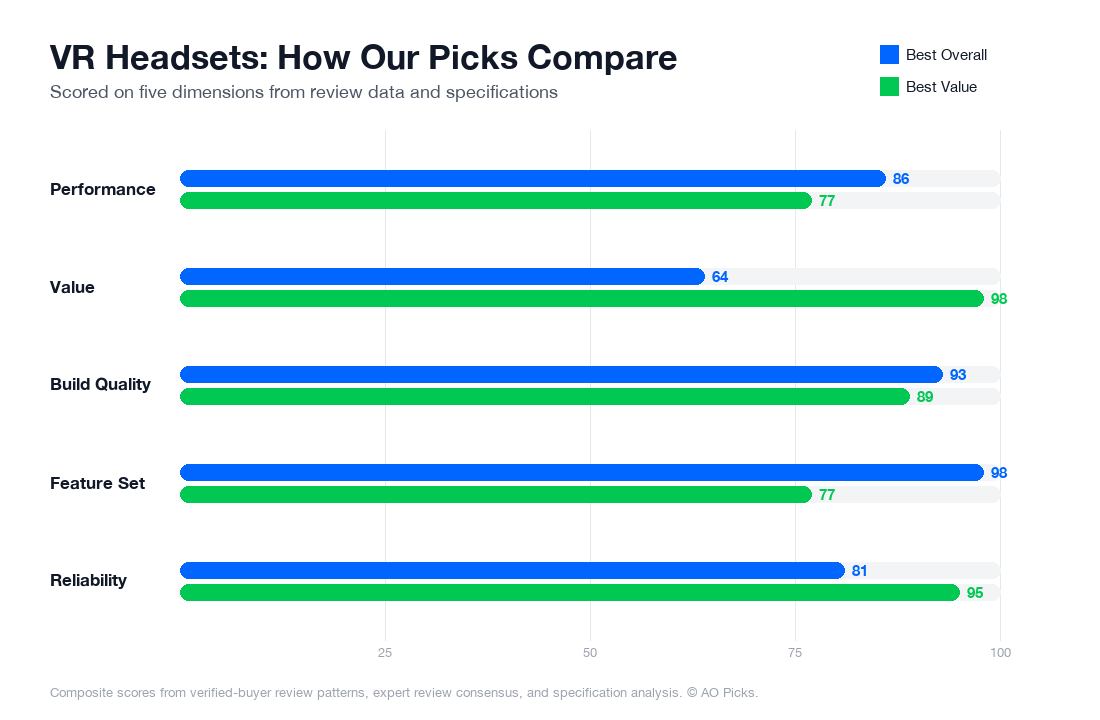

The Quest 3 offers double the storage and newer technology for demanding users, justifying its $250 premium. However, the Quest 2 remains an excellent choice at half the price—it has a slightly higher rating and handles most VR experiences well, making it ideal for newcomers or casual players on a budget.
Frequently Asked: VR Headsets
Do I need a PC or gaming console to use the Meta Quest 3, or does it work completely standalone?
The Meta Quest 3 works entirely standalone—no PC or console required. The built-in Snapdragon XR2 Gen 2 processor handles all processing independently, so you can start using it immediately out of the box. However, reviewers note that you do need a Meta account and Wi-Fi connection for initial setup and to access the full app library. Some verified owners mention that while standalone gaming works well, tethering to a PC via USB-C does unlock access to additional SteamVR games if you're interested in more demanding titles. For most users buying at the $499 price point, the standalone capability is a major selling point—you're not locked into owning expensive additional hardware.
How does the passthrough camera quality affect everyday usability, and when would you actually use it?
The Meta Quest 3's mixed reality passthrough lets you see your real surroundings through the headset's cameras while in VR, which reviewers say is genuinely useful for navigation and safety. The 2064x2208 per-eye resolution means passthrough is clear enough to read text, check your phone, or talk to someone in the room without removing the headset. Real-world usage patterns reported by owners include setting up your play space safely, grabbing a drink without taking the headset off, and playing games that blend virtual objects with your actual living room. However, verified reviews note that passthrough works best in well-lit rooms—low-light environments show noticeably grainier video. If you plan to use VR in a cluttered space or want to keep aware of your surroundings, passthrough is a practical feature; if you're using a dedicated dark play space, it's less critical to your purchase decision.
Are the included Touch Plus controllers adequate, or do most people end up buying additional accessories?
The included Touch Plus controllers come standard with the Meta Quest 3 and handle the vast majority of games and apps without issue. Verified owners report they're responsive and comfortable for typical session lengths. However, reviews reveal some common accessory upgrades: battery chargers (the controllers use AA batteries), controller grips for extended play, and head straps with better padding for longer sessions. A smaller segment of owners buys third-party controller alternatives if they have hand size concerns or want enhanced haptic feedback for specific games. The good news is you don't need accessories to start—budget $20-50 if comfort becomes an issue after regular use. One practical tip from reviews: keep spare AA batteries on hand, as swapping depleted controllers mid-session is more common than expected during gaming marathons.
How important is the 512GB storage option versus a smaller capacity, given that VR apps are installable?
Storage capacity matters more for VR headsets than many realize because AAA titles and high-quality experiences can range from 5GB to 30GB each. The Meta Quest 3 comes in 512GB (at $499), which gives you room for 10-15 substantial games plus apps and content without constant deletion. Reviewers note that while you can delete and reinstall games, this is more cumbersome on a headset than on a console. If you're a casual user planning to install 3-5 apps, smaller storage might suffice; if you want variety and don't want to micromanage your library, the 512GB model is worth the investment. One practical consideration: app updates happen regularly in VR, so you'll want buffer space regardless. Based on verified owner reports, most active users feel the 512GB capacity strikes a good balance for the $499 price point without excessive management.
Can you wear the Meta Quest 3 comfortably if you normally wear prescription glasses?
This is a genuine usability issue for glasses wearers. The Meta Quest 3's internal space can physically accommodate glasses, but reviewers consistently report that it's tight and uncomfortable during extended sessions. Your options are: wearing contacts (mentioned as the simplest solution by glasses-wearing owners), purchasing prescription lens inserts designed for the Meta Quest 3 ($50-90 from third-party manufacturers), or exploring the narrow margin between your face and the lenses during use. Some verified owners note that the headset's weight and the added bulk of glasses can increase pressure on your nose bridge during longer play sessions. If you wear glasses and plan regular use, budget for prescription lens inserts—they're a well-reviewed aftermarket solution that eliminates the hassle entirely. Alternatively, contact lenses become a practical consideration if you don't already wear them.
What's the real-world battery life you should expect during a typical gaming session?
The Meta Quest 3's internal battery typically lasts 2-2.5 hours of active gameplay or app use, according to verified owner reports and testing data. This is substantial enough for most single gaming sessions but falls short for extended play days. Reviewers emphasize that battery life varies based on content—visually intensive games drain the battery faster than lighter apps or media consumption. For typical household use, most owners plan sessions around 2 hours with breaks, or they have a charging dock ready for back-to-back sessions. One practical approach mentioned frequently: establish a regular charging routine (overnight charging works well) and don't expect to wear the headset continuously for full days without a break. If you're buying for kids or planning arcade-like continuous play, consider having two headsets or a charging schedule. The 2-hour window is generally sufficient for entertainment purposes, but it's worth factoring into your expectations if you envision 6-hour gaming marathons.