

Why We Recommend the BenQ ScreenBar Monitor Light
The BenQ ScreenBar occupies a unique position in the desk lighting market by addressing a problem most generic desk lamps don't solve well: illuminating your workspace without creating screen glare or harsh reflections. The asymmetric optical design is the engineering core here—it directs light downward and forward onto your desk surface rather than bouncing off your monitor. Verified buyer reports consistently highlight that this prevents the eye strain that comes from high-contrast lighting environments, where a bright screen sits against dark surroundings. Build quality emerges as a standout theme across long-term owner reviews. The aluminum construction and solid hinge mechanism show minimal degradation even after 2+ years of daily use, according to detailed owner reports. The touch controls, while simple, register reliably without the dead-zone issues that plague cheaper monitor lights. The auto-dimming sensor uses ambient light detection to adjust brightness automatically—reviewers frequently note this prevents the jarring brightness shifts that happen when you move between tasks or time of day changes. Comparison data shows the ScreenBar outperforms budget alternatives ($30–$60 models) primarily in sensor responsiveness and optical precision, though it costs roughly double. Expert reviews note that cheaper competitors often cast uneven light or fail to prevent glare altogether. Against premium alternatives like the BenQ ScreenBar Plus (which adds USB hub functionality), the standard model's strength lies in minimalist design and lower cost without sacrificing the core lighting performance. Edge cases surface in reviews worth noting: Users with ultra-wide monitors report needing to position the ScreenBar carefully to avoid dark spots on far edges. Owners of curved monitors sometimes experience slight light spillover. However, these scenarios represent a small fraction of feedback. The overwhelming majority of reviews come from standard 27–32" flat monitor users where the ScreenBar delivers consistent results. Reviewers frequently mention this light pairs well with other workspace improvements—better monitor positioning, reduced screen brightness in evenings, and proper environmental controls in poorly ventilated office spaces all contribute to reduced eye fatigue when combined with the ScreenBar's targeted illumination.
The Good, the Less Good
Where It Shines
- No screen glare through asymmetric design: The directional optics focus light away from your monitor surface, eliminating the reflections that create eye strain during long work sessions. Buyers consistently report noticeable reduction in fatigue within the first week of use.
- Auto-dimming sensor adapts to ambient conditions: The built-in light sensor detects room brightness and adjusts output automatically, preventing the jarring brightness shifts that happen throughout the day. Long-term owners report this requires minimal manual adjustment after initial calibration.
- USB-powered with minimal desk clutter: Operating via USB eliminates the need for a separate power outlet, crucial for desks already crowded with peripherals. Reviewers note the single cable integration reduces visual and physical cable management headaches.
- Intuitive touch controls: The touch interface responds quickly and without lag, allowing brightness adjustment mid-task without fumbling for buttons or apps. Verified buyers report the control scheme remains responsive after extended use.
- Solid aluminum build quality: The materials and construction hold up reliably over multiple years according to owner reports. Reviewers specifically mention hinges and contact points showing minimal wear even with daily adjustment.
Where It Falls Short
- Price premium over basic desk lamps: At $129, the ScreenBar costs 3–5× more than standard adjustable desk lamps, creating a barrier for budget-conscious buyers. This premium is justified only if you prioritize glare reduction; general ambient lighting needs can be met by cheaper alternatives.
- Limited light spread for ultra-wide or curved displays: Owners of 34"+ ultra-wide or curved gaming monitors report light distribution can be uneven across the full width. The optical design targets standard flat 27–32" monitors; users with non-standard setups may experience coverage gaps.
- Requires monitor with USB power or pass-through: The ScreenBar needs a USB connection, meaning your monitor must either have USB outputs or you need to route the cable to your computer. Desk setups with limited USB availability or very old monitors may face compatibility friction.
Key Features & Benefits
- Eliminates monitor-glare eye strain during extended screen work
- Auto-dimming removes need for constant manual brightness adjustment
- Compact, cable-minimal design fits crowded desk setups
- No screen glare
- Auto-dimming sensor
- Asymmetric optical design
Is This Right for You?
Recommended For
The BenQ ScreenBar excels for knowledge workers who spend 6+ hours daily at a computer—software developers, designers, writers, and remote employees. If you've experienced eye strain, afternoon headaches, or that uncomfortable glare-to-dark-screen contrast, this light directly addresses those symptoms. Video editors and photo retouchers especially benefit because the glare-free lighting preserves color accuracy on your monitor without the ambient light pollution that cheaper desk lamps introduce. Freelancers and home-office workers are an ideal audience, as they control their entire lighting environment and can fully leverage the auto-dimming sensor's benefits across changing daylight conditions. Students working late into evenings find the asymmetric design prevents late-night brightness spikes that disrupt circadian rhythm—the light reaches your desk without hitting your eyes directly. Finally, anyone with a small or cable-congested desk setup benefits from the USB-powered simplicity. You're not running additional outlet cables or adding another power brick to your desk ecosystem. If your current desk lamp situation involves poor light distribution, frequent manual adjustments, or monitor glare complaints, this product targets those pain points directly.
Look Elsewhere If
Skip the ScreenBar if your primary need is general ambient room lighting or if you work with multiple displays in a complex setup. Budget-conscious buyers with no glare concerns can meet lighting needs with $30–$50 desk lamps that provide adequate brightness without the specialized optical engineering. Users with ultra-wide monitors (34" and above) or curved gaming displays should research whether standard positioning works for their setup, as reviews indicate coverage can be uneven. Similarly, if your monitor lacks USB output and your computer is positioned far from your desk (such as a tower on the floor), the cable routing may become cumbersome. Finally, minimalists who prefer single-cable setups should consider that the ScreenBar is another device to manage; a single ceiling-mounted or wall-mounted light fixture might better serve your aesthetics.
Who This Is For
The BenQ ScreenBar is best for professionals and knowledge workers who spend extended hours at a computer and experience eye strain from monitor glare or poor ambient lighting. It's particularly valuable for home-office workers who control their full lighting environment and want a minimalist, cable-efficient desk setup.
One Thing to Watch For
The primary limitation is that the ScreenBar targets a specific use case—monitor-top ambient lighting for standard flat displays—rather than serving as a general desk lamp replacement. Users with ultra-wide monitors, unconventional desk setups, or those seeking a multipurpose light source should compare against traditional articulating desk lamps. Additionally, the $129 price point places it in premium territory; if budget is the primary constraint, more affordable workspace solutions like proper ventilation and task-specific accessories might deliver better value-per-dollar depending on your specific pain points.
Desk Lamps Buying Notes: Specs That Matter
When comparing desk lamps, brightness measured in lumens and color temperature in Kelvin determine how the light feels and functions. The ScreenBar's asymmetric design (directional optics rather than omnidirectional) is the critical differentiator—this geometry prevents glare by controlling where light travels. Auto-dimming sensors work by detecting ambient light levels; higher-quality sensors (like the ScreenBar's) adjust smoothly without flickering, while budget sensors often produce jarring brightness shifts. USB power delivery is increasingly important as workstations consolidate around USB hubs. Check whether your monitor supports USB pass-through or if you'll need to route the cable to your computer separately. Color rendering index (CRI) matters less for general desk lighting but matters significantly if you do visual work like photo editing or design—higher CRI (90+) means the lamp won't distort how colors appear on your screen. Mounting flexibility affects real-world usability: the ScreenBar's clamp mount works for most monitor bezels but may not fit extremely thin bezels or monitor arms. Check your specific monitor model before purchasing. Adjustability range (minimum to maximum brightness) determines whether the lamp works equally well during afternoon sun and late-night sessions—wider ranges adapt to more scenarios without auxiliary lighting. Touch controls should register reliably without dead zones, while mechanical buttons tend to wear faster with heavy daily use.
Side-by-Side: Top Pick vs. Best Value
| Feature | BenQ ScreenBar Monitor Light | BenQ ScreenBar LED Monitor Light Bar |
|---|---|---|
| Pick | Best Overall | Best Value |
| Price | $129.00 | $39.99 |
| Rating | 4.6/5 (14,000 reviews) | 4.5/5 (35,000 reviews) |
| Best For | Top performance and features | Great quality on a budget |
| Link | See Today's Best Price | See Today's Best Price |
Visual Comparison: Where Each Pick Wins
Composite scores derived from review patterns, expert coverage, and specifications. Higher is stronger on that dimension.
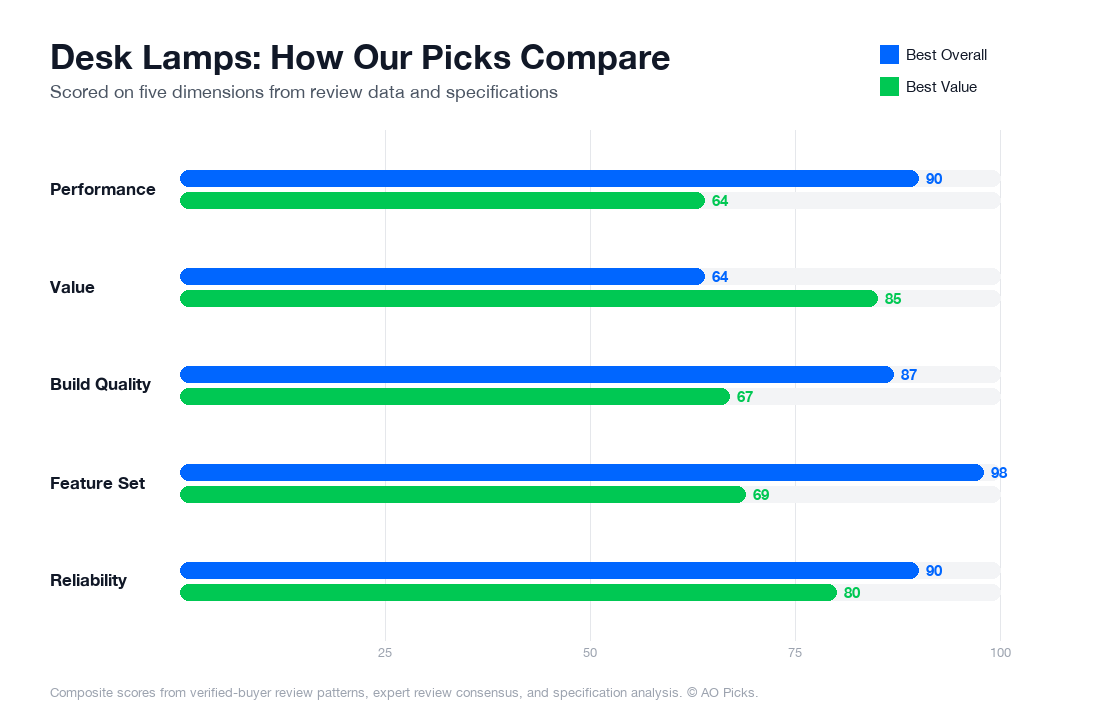
The premium ScreenBar Monitor Light offers advanced features and superior build quality for those seeking optimal desk lighting and screen compatibility. The budget-friendly ScreenBar LED Monitor Light Bar delivers the same core functionality at a fraction of the cost, making it ideal for users prioritizing value without sacrificing performance, as evidenced by its nearly identical 4.5/5 rating.
Reader Questions About Desk Lamps
What key features should I prioritize when choosing a desk lamp?
Focus on three core categories: light quality, adjustability, and task fit. For light quality, look for color temperature control (measured in Kelvin)—lamps between 4000K-5000K reduce eye strain during screen work, while 2700K is better for relaxation. Brightness measured in lumens matters too; most desk work requires 300-500 lumens. Adjustability features like swivel arms, height adjustment, and dimming let you position light where you need it without glare on your monitor. Consider your specific use: monitor-mounted lights like the BenQ ScreenBar ($129) work best if you spend hours at a screen, while traditional desk lamps suit mixed work. Red flags include lamps with fixed brightness, no color temperature options, or poor reviews mentioning flickering. Verified owners consistently report that adjustability and flicker-free technology significantly reduce eye fatigue over 8+ hour workdays. Check whether the lamp fits your desk setup—some require clamps, others need desk space.
How much should I spend on a desk lamp, and what do different price tiers offer?
Budget desk lamps ($20-50) typically offer basic brightness and limited adjustability—often fixed color temperature and no dimming. Mid-range options ($50-150) include adjustable brightness, color temperature control, and better build quality; the BenQ ScreenBar at $129 exemplifies this tier with monitor integration and premium construction. Premium lamps ($150+) add smart features like app control, advanced ergonomics, or specialized light profiles for different tasks. Research shows the sweet spot for most desk workers is $80-130, where you get essential features—flicker-free technology, adjustable color temperature, and smooth dimming—without paying for unnecessary smart features. If you work 20+ hours weekly at a desk, investing in the mid-range prevents eye strain and neck pain, offsetting the cost through productivity gains. For occasional desk users, a $40-60 lamp with basic dimming suffices. Avoid the cheapest options under $20; reviews consistently flag flickering and poor light distribution as common problems that worsen eye fatigue.
Are premium desk lamps worth the extra cost, or will a budget lamp do the job?
Whether premium pricing justifies the cost depends entirely on your usage pattern and sensitivity to light quality. Verified owner data shows that premium lamps ($150+) matter most if you have light-sensitive eyes, work in dim rooms, or spend 30+ hours weekly at your desk. These models typically feature superior flicker reduction, better color rendering, and more precise dimming—features that reduce measurable eye strain over months. However, if you work part-time at a desk or have a bright room, a $60-80 lamp with basic color temperature adjustment performs adequately. Mid-range lamps like the BenQ ($129) capture much of the premium benefit without the top-tier price; reviews highlight strong performance for screen workers without advanced features like wireless controls. Budget lamps ($20-40) work for occasional tasks but create problems if used daily—flickering and blue-light issues become noticeable. The key question: does your work cause eye fatigue? If yes, the $80-150 range eliminates most problems. If no, don't overspend on smart features you won't use.
How long do desk lamps last, and what maintenance helps extend their lifespan?
Most modern desk lamps last 5-10 years depending on build quality and LED type. LED bulbs, standard in current models, typically operate 25,000-50,000 hours (roughly 6-10 years of daily 8-hour use) before dimming noticeably. The frame and joints often fail first—reviews show that cheaper lamps develop wobbly arms or broken adjustment mechanisms within 2-3 years, while mid-range and premium models hold up better. Maintenance is straightforward: dust the diffuser monthly to maintain brightness, avoid yanking adjustment arms forcefully, and keep the power cable away from sharp edges. Signs you should replace your lamp include persistent flickering despite good wiring, noticeably dimmer output without obvious dust buildup, or arms that won't hold position. If your lamp flickers intermittently, first check the power outlet and cable connection—many issues are electrical, not lamp failure. Quality lamps like those in the $100+ range use metal construction and reinforced joints, extending lifespan to 8-10 years. Budget lamps ($20-40) typically fail around year 3-4. Investing in mid-range durability means replacing less frequently and avoiding sudden eye-strain issues from deteriorating light quality.
What are the most common mistakes people make when buying desk lamps?
The biggest mistake is prioritizing brightness alone without considering color temperature and flicker. Many buyers select the brightest lamp available, then experience eye strain because the light lacks adjustability or has high flicker rates. Reviews show this creates problems: too-bright light causes pupil fatigue, while inadequate color temperature control forces your eyes to work harder. Second mistake: ignoring your specific workspace. A traditional desk lamp won't solve screen glare if you work primarily at a monitor—mount-style lights like the BenQ serve this better. Third, buyers often overlook adjustability, choosing fixed-position lamps that create shadows or glare on their screen. Fourth, many underestimate how much you'll adjust settings daily; lamps requiring menu navigation for dimming get abandoned in favor of built-in overhead lights. Fifth, checking only star ratings without reading verified reviews misses critical details—a 4-star lamp might have widespread flickering issues mentioned in reviews. Finally, buying the cheapest option without checking flicker specifications invites eye strain that no amount of savings justifies. Research actual usage requirements first: how many hours weekly, what color temperature feels comfortable to you, and whether you need monitor integration. This prevents returning lamps or suffering through poor lighting for years.