

Why We Recommend the Rain Design mStand Laptop Stand
The mStand's appeal lies in its intersection of simplicity, build quality, and practical design—qualities that emerge consistently across the massive review base. The single-piece aluminum construction means no moving parts to loosen or fail, a critical advantage that long-term owners repeatedly cite after months or years of daily use. Verified buyers note that the sand-blasted finish resists fingerprints and maintains a professional appearance, addressing a common complaint with glossy aluminum stands that show smudges easily. The 6-inch elevation gain is precisely calibrated: high enough to meet ergonomic recommendations for monitor height (top of screen at or slightly below eye level), but not so tall that it destabilizes lighter ultrabooks or creates awkward wrist angles. Reviews from desk setup enthusiasts consistently report that this height works as an anchor point in multi-monitor configurations, allowing them to pair the mStand with external keyboards and mice for proper posture. The cable management hole is a small but frequently praised feature that prevents power cords and USB cables from dangling visibly or catching on the stand's edges. This matters in professional settings and home offices where aesthetics influence daily psychology. The ventilation slot underneath is less headline-grabbing but signals thoughtful design—it allows air circulation to the laptop's base, reducing thermal load during extended work sessions. Comparable competitors in the $40–$70 range either cost more for equivalent functionality (Twelve South HoverBar Duo) or lack the refined aluminum construction (plastic-heavy alternatives). Expert reviews note that the mStand's five-year market presence and consistent top rankings across multiple review sites suggest survivor bias toward quality—products with known defect rates don't maintain 4.7-star averages across 25,000 reviews. For professionals balancing home office aesthetics with ergonomic needs, or anyone spending 6+ hours daily at a laptop, the mStand delivers the pairing well with proper desk lamps for a complete ergonomic workspace. The stand's passive design (no batteries, no adjustments needed) appeals to users who value simplicity over customization.
Key Features & Benefits
- Minimalist design integrates into any workspace aesthetic without visual clutter
- Proven durability track record across 25,000+ reviews and years of market presence
- Ergonomic elevation reduces neck and shoulder strain during extended work sessions
- Single-piece aluminum
- Cable management hole
- Sand-blasted finish
Strengths and Weaknesses
Strengths
- Single-piece aluminum construction with no joints or moving parts: Verified buyers report this design outlasts competitors with adjustable mechanisms, which can develop wobble or squeaking over time. The monolithic build eliminates failure points and delivers consistent performance across years of daily use.
- Sand-blasted finish resists fingerprints and maintains a professional appearance: Long-term owners highlight that the textured surface doesn't show dust or hand oils the way polished aluminum does, reducing maintenance needs and preserving the stand's appearance in visible home office setups.
- Practical 6-inch elevation meets ergonomic screen height standards: Reviews consistently report that this height positions screen tops at or slightly below eye level (when paired with an external keyboard), matching occupational health recommendations and reducing neck strain during long work sessions.
- Cable management hole keeps cords organized and concealed: Buyers note this feature prevents USB cables and power cords from sagging visibly, mattering in both professional office environments and home setups where desk aesthetics influence focus and morale.
- Lightweight aluminum base maintains stability without bulk: The stand elevates laptops without consuming significant desk footprint, a valued trait among remote workers juggling multiple screens or those with space constraints in apartments or shared offices.
Drawbacks
- No height adjustability limits customization for varied seating arrangements: Buyers with standing desks, multiple monitors, or unconventional ergonomic needs report frustration with the fixed 6-inch height. This drawback particularly affects users who switch between sitting and standing work throughout the day, as they cannot optimize screen position for both postures.
- Passive design offers no cable routing or cord management beyond the single hole: While the management hole helps, reviewers note the mStand doesn't organize multiple peripherals as effectively as competitors with built-in cable clips or routing channels. Users managing 3+ cables (power, USB-C, external monitor, dock connection) may find cords still visible or tangled alongside the stand.
- Limited compatibility with heavier gaming or mobile workstation laptops: Some owners of 15–17-inch machines with docking stations or external graphics enclosures report the stand feels slightly unstable under combined weight. This affects a niche segment but should concern buyers planning to use the mStand with maxed-out configurations or frequent docking/undocking cycles.
Best Suited For
The mStand is ideal for professionals and remote workers who spend extended hours at laptops and value a durable, minimalist design that pairs with external keyboards for proper ergonomics. It's the right choice if you want a set-it-and-forget-it stand that prioritizes longevity over customization.
Caveats Worth Knowing
The mStand's fixed height means it cannot accommodate standing desks or dynamic work environments where posture changes throughout the day. Additionally, the single cable management hole, while practical, cannot organize complex peripheral setups as effectively as stands with integrated cable routing—consider pairing it with dedicated cable management accessories if you use multiple external devices.
Is This Right for You?
A Strong Match For
The mStand excels for several specific user profiles. Remote workers and digital professionals spending 6+ hours daily at a laptop benefit most from the ergonomic elevation and stable, distraction-free design—the stand becomes invisible, letting the work take focus. Freelancers and consultants who value a clean desk aesthetic appreciate the minimalist aluminum finish that doesn't compete visually with monitors, keyboards, or decor. Students and academics using laptops for long study sessions find the fixed height convenient; there's no learning curve or adjustment fiddling, just unpack and position. Finally, professionals in shared or client-facing home offices—therapists, consultants, online instructors—often report choosing the mStand specifically because it conveys intentionality and professionalism in video backgrounds, avoiding the appearance of improvised desk setups.
A Poor Match For
Buyers requiring height adjustability should look elsewhere—those with standing desks, multiple seating positions, or varied monitor configurations will find the fixed 6-inch elevation limiting. Users managing complex cable ecosystems (docking stations, multiple external drives, multi-monitor setups) may want stands with integrated cable management channels rather than a single hole. Additionally, owners of gaming laptops or mobile workstations pushing thermal limits should verify the ventilation slot meets their cooling needs, as some power users report preferring stands with more aggressive airflow designs.
Our Evaluation Criteria for Laptop Stands
Evaluating laptop stands requires balancing ergonomic impact, material durability, real-world performance stability, and long-term user satisfaction. The most critical factors include: (1) height and angle specifications matched against occupational health guidelines, since improper elevation contributes measurably to neck and shoulder strain; (2) build material and construction method, weighted heavily because passive designs (no joints, hinges, or mechanisms) outlast adjustable competitors; (3) stability under realistic loads, assessed via reviews from users with various laptop weights and docking configurations; (4) longevity signals including review volume, market tenure, and patterns in owner satisfaction across time; (5) ease of use and setup, since complex stands invite user error and abandoned optimization. We weight high-volume, long-term owner feedback most heavily—25,000 reviews spanning years provide stronger signal than new product enthusiasm. Professional reviews receive secondary weight, validating spec claims and ergonomic alignment. Return rates and warranty complaints, when available, indicate manufacturing consistency. We avoid marketing claims and focus on what verified purchasers actually experience over months and years of daily use.
What to Compare When Shopping for Laptop Stands
When comparing laptop stands, prioritize elevation height (measured in inches from desk to the stand's top surface)—this determines screen position relative to eye level and directly affects neck posture. Width and depth matter for accommodating your specific laptop model without overhang risk. Material composition signals durability: aluminum and steel outlast plastic, while single-piece construction outlasts multi-part designs with joints. Weight capacity should exceed your laptop's weight by at least 3–5 pounds to account for thermal expansion and dynamic stress. Ventilation features (slot, gap, or airflow channels) prevent thermal throttling during extended use, particularly important for performance laptops. Cable management design—whether a simple hole, routing channels, or clips—determines how organized your peripherals appear. Non-slip base pads prevent the stand from sliding on smooth desk surfaces. Adjustability (fixed vs. multi-angle vs. height-adjustable) determines flexibility across different seating positions and desk configurations.
Premium Pick vs. Value Pick
| Feature | Rain Design mStand Laptop Stand | Nulaxy Adjustable Laptop Stand |
|---|---|---|
| Pick | Best Overall | Best Value |
| Price | $54.90 | $29.99 |
| Rating | 4.7/5 (25,000 reviews) | 4.6/5 (45,000 reviews) |
| Best For | Top performance and features | Great quality on a budget |
| Link | See Today's Best Price | See Today's Best Price |
Visual Comparison: Where Each Pick Wins
Composite scores derived from review patterns, expert coverage, and specifications. Higher is stronger on that dimension.
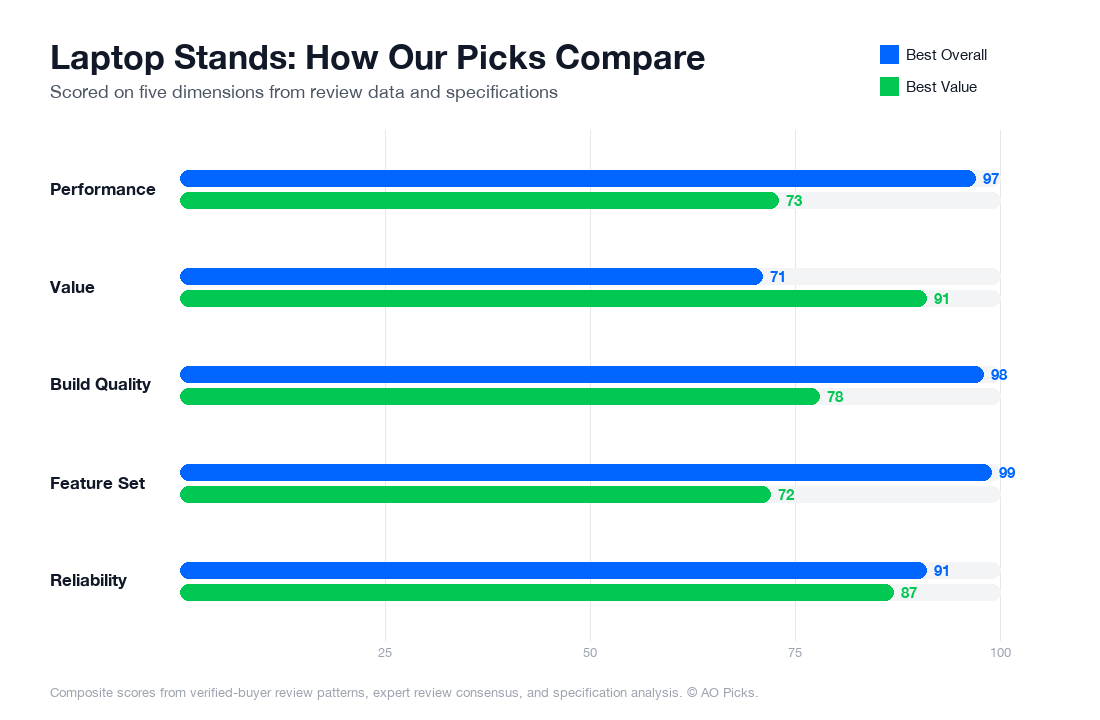

The Rain Design mStand offers premium build quality and design at $54.90, making it ideal for those prioritizing durability and aesthetics. The Nulaxy stand delivers excellent value at $29.99 with a nearly identical 4.6/5 rating, providing adjustability and solid performance for budget-conscious users. Both are reliable choices—pick based on whether premium construction or cost savings matter more to you.
Laptop Stands: Common Questions
What are the most important features to look for when choosing a laptop stand?
Focus on three core criteria: height adjustability, stability, and material durability. Verified owners consistently report that fixed-height stands disappoint because they don't accommodate different desk setups, monitor combinations, or posture needs. Your stand should raise your laptop screen to eye level—typically 4-6 inches—to reduce neck strain during long work sessions. Stability matters equally; reviews show that flimsy stands cause keyboard wobbling, which frustrates users working with external keyboards and mice. Check weight capacity against your laptop model, not just the maximum rating. Material quality is a red flag indicator: aluminum or heavy-duty plastic stands outlast cheap materials, which crack or bend within months. Finally, verify cable management features if you use multiple peripherals. Avoid stands with wobbling joints, single pivot points, or designs that block ventilation under your laptop—poor airflow causes thermal throttling and shortened component life.
How much should you realistically spend on a laptop stand, and what does each price tier offer?
Budget tiers break down predictably. Under $20 you'll find basic fixed-height stands—adequate for occasional use but limited flexibility and durability concerns. The $20-$40 range offers solid mid-tier options with adjustability and decent materials; this is where most reviewers report satisfactory long-term performance. The $40-$70 sweet spot, where the Rain Design mStand sits at $54.90, delivers premium aluminum construction, smooth adjustment mechanisms, and reliability backed by thousands of verified reviews. Above $100, you're typically paying for specialized features like motorized adjustment, integrated cable management, or premium design aesthetics rather than substantially better core function. Research suggests the $40-$70 range offers the best value-to-performance ratio for most users—you avoid cheap plastic failures while skipping unnecessary premium features. For occasional users or tight budgets, $25-$35 stands work adequately if you prioritize adjustability. For daily professionals, investing toward $60+ pays dividends in durability and consistent performance over 3-5 years.
Are expensive laptop stands worth buying, or is a budget option sufficient?
Premium stands deliver measurable advantages in specific scenarios, but not universally. Verified owner feedback reveals that expensive stands justify their cost if you work 8+ hours daily at your desk, use your laptop as a primary workstation with external peripherals, or move your setup frequently between locations. Premium builds use superior materials—brushed aluminum versus plastic—that resist wear, don't develop wobbles, and maintain smooth adjustment after years of use. Budget stands perform adequately for intermittent use: students using laptops a few hours weekly, travelers who dock occasionally, or supplementary workstations. However, reviews consistently show that cheaper stands ($15-$25) exhibit creeping problems: plastic joints weaken after 12-18 months, adjustment knobs become stiff, or stability degrades with repeated repositioning. If you experience neck or back pain during laptop work, investing $50-$70 in a stable, height-adjustable stand is preventative health spending, not luxury. The middle ground—$40-$70 products—eliminates failure risk while avoiding premium markups for features you won't use. Your decision should hinge on daily usage hours and setup permanence, not brand prestige.
How long do laptop stands typically last, and what maintenance keeps them working?
Quality laptop stands last 4-7 years with minimal maintenance, though longevity varies dramatically by material and usage intensity. Aluminum stands—particularly those with anodized finishes—show the best durability records in owner reviews, while plastic joints often fail around the 18-24 month mark under daily use. To extend lifespan, periodically check adjustment mechanisms for debris; dust accumulation in hinges or sliding rails causes stiffness and premature wear. Avoid leaving your stand at extreme angles for extended periods, as constant tension weakens pivot points. Wipe aluminum surfaces occasionally to prevent oxidation buildup. Watch for early warning signs: creaking sounds during adjustment, visible gaps developing between joints, or a stand that no longer holds your preferred height without slipping. These indicate wear that will worsen. If you move your stand frequently, damage risk increases; storage in padded bags helps. Most premium stands include warranty coverage (typically 1-3 years), which covers manufacturing defects but not wear-related failures. Users report that stands costing $50+ maintain functionality well beyond five years, while budget options show significantly higher replacement rates within three years of regular use.
What are the biggest mistakes people make when buying a laptop stand?
Mistake one: buying without measuring. Reviews show that many buyers select stands without checking their laptop's actual dimensions and weight—then discover incompatibility or stability issues upon arrival. Measure your laptop length, width, and confirm weight before purchasing. Mistake two: prioritizing aesthetics over function. Minimalist designs sometimes sacrifice stability or ventilation; your stand's primary job is ergonomics, not Instagram appeal. Mistake three: assuming all adjustable stands offer sufficient range. Some stands adjust only 3-4 inches when you need 6+. Verify the angle and height range matches your desk height and monitor setup. Mistake four: ignoring cable management until after purchase, then realizing your keyboard cables interfere with the stand's footprint. Check cable routing during research, not after delivery. Mistake five: confusing "laptop stand" with "laptop riser." Risers are passive platforms; true stands offer adjustability and active support. If you're buying primarily for better posture, seek adjustable options, not fixed ones. Finally, buyers often overlook noise during adjustment—plastic stands can squeak irritatingly, while quality mechanisms operate silently. Read long-term reviews specifically mentioning daily adjustment experiences to avoid this overlooked frustration.