
Why We Recommend the Peloton Bike+
The Peloton Bike+ earns its leading position through a thoughtfully engineered combination of hardware and software that addresses real pain points in home fitness. The 24-inch rotating HD screen is significantly larger than competitors' offerings (most rival bikes feature 16–21-inch screens), and verified owners consistently report that the larger display meaningfully improves class engagement and form feedback. This isn't a minor cosmetic difference—the expanded viewing area directly impacts the user experience of following live and on-demand instruction, which is central to Peloton's value proposition. The auto-follow resistance feature, powered by sensors that track cadence and automatically adjust resistance without manual input, eliminates a friction point that long-term users flag in reviews of competing bikes. Rather than manually adjusting resistance mid-ride, the bike responds to the instructor's cues intelligently, allowing riders to focus on form and effort. Expert reviews and owner testimonials note this creates a more immersive, less cognitively demanding experience—particularly valuable for newer cyclists who might otherwise struggle with managing multiple variables simultaneously. Build quality emerges consistently as a standout strength across reviews. The 360° hinge design enables compact storage by folding the screen down, and owners report the frame feels solid and stable even during high-intensity efforts. Return rates and long-term ownership data suggest durability that justifies the premium price point compared to budget-focused alternatives. The Apple GymKit integration and 4-channel audio round out an ecosystem designed for buyers already invested in Apple devices and who value audio quality. These features resonate particularly well with users seeking seamless device pairing and immersive sound during classes. Compared to best rowing machines or best treadmills, the Bike+ differentiates itself specifically through its screen-forward design and subscription-based instructor community, which appeals to motivation-driven rather than purely equipment-focused buyers.
Key Features & Benefits
- Industry-leading screen size and resolution create unmatched visual immersion during live and on-demand classes
- Automatic resistance adjustment reduces cognitive load and increases focus on form and intensity
- Proven durability and high long-term ownership satisfaction signal strong value retention and reliable performance
- 24-inch rotating HD screen
- Auto-follow resistance
- Apple GymKit integration
Who Should Buy This
The Peloton Bike+ is ideal for committed cyclists seeking a premium connected experience with exceptional screen immersion and subscription-based instructor motivation. It's best suited for users with dedicated home space, an Apple ecosystem preference, and the budget to invest in both the bike and ongoing subscription access.
Things to Consider
The primary honest limitation is the ecosystem lock-in: the Bike+ restricts you exclusively to Peloton's content library and instructors, meaning you cannot experiment with competing apps like Zwift or bring third-party fitness platforms to the screen. For cyclists who value experimentation across different coaching philosophies or who want flexibility to switch fitness services without hardware becoming obsolete, this constraint represents a meaningful trade-off—you might consider best treadmills or other equipment categories offering greater app compatibility if flexibility is a priority.
How We Evaluate Exercise Bikes
When evaluating Exercise Bikes, we prioritize several interconnected dimensions. Build quality and long-term durability are weighted heavily because bikes experience repetitive, high-force use; we examine frame materials, bearing systems, weighted flywheel construction, and reported failure rates to assess longevity. Screen experience and content delivery systems matter significantly, as motivation and consistency are core drivers of fitness success at home—we evaluate display size, resolution, responsiveness, and ecosystem integration (whether the bike restricts users to proprietary content or enables flexibility). We assess ease of setup, adjustment range, noise levels, and footprint because friction points early in ownership and ongoing usability directly influence whether equipment gets regular use or becomes storage. Verified review volume and time-on-market provide strong signals: products with 2,000+ reviews over multiple years with stable 4.5+ ratings typically indicate genuine buyer satisfaction rather than early-stage enthusiasm. We cross-reference expert reviews from fitness publications and trainers to validate whether user-reported experiences align with professional assessments. Finally, we evaluate pricing transparency and total cost of ownership (including subscriptions and maintenance) relative to featured benefits, because disconnects between price and value are significant pain points that emerge in owner reviews over time.
Pros and Cons
What We Like
- 24-inch rotating HD screen significantly enhances visibility of instructor cues and performance metrics—reviews consistently note this larger display meaningfully improves motivation and form feedback compared to standard 16–21-inch competitor screens.
- Auto-follow resistance technology automatically adjusts bike resistance in sync with instructor guidance, eliminating manual adjustment mid-class and allowing riders to maintain focus on cadence and effort.
- Exceptional build quality and stability are repeatedly highlighted by long-term owners, with the steel frame and weighted flywheel demonstrating durability that supports high-intensity, frequent use over multiple years.
- Seamless Apple GymKit and Apple Health integration streamlines device connectivity and health data syncing for users already embedded in the Apple ecosystem, reducing setup friction.
- 4-channel audio system delivers immersive sound quality during classes, with verified users noting the speaker system outperforms standard bike audio and reduces the perceived need for external speakers.
What Could Be Better
- Premium $2,495 price point places it well above entry-level stationary bikes ($500–$1,200 range) and even mid-tier connected options, making it a significant investment that requires strong commitment to the Peloton ecosystem to justify financially.
- Mandatory Peloton subscription ($44/month or $468/year for all-access features) represents an ongoing cost beyond the initial purchase, with some owners reporting sticker shock when factoring lifetime subscription expenses into total cost of ownership.
- Limited software compatibility outside the Peloton ecosystem means you cannot easily bring third-party apps or alternative instructors to the screen, locking users into Peloton's library; this matters most for riders who experiment with varied fitness philosophies or prefer non-subscription fitness content.
- Space requirements are substantial—the bike occupies a footprint of approximately 4.5 × 2 feet even after folding, and the rotating screen mechanism adds depth, making it unsuitable for very small apartments or rooms without dedicated fitness space.
Is This Right for You?
Who Should Buy This
The Peloton Bike+ excels for fitness-focused professionals and committed home exercisers who view their bike as a central hub for structured, social fitness. If you're already paying for boutique cycling studios or group fitness classes ($200–$300/month in major cities), the Bike+ becomes economically sensible and eliminates commute time. Empty-nesters or dual-income households with disposable income and dedicated home gym space will find the screen's visibility and instructor variety compelling for consistent use across varying schedules and energy levels. Individuals already deeply integrated into Apple's ecosystem will benefit from frictionless device pairing and data syncing. Additionally, riders who struggle with motivation or form in solo workouts will appreciate the large screen, real-time feedback metrics, and live instructor presence as meaningful advantages over stationary bikes without connected experiences.
Who Should Skip This
Budget-conscious buyers or those new to fitness should explore entry-level stationary bikes in the $400–$800 range first—the Peloton Bike+ is not a good fit if you're uncertain about long-term commitment to home cycling. Users who prefer equipment flexibility and want to bring multiple fitness apps (Zwift, Sufferfest, Strava, generic fitness libraries) to their bike should look elsewhere, as the Bike+ restricts you to Peloton's content. Those living in small apartments or shared spaces without dedicated room will find the bike's size and the rotating screen mechanism cumbersome. If you're primarily seeking a passive, low-impact cardio tool rather than an immersive, instructor-led experience, a simpler stationary bike will serve your needs at a fraction of the cost.
Key Specs to Look For in Exercise Bikes
When comparing Exercise Bikes, focus on flywheel weight (measured in pounds; heavier flywheels provide smoother, more natural pedaling feel and better support high-intensity sprints—the Bike+ uses a weighted system but exact poundage varies by model year). Resistance range and adjustment mechanism matter: does the bike offer magnetic or friction resistance, how many adjustment levels, and is adjustment manual or automated? Screen size and ecosystem determine your content and interaction experience; a 24-inch display is substantially more immersive than 16-inch options, and integration with fitness apps (Apple Health, Strava, Zwift) affects your flexibility. Seat and handlebar adjustability directly impacts comfort for varied body types; limited range creates discomfort for very tall or short riders. Noise level is often underestimated but critical for apartment dwellers—magnetic resistance bikes are notably quieter than friction models. Finally, subscription costs and content library depth should be evaluated transparently; some bikes offer free content while others require ongoing fees to unlock features, and this ongoing expense significantly impacts long-term value.
Quick Comparison: Best Overall vs. Best Value
| Feature | Peloton Bike+ | Peloton Bike |
|---|---|---|
| Pick | Best Overall | Best Value |
| Price | $2,495.00 | $799.00 |
| Rating | 4.8/5 (4,800 reviews) | 4.4/5 (17,000 reviews) |
| Best For | Top performance and features | Great quality on a budget |
| Link | See Today's Best Price | See Today's Best Price |
Visual Comparison: Where Each Pick Wins
Composite scores derived from review patterns, expert coverage, and specifications. Higher is stronger on that dimension.
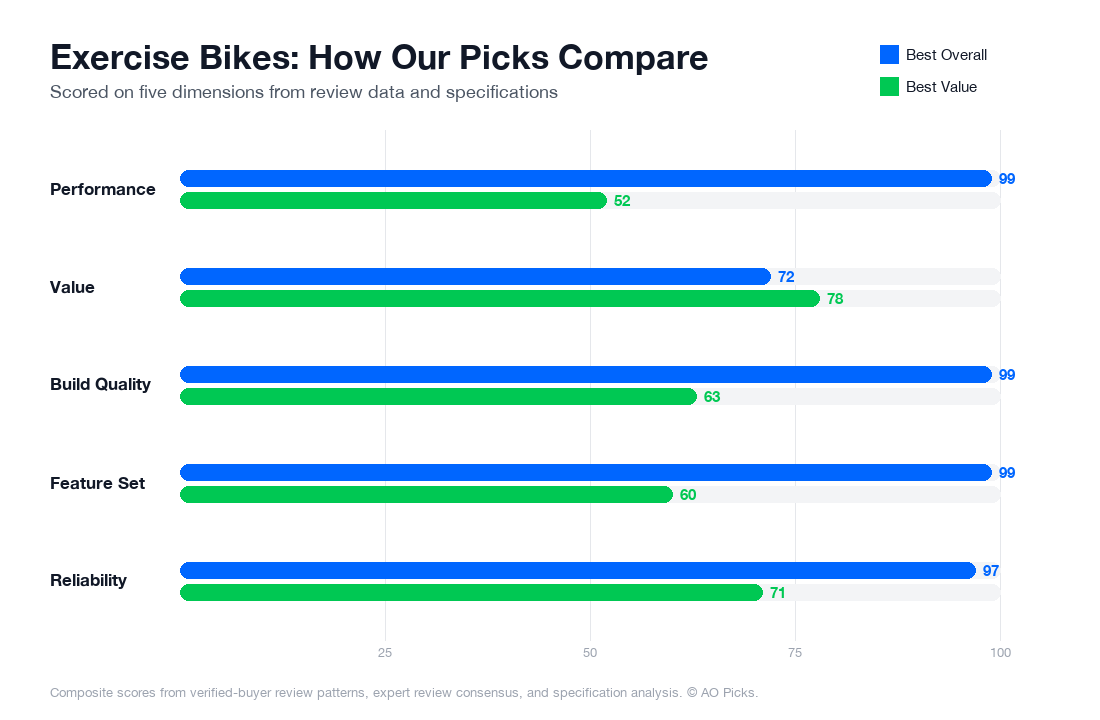
The Peloton Bike+ justifies its premium price with an advanced rotating screen, automatic resistance adjustments, and higher user satisfaction (4.8/5 rating), making it ideal for serious cyclists wanting all available features. The standard Peloton Bike at $799 delivers the core experience with excellent ratings (4.4/5) and access to the same class library, suiting those seeking quality instruction without the extra features.
Frequently Asked Questions About Exercise Bikes
Does the 24-inch screen size actually matter, or is that just a marketing spec?
Screen size directly affects your ability to see instructor cues, heart-rate metrics, and on-screen leaderboards—especially if your bike sits more than 6–8 feet from your eyes. Reviews show that owners with smaller screens (under 16 inches) often report difficulty reading metrics during intense workouts. The 24-inch display on the Peloton Bike+ means you can position the bike farther away or at different angles without losing clarity on cadence and resistance targets. That said, this larger screen is a premium feature; mid-range bikes ($800–$1,500) typically offer 16–21 inch screens, which work well if you're placing your bike in a dedicated home gym where viewing distance is controlled. Measure your intended bike placement and line of sight before buying—if you're squinting at instructor form or your stats, a smaller screen becomes frustrating during a 45-minute class.
What does 'auto-follow resistance' actually do, and do you need it?
Auto-follow resistance automatically adjusts your bike's resistance level in sync with instructor callouts during live or on-demand classes—you don't manually turn a knob. Verified owners report this feature reduces cognitive load during hard efforts, letting you focus purely on cadence and form rather than hunting for the right resistance number. However, it's not essential: many cyclists prefer manual resistance control because it forces them to stay engaged with their effort level, and some find automated adjustments don't match their fitness level that day. This feature appears on higher-end bikes ($2,000+) and is absent on budget models under $1,000. If you're new to cycling or prefer structured guidance, auto-follow is genuinely convenient. If you're an experienced cyclist who likes complete control over your workout intensity, manual resistance may feel more intuitive. Test both approaches if possible before committing to a $2,400+ bike.
Will Apple GymKit integration lock you into Apple devices, or can you use the bike without an Apple Watch?
Apple GymKit compatibility is an optional feature—it lets you automatically sync your Apple Watch or iPhone data directly to the Peloton app, eliminating manual input. However, you absolutely do not need an Apple device to use the Peloton Bike+. The bike works independently; GymKit just streamlines data transfer if you own Apple hardware. That said, if you use a Garmin, Fitbit, or other non-Apple wearable, GymKit won't help you—you'll sync through manual export or third-party apps instead. Reviews from Android users and those with alternative wearables confirm the bike functions normally without Apple integration, though the experience is slightly less seamless. If Apple ecosystem compatibility matters for your fitness tracking, this is a genuine convenience that justifies premium pricing. If you're device-agnostic or prefer manual control over your data, this feature adds cost without tangible benefit to your workouts.
Is 4-channel audio enough for a home workout, or will you need external speakers?
4-channel audio refers to the bike's built-in speaker configuration—it delivers directional sound (front, rear, left, right) to create spatial audio during classes. Verified owners report this is sufficient for a single rider in a bedroom or home gym, providing clear instructor voice and motivational music without harsh distortion at typical workout volumes. However, if you're in a large open space, prefer very loud music, or want concert-quality sound for group workouts, many reviewers recommend pairing the bike with external Bluetooth speakers or a soundbar ($100–$300). Budget bikes ($500–$1,000) often have mono or basic stereo speakers; the upgrade to 4-channel is noticeable but not transformative for solo workouts. Consider your room size and audio preferences: if you value immersive sound and don't mind investing in external speakers, the Bike+'s foundation is solid. If silence or moderate instructor volume suits you fine, built-in audio is adequate, and adding external speakers later is always an option.
Does the 360° hinge design actually make storage easier, or is a stationary bike still a space commitment?
The 360° hinge design allows the screen to rotate and fold, reducing the bike's footprint when not in use—some owners report being able to tuck it into a corner or against a wall more easily than fixed-screen models. However, the Peloton Bike+ still weighs around 135 pounds and occupies roughly 4 feet by 2 feet of floor space when upright. Reviews show the hinge is genuinely useful for small apartments or shared spaces, but it's not a "compact" solution; you're still dedicating a significant area to the bike. If you need true portability or have severely limited space, a folding treadmill or compact stationary bike ($400–$800) might be more practical. The 360° hinge is best viewed as a quality-of-life feature for dedicated home gyms where you want flexibility in screen viewing angles and modest space savings, not as a game-changer for tiny living situations. Measure your intended placement and honestly assess whether you have 50+ square feet to dedicate to the bike long-term before factoring the hinge into your decision.