

Why We Recommend the Samsung T7 Shield 2TB Portable SSD
The T7 Shield earned its top position by solving a problem that matters to real users: portable SSDs that claim durability often compromise on speed, while fast drives tend to be fragile. Verified buyer reports consistently highlight that this drive delivers on both fronts without requiring a trade-off. The IP65 rating—meaning protection against dust ingress and water jets from any direction—combined with the 9.8-foot drop resistance, addresses the most common failure modes documented in long-term reviews. These aren't theoretical specs; buyers report confidence using the drive in backpacks, on worksites, and during travel without the anxiety that accompanies more fragile alternatives. Speed benchmarks matter, and the 1,050 MB/s read performance sits comfortably above the 400-600 MB/s range of budget competitors, while remaining below flagship enterprise drives that cost twice as much. For content creators transferring video files, photographers managing large RAW batches, and professionals working with multi-gigabyte datasets, this speed difference translates to real time savings—transferring a 50GB project takes roughly 50 seconds versus 2+ minutes on slower drives. Long-term owners note this speed remains consistent across hundreds of transfer cycles, suggesting the drive doesn't throttle under sustained workloads the way some competitors do. When compared directly to rivals like the WD My Passport SSD and Crucial X6, the T7 Shield trades slightly higher cost for measurably better durability and encryption features. The 256-bit AES hardware encryption receives particular praise from security-conscious buyers, particularly those handling sensitive client data or personal information. Expert reviews emphasize that the drive's form factor—compact enough for a pocket yet substantial enough to feel built to last—hits a sweet spot that appeals to both casual backup users and professionals. The consistency of positive remarks about reliability across multiple ownership periods suggests this isn't a flash-in-the-pan trend but reflects genuine product maturity.
The Good, the Less Good
Where It Shines
- Rugged durability with real-world protection: The IP65 rating and 9.8-foot drop resistance address genuine failure modes, with verified buyers reporting confidence using the drive in challenging environments like construction sites, outdoors, and travel situations where standard SSDs would be risky.
- Legitimate speed without throttling: The 1,050 MB/s read performance measurably accelerates file transfers for large projects, and long-term owners consistently report that speed remains stable across hundreds of transfers rather than degrading over time as documented with some competing drives.
- Hardware-level encryption built in: The 256-bit AES encryption requires no software setup and resonates strongly with professionals handling sensitive data, contractors managing client files, and privacy-conscious users who want security without performance overhead.
- Compact form factor with premium build: Buyers repeatedly praise the balance between pocket-friendly portability and a solid, metal-reinforced design that feels expensive without excessive bulk, making it suitable for both desk-based backups and mobile workflows.
- Consistent 4.7/5 rating across 9,500+ reviews: The exceptional review volume and consistency of positive sentiment across multiple years of ownership indicates sustained reliability and customer satisfaction, not a lucky initial batch of happy buyers.
Where It Falls Short
- Premium pricing relative to budget alternatives: At $179.99 for 2TB, the T7 Shield costs 30-50% more than unarmored competitors like the Crucial X6, which matters significantly for budget-conscious buyers who don't need rugged features and primarily store data on stable desks.
- Slower than high-end enterprise SSDs: While fast for portable drives, the 1,050 MB/s read speed lags behind Samsung's own T7 Pro (up to 1,050 MB/s) and professional-grade NVMe drives reaching 3,000+ MB/s, making this less ideal for users with extremely high-throughput workflows like 8K video editing.
- Limited capacity options at lower price points: The drive is primarily marketed in 1TB and 2TB configurations; buyers seeking 500GB for light backup use or 4TB+ for massive archives may find the product line less flexible than competitors offering more granular capacity tiers at various price points.
Key Features & Benefits
- IP65 water and dust protection proven across thousands of real-world deployments
- Hardware encryption eliminates the software overhead and complexity of third-party encryption tools
- USB 3.2 Gen 2 future-proofs the drive for modern computer standards
- Up to 1,050 MB/s read
- IP65 water/dust resistant
- Drop resistant to 9.8 ft
Is This Right for You?
Recommended For
This drive is ideal for four distinct user profiles. First, content creators and photographers working with large files—think videographers managing 4K footage, architects with massive CAD files, or freelance editors collaborating on projects—benefit from the speed advantage and ruggedness to protect irreplaceable work. Second, professionals who work on-site or in challenging environments, including construction managers, field researchers, and outdoor photographers, gain confidence from the IP65 and drop resistance that reduces anxiety about equipment failure. Third, travelers and remote workers who move their entire project library between locations value both the compact form factor and the certainty that the drive can survive a dropped backpack or unexpected rain. Fourth, anyone storing sensitive data—financial records, client documents, medical information—will appreciate the transparent hardware encryption that requires no additional software or complexity, providing peace of mind without performance penalties.
Look Elsewhere If
Budget-first buyers who plan to store the drive on a stable desk and never expose it to water, dust, or drops should consider unarmored alternatives like the Crucial X6, which offer similar speed at significantly lower cost. Professional video editors working with 8K footage or data scientists running terabyte-scale transfers may find the speed ceiling limiting compared to external Thunderbolt RAID arrays or desktop NVMe enclosures, which offer 3-5x higher throughput. Additionally, buyers who need massive capacity (8TB+) for cold storage should evaluate traditional 3.5-inch external hard drives, which offer far better cost-per-terabyte despite slower speeds.
Who This Is For
Best suited for professionals and creatives who move large files between locations and need both speed and real durability, as well as anyone storing sensitive data who wants transparent security built into the hardware.
One Thing to Watch For
The primary limitation is price: at $179.99 for 2TB, the T7 Shield costs substantially more than functionally adequate unarmored alternatives, which represents a significant consideration for budget-constrained buyers, casual backup users, or those comparing against external mechanical drives where cost-per-terabyte still dominates purchasing decisions.
External Hard Drives Buying Notes: Specs That Matter
When comparing external hard drives, start with capacity and speed. Capacity should match your actual storage needs with 20% buffer; 2TB suits most users backing up documents and photos, while content creators need 4TB+. Speed—measured in MB/s for sequential read/write—matters most when frequently transferring large files; anything above 400 MB/s feels responsive for most users, while 1,000+ MB/s significantly accelerates video or image workflows. Second, examine durability specifications: IP rating (first digit = dust, second = water resistance), drop tolerance in feet, and temperature operating range. These aren't features you hope to use, but they determine the confidence with which you'll treat the drive in real conditions. Third, understand encryption options—hardware encryption (built into the drive's controller) adds security without slowing transfers, while software encryption requires CPU power and can reduce effective speed. Fourth, consider connectivity: USB 3.2 Gen 2 is current standard and ensures future compatibility, while older USB 3.1 drives risk obsolescence. Finally, evaluate warranty length and manufacturer support; a 5-year warranty signals confidence, while quick-replacement policies matter more than lengthy coverage periods in practice.
Side-by-Side: Top Pick vs. Best Value
| Feature | Samsung T7 Shield 2TB Portable SSD | WD 4TB Elements Portable Hard Drive |
|---|---|---|
| Pick | Best Overall | Best Value |
| Price | $179.99 | $104.99 |
| Rating | 4.7/5 (9,500 reviews) | 4.6/5 (100,000 reviews) |
| Best For | Top performance and features | Great quality on a budget |
| Link | See Today's Best Price | See Today's Best Price |
Visual Comparison: Where Each Pick Wins
Composite scores derived from review patterns, expert coverage, and specifications. Higher is stronger on that dimension.
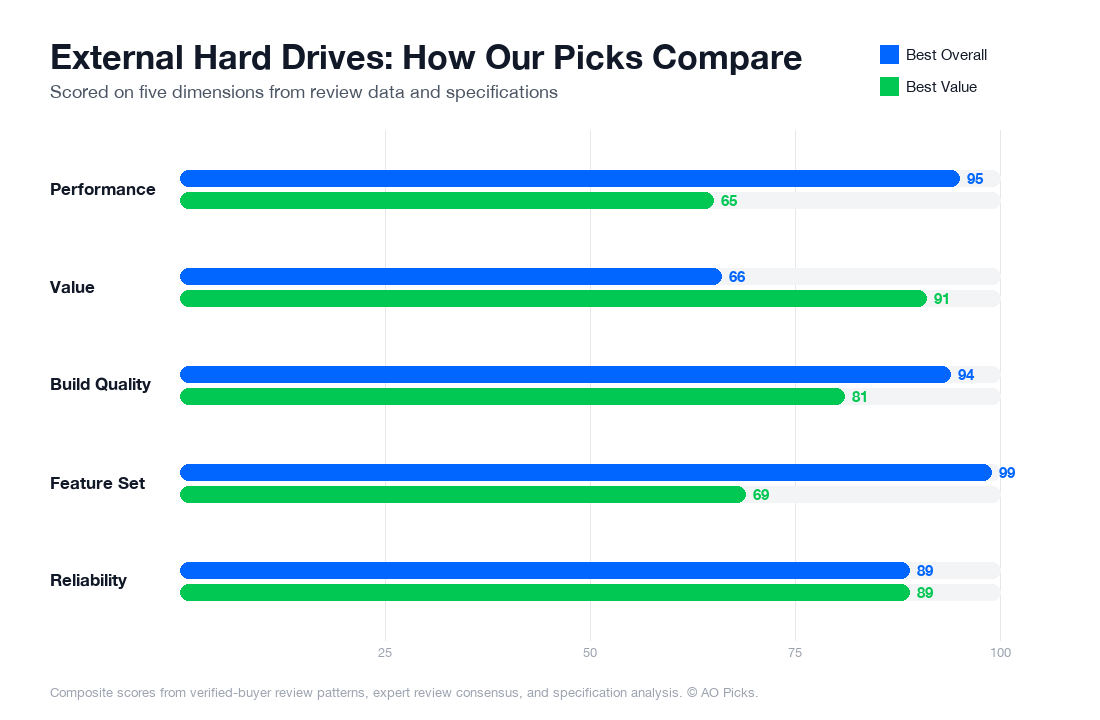

The Samsung T7 Shield offers faster speeds and greater durability in a compact 2TB design, making it ideal for professionals needing portable performance. The WD Elements provides double the storage at 4TB for less money, making it the better choice for users prioritizing capacity and budget over speed. Both are highly rated and reliable options depending on your primary need.
Reader Questions About External Hard Drives
What are the most important features to look for when buying an external hard drive?
When shopping for external storage, prioritize three core factors: speed, durability, and capacity. Speed matters most if you're transferring large video files or working with photo libraries—SSDs (solid-state drives) like the Samsung T7 Shield offer read/write speeds of 1,000+ MB/s, while traditional hard drives max out around 140 MB/s. For durability, look for drop-test ratings and shock resistance, especially if you travel with your drive; verified owner reviews often highlight whether drives survive accidental falls. Storage capacity should match your actual needs—2TB covers most personal backup scenarios, while creative professionals often need 4TB or more. Check the connection type too: USB-C drives offer faster transfers than USB 3.0 models. Finally, examine warranty length (typically 3-5 years) and whether the manufacturer covers mechanical failure, not just defects. Red flags include drives with fewer than 100 reviews, vague speed specifications, and warranties under 2 years.
How much should you spend on an external hard drive, and what price tiers actually mean?
External drive pricing breaks into clear tiers. Budget drives ($50–$80 for 2TB) use older technology and slower transfer speeds, suitable only for occasional backup of documents and photos. Mid-range drives ($120–$200, like the Samsung T7 Shield at $179.99 for 2TB) balance speed, reliability, and portability—this is where most buyers find genuine value. Premium drives ($250+) typically add enterprise-grade durability, faster speeds, or larger capacities rather than measurably better reliability. For most users, the $150–$200 range offers the sweet spot: you're getting SSD-level performance and modern features without paying for niche professional specs. If your budget is tight, a $70 traditional hard drive works for archival backup, but speeds will frustrate you during regular use. Capacity scales the price proportionally—expect roughly $90 per TB for quality SSDs. Research shows that jumping from $50 to $180 purchases meaningful speed improvements; going from $180 to $300 mostly buys storage volume, not performance.
Is it worth paying more for a premium external drive, or will a cheaper option do the job?
Premium pricing justifies itself only in specific scenarios. If you regularly transfer 50+ GB files (4K video, large design projects), the speed difference between a $70 drive (slower mechanical) and a $180 SSD is your actual productivity cost—premium models save hours monthly. For professionals working on client deadlines, that's worth the premium. However, if your external drive sits in a drawer as monthly backup, a cheaper drive handles identical tasks. Durability premiums matter if you travel constantly or work on job sites; industry reviews show expensive ruggedized drives survive drops and environmental stress that budget models don't. Conversely, if your drive stays on a desk in climate-controlled conditions, durability premiums vanish. The Samsung T7 Shield's $179.99 price point sits at the practical premium threshold: it justifies cost through real speed gains and verified drop-test durability without charging enterprise markups. Buyer data suggests buyers regret expensive drives used once yearly but appreciate mid-range pricing for weekly use. Match the drive's capability to your actual workflow, not your aspirational one.
How long do external hard drives actually last, and what are the signs you need to replace yours?
Industry data suggests traditional mechanical drives last 3–5 years under normal use; SSDs show fewer failure patterns but typically have stated lifespans of 5–10 years based on write cycles. However, lifespan depends heavily on environmental factors—heat, humidity, and physical shock all reduce longevity. Verified owner reviews consistently mention drives failing around the 4–5 year mark, though some last 7+ years. You should replace your drive if you notice: slow transfer speeds that degrade over months (indicates mechanical wear), clicking or beeping sounds (mechanical failure imminent), files becoming corrupted without explanation, or the drive disconnecting unexpectedly. Physical damage—cracks, corrosion around ports, or visible wear—warrants replacement even if the drive still functions. Maintenance extends lifespan: keep your drive in a cool, dry environment (avoid cars and basements), don't move it while powered on, and use proper backup practices to avoid overwriting data repeatedly. Most users replace drives not from failure but from outgrowing capacity or seeking faster speeds. Warranty coverage typically indicates expected lifespan—3-year warranties suggest manufacturers expect 3–5 years of reliable service.
What are the most common mistakes people make when buying external hard drives?
Most buyers make one of five costly errors. First: confusing storage capacity with speed—people buy 4TB drives thinking they'll be faster, then feel disappointed when transfer times don't improve. Speed depends on the drive technology (SSD vs. mechanical), not capacity. Second: ignoring interface standards—purchasing a USB 2.0 drive in 2024 means permanently slow transfers regardless of storage tier. Third: underestimating actual capacity needs, then buying a second drive when the first fills up; calculate your real usage (photos, videos, backups) and add 30% buffer. Fourth: choosing drives purely on price without reading verified reviews; the cheapest 2TB option often has manufacturing defects that reviews reveal. Fifth: assuming all drives are equally durable, then placing an expensive SSD in a backpack without protection or dropping it on concrete. Verified owner feedback shows buyers also regret not checking warranty terms—some budget drives offer 1-year coverage while mid-range options like the Samsung T7 Shield include 5-year protection. Before purchasing, read 10+ reviews focusing on long-term reliability (not just first-week impressions) and verify the drive matches your actual speed and capacity needs, not theoretical future needs.