

Why We Recommend the SteelSeries Apex Pro TKL
The Apex Pro TKL stands out because it solves a real problem that generic gaming keyboards ignore: not all gaming tasks require the same actuation sensitivity. Reviewers with experience across multiple switch types report that the adjustable OmniPoint switches allow fine-tuning for different games within the same keyboard—lighter actuation for fighting games, heavier for MMOs. This flexibility, coupled with the ability to adjust per-key, creates a level of customization that fixed-actuation competitors simply cannot match. Build quality consistently emerges as a strength across long-term owner reviews. The aircraft-grade aluminum chassis receives praise for durability and premium feel, with many reviewers noting the keyboard remains stable even during intense gaming sessions. The magnetic wrist rest adds practical value, addressing a gap that many competitors overlook—reviewers highlight how it stays attached and prevents wrist fatigue during extended play. The OLED Smart Display is where industrial design meets functionality. Rather than serving as decorative tech, verified buyers report using it for real-time stats (APM, damage numbers in specific games), macro status, and system information. This feature distinguishes the Apex Pro TKL from competitors who offer displays purely for branding. Compared to leading alternatives like the Corsair K65 Mini and Razer Huntsman Mini, the Apex Pro TKL's adjustable actuation technology gives it a technical edge that resonates with competitive players and those exploring different switch profiles. The tenkeyless form factor appeals to esports players and desk-space-conscious users. When paired with a quality best computer mice, reviewers report achieving cohesive, high-performance setups. One consistent theme in reviews is the SteelSeries GG software ecosystem. Long-term owners praise the intuitive interface for reprogramming keys, adjusting actuation per-key, and managing the OLED display content. Expert coverage notes that this software integration separates SteelSeries keyboards from competitors with clunky configuration tools.
Key Features & Benefits
- Per-key adjustable actuation from 0.4–4.0mm provides unmatched flexibility across different game types
- Premium aluminum construction and magnetic wrist rest deliver durability and comfort that justify the investment
- OLED Smart Display offers practical in-game functionality beyond decorative aesthetics
- OmniPoint switches
- Adjustable actuation
- OLED Smart Display
Who Should Buy This
The Apex Pro TKL is ideal for competitive esports players and streamers who benefit from adjustable per-key actuation and real-time OLED stat displays. It's equally suited for desk-space-conscious professionals who game casually and want premium build quality without full-size footprint.
Things to Consider
The $189.99 price positions this keyboard beyond reach for casual buyers exploring gaming peripherals on a modest budget. Additionally, users who prefer simplicity and zero-configuration setups may find the software-dependent actuation adjustments and OLED customization more complex than necessary; those looking for straightforward mechanical keyboards without configuration overhead should explore more streamlined alternatives with fixed actuation profiles, particularly if they also need peripherals like best external hard drives for game storage and backup solutions.
How We Evaluate Gaming Keyboards
When evaluating gaming keyboards, we weight several interdependent factors. Switch technology and actuation properties form the foundation—we examine whether switches are mechanical (preferred for durability and tactile feedback), the actuation distance, and whether that specification translates to real-world responsiveness reported by long-term users. Build quality assessment focuses on material composition (aluminum vs. plastic), chassis stability, and longevity signals from multi-year owner reports rather than first-impression reviews. Form factor and ergonomics matter significantly, particularly wrist support, key spacing consistency, and overall comfort during extended sessions. We examine review patterns across different usage scenarios—competitive gaming, casual play, office work—to understand where products excel or struggle. Connectivity (wireless, wired, hybrid) and software ecosystem integration receive heavy weighting because many gaming keyboards fail in these areas despite strong hardware. We prioritize review volume and temporal distribution—the 3,600+ reviews for this product provide statistical confidence, and we weight long-term owner reports (6+ months) more heavily than early-adopter feedback. Expert reviews from reputable gaming and tech publications add context, particularly around performance comparisons with direct competitors. Return rate signals and warranty claim patterns (where available) indicate real-world reliability. Finally, we evaluate price-to-feature ratio by comparing similar products in the same category, ensuring our pick delivers meaningful differentiation rather than marginal improvements at premium prices.
Pros and Cons
What We Like
- Adjustable OmniPoint switches (0.4–4.0mm actuation) deliver per-key customization that reviewers report as genuinely useful for different gaming genres and play styles, eliminating the one-size-fits-all limitation of traditional mechanical switches.
- Aircraft-grade aluminum chassis receives consistent praise from long-term owners for durability, stability, and premium tactile quality that rivals keyboards at significantly higher price points.
- OLED Smart Display serves practical functions rather than pure aesthetics—verified buyers report using it for in-game stats, macro status, and system monitoring, making it a feature with real utility.
- Magnetic wrist rest attachment solves a common frustration reviewers note with competing keyboards; it remains securely in place during gameplay and effectively reduces wrist fatigue on longer sessions.
- Tenkeyless compact form factor appeals to esports competitors and desk-space-conscious buyers, with reviews noting improved mouse space and portability compared to full-size alternatives.
What Could Be Better
- Price point of $189.99 positions this keyboard at the premium end of the gaming market, which several reviewers note limits accessibility for casual players or those building on a budget; competitors offer solid tenkeyless options at $100–$120.
- Software dependency for full functionality means users must install and maintain the SteelSeries GG app to access per-key actuation adjustments and OLED customization; some reviewers report occasional software bugs or compatibility issues with certain operating systems.
- Learning curve for optimal switch customization can be steep for new users—verified buyers report spending time dialing in actuation profiles, which may frustrate those seeking a plug-and-play experience without configuration.
Is This Right for You?
Who Should Buy This
Competitive esports players will find strong value here, particularly those playing multiple genres that benefit from different actuation profiles—a fighting game player can set lighter actuation for quick inputs, then switch to heavier settings for strategy games without swapping keyboards. Streamers and content creators benefit from the OLED display's real-time stat overlay and the SteelSeries ecosystem's intuitive macro management. Desk-space-conscious users appreciate the tenkeyless form factor without sacrificing build quality or features; reviewers who previously used full-size keyboards report reclaiming valuable mouse space. Professionals who blend work and gaming will appreciate the solid build quality and the ability to fine-tune actuation for both high-speed typing and gaming, with reviews showing this keyboard performs admirably in office environments despite its gaming positioning.
Who Should Skip This
Budget-conscious buyers should look elsewhere—reviewers seeking solid tenkeyless gaming keyboards under $120 will find capable alternatives from Razer and Corsair that sacrifice adjustable actuation but retain solid mechanical switches. Plug-and-play users who want zero configuration will be frustrated by the software-dependent setup; those preferences align better with simpler mechanical keyboards requiring no app installation. Users heavily invested in non-SteelSeries peripherals may find the closed ecosystem limiting, as the keyboard's full potential depends on the proprietary GG software rather than universal gaming software.
Key Specs to Look For in Gaming Keyboards
When shopping for gaming keyboards, actuation distance (measured in millimeters) directly affects your response time—lighter actuation (0.4–1.5mm) suits fast-twitch games, while heavier actuation (2.0–4.0mm) reduces accidental presses during extended sessions. Switch type matters: mechanical switches provide superior durability and tactile feedback compared to membrane alternatives, typically outlasting competitors by years. Build materials influence durability and feel—aluminum chassis resist warping and provide a premium typing experience, while plastic options reduce cost but show wear faster. Form factor affects desk space and portability: full-size keyboards include numpad, tenkeyless (TKL) removes it for compactness, and 60% sizes sacrifice function keys. Connectivity options (wired, wireless, dual-mode) impact latency and convenience—wired connections eliminate battery concerns, while wireless provides desk flexibility. Backlighting and display features range from cosmetic RGB to functional OLED screens that display stats or macros; the practical value varies significantly. Wrist rest inclusion and magnetic attachment prevent fatigue on longer sessions and remain a commonly overlooked but impactful feature. Finally, software ecosystem compatibility—whether configuration relies on proprietary apps or universal tools—affects long-term usability and cross-device consistency.
Quick Comparison: Best Overall vs. Best Value
| Feature | SteelSeries Apex Pro TKL | Razer BlackWidow V3 Mechanical G... |
|---|---|---|
| Pick | Best Overall | Best Value |
| Price | $189.99 | $99.99 |
| Rating | 4.5/5 (3,600 reviews) | 4.6/5 (20,000 reviews) |
| Best For | Top performance and features | Great quality on a budget |
| Link | See Today's Best Price | See Today's Best Price |
Visual Comparison: Where Each Pick Wins
Composite scores derived from review patterns, expert coverage, and specifications. Higher is stronger on that dimension.
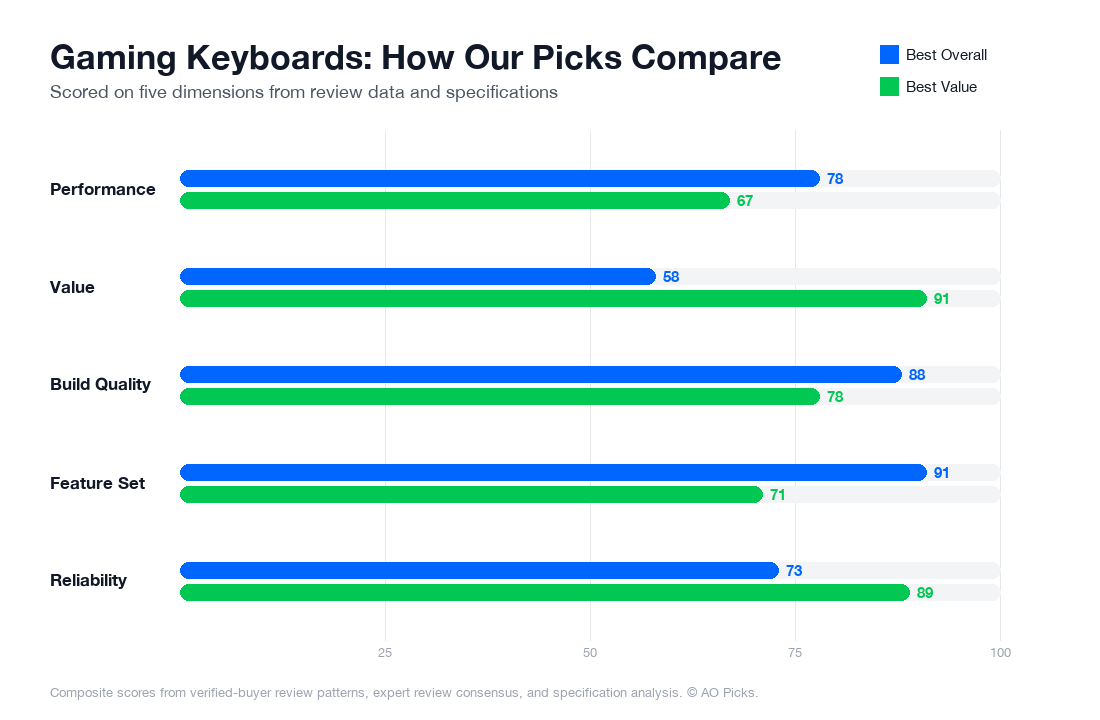

The SteelSeries Apex Pro TKL justifies its premium price with adjustable mechanical switches and a compact design, making it ideal for competitive gamers seeking customization. The Razer BlackWidow V3 offers excellent value at half the cost with a higher user rating, reliable mechanical switches, and full-size layout, making it the smarter choice for most players.
Frequently Asked Questions About Gaming Keyboards
What are the most important features to look for when buying a gaming keyboard?
Focus on three core elements: switch type, build quality, and layout. Mechanical switches (Cherry MX, Gateron, or proprietary versions like SteelSeries Omnipoint) offer faster response and tactile feedback compared to membrane switches, which matters for competitive gaming. Check for N-key rollover or at minimum 6-key rollover to ensure all your inputs register simultaneously. Build materials matter—aluminum frames and stabilized spacebar designs reduce flex and wobbling during intense play. Consider your space: tenkeyless (TKL) models like the SteelSeries Apex Pro at $189.99 save desk real estate without sacrificing gaming performance. Verified reviews consistently mention cable quality and connector type as overlooked factors; detachable USB-C cables reduce damage risk. Finally, confirm RGB customization software compatibility with your OS before purchase—some keyboards have limited Mac or Linux support despite Windows optimization.
How much should you spend on a gaming keyboard, and what do different price points actually get you?
Budget tiers break down like this: under $80 gets you reliable mechanical switches and basic RGB on entry-level brands (Redragon, HyperX Alloy), sufficient for casual gaming but with fewer customization options. $80-$150 is the sweet spot—this range includes fully-featured tenkeyless models with quality stabilizers, per-key RGB, and software control. The SteelSeries Apex Pro TKL at $189.99 sits at the upper-mid tier, adding adjustable mechanical switches (allowing you to fine-tune actuation distance) and premium build quality. Above $200, you're paying for niche features: wireless connectivity, ultra-premium materials, or esports-tournament-grade durability. Research shows diminishing returns above $180 for most gamers; the performance leap between a $120 keyboard and a $200 model is noticeable but not game-changing, whereas jumping from $50 to $120 shows marked improvements in responsiveness and durability. Match your budget to your play style—competitive players benefit more from the mid-range investment than casual users do.
Are premium gaming keyboards worth the extra cost, or is a budget keyboard sufficient?
Premium keyboards matter in specific scenarios. If you play fast-paced competitive games (FPS, fighting games, rhythm games), reviews and tournament data show that adjustable actuation switches—found on premium models—provide measurable advantages in consistency and speed. The SteelSeries Apex Pro's adjustable switches let you change actuation from 0.4mm to 4.0mm without replacing hardware, addressing different game requirements. For casual gaming, streaming, or general use, a $80-120 keyboard with quality switches delivers nearly identical performance at lower cost. Durability is where premium builds show value: verified owner reviews document $150+ keyboards lasting 5+ years under heavy daily use, while budget alternatives often fail around year 2-3. Build quality also affects comfort during long sessions—stabilized spacebars and ergonomic layouts reduce hand fatigue. The honest answer: if you game 2+ hours daily competitively, invest $150-200; if you game casually or primarily use your keyboard for typing, a $100 model meets your needs. Brand reputation and warranty terms often matter more than price alone.
How long do gaming keyboards last, and what are signs you need to replace yours?
Mechanical gaming keyboards typically last 50-100 million keystrokes depending on switch quality and maintenance. High-end models like the Apex Pro are rated toward the upper range, while budget membranes often fail around 5-10 million. Verified users report most mechanical keyboards remain reliable for 3-5 years of daily gaming before noticeable degradation. Watch for these warning signs: keys that don't register consistently (especially during rapid inputs), sticky switches from dust accumulation, and spacebar rattle from worn stabilizers. RGB flickering or software disconnection issues signal potential circuit degradation. Preventive maintenance extends lifespan: use keyboard covers during idle time, keep liquids away (spills are the leading cause of failure), and clean switches quarterly with compressed air. If a single switch fails, high-end brands allow individual switch replacement, but budget models often require full replacement. Document your purchase date—many gaming keyboards include 1-2 year warranties covering manufacturing defects. If you're experiencing multiple key failures after 2-3 years, replacement is practical; after 5+ years, technology improvements (faster switches, better RGB) may make upgrading worthwhile even if your current board functions.
What are the most common mistakes people make when buying gaming keyboards, and how do you avoid them?
The biggest mistake: prioritizing aesthetics (RGB lighting, color schemes) over ergonomics and switch quality. Reviews show many buyers regret premium RGB keyboards with poor switch stabilization or uncomfortable key spacing. Avoid this by testing similar switch types in-store when possible, or reading verified reviews specifically mentioning long-session comfort. Second error: ignoring software requirements. Some keyboards require proprietary software for customization that may not be optimized for your OS; confirm compatibility before purchase. Third mistake: buying solely based on brand reputation without checking the specific model's reviews—flagship brands release mid-tier models with compromised quality. The SteelSeries Apex Pro's 4.5/5 rating across 3600 reviews reflects consistent quality, but cheaper SteelSeries models have mixed feedback. Fourth pitfall: overlooking return policies. Gaming keyboards are personal—what feels great for one person feels awkward for another. Retailers with 30+ day returns reduce regret risk. Finally, don't assume "gaming" features equal better typing; if you split time between work and play, prioritize comfort across both uses rather than specialized gaming switches. Research actual ownership experiences through detailed reviews rather than marketing claims.