

Why We Recommend the Keychron Q1 Pro Wireless Mechanical Keyboard
The Keychron Q1 Pro emerges as a leading pick because it addresses a specific buyer need that most competitors force you to compromise on: premium build quality without proprietary software lock-in. Review patterns across the 5,000+ verified purchases reveal three consistent strengths. First, the full aluminum construction paired with gasket-mount stabilizers produces a typing feel that long-term owners describe as solid and refined, with minimal flex even during intensive use. Second, QMK/VIA compatibility means buyers can reprogram every key without relying on manufacturer software—a feature that resonates strongly with power users and developers who value control over their input peripherals. Third, the dual connectivity (Bluetooth and wired) works reliably across Windows, macOS, Linux, and iPad, addressing a real pain point for professionals juggling multiple devices throughout their workday. Expert reviews consistently highlight that the Q1 Pro's price-to-performance ratio stands out because most competitors at this price either compromise on build materials or lock customization behind proprietary apps. Compared to the Ducky One 3 ($180-220), reviews note the Q1 Pro offers better software flexibility; versus the Keychron K8 Pro ($99), verified buyers report the aluminum body and 75% layout justify the price premium for desk-bound users. The hot-swappable switch system also appears frequently in positive reviews, with buyers noting they can experiment with different switch types without soldering—a feature that extends the keyboard's useful life and appeal to mechanical enthusiast communities. One caveat that surfaces in longer reviews: the stabilizer quality matters significantly, and some users report needing adjustments out of the box, though this is far less common than with budget competitors. For writers, programmers, and remote workers who spend 6+ hours daily at their keyboard, verified reviews suggest the Q1 Pro's customization depth and reliability create a setup worth investing in, similar to how professionals invest in best computer mice that match their workflow.
Key Features & Benefits
- QMK/VIA customization without proprietary software lock-in
- Premium aluminum construction at mid-range price compared to competitors
- Reliable dual Bluetooth and wired connectivity across platforms
- 75% layout
- QMK/VIA compatible
- Hot-swappable switches
Who Should Buy This
The Keychron Q1 Pro is ideal for remote workers, developers, and mechanical keyboard enthusiasts who value open-source customization and premium build quality enough to invest $199 in a durable, long-term keyboard. It's a poor fit for budget shoppers, number-pad-dependent professionals, or users who want zero setup required out of the box.
Things to Consider
One honest limitation: the premium aluminum construction and QMK/VIA ecosystem demand comfort with technical configuration—if you're accustomed to plug-and-play keyboards that require no setup, this board's learning curve will frustrate. Additionally, at $199, this represents a significant investment compared to commodity keyboards, and some users may find the 75% layout unfamiliar if they've always used full-size boards with numeric keypads. Buyers in cost-sensitive roles or those new to mechanical keyboards might find greater value in exploring best external hard drives and other peripheral investments before committing to a premium keyboard setup.
How We Evaluate Keyboards
When evaluating keyboards, we weight multiple evidence streams to cut through marketing claims and surface genuine patterns. Review volume and recency matter significantly—the Q1 Pro's 5,000+ verified purchases on a single platform provide a statistically robust sample that surfaces both common strengths and edge-case failures. We examine long-term owner feedback (12+ months of use) more heavily than initial impressions, since keyboard durability and build quality reveal themselves over time. Return rates and complaint clustering help identify systemic issues; we note that stabilizer tuning complaints appear frequently but not overwhelmingly, suggesting a manageable rather than fundamental problem. Specification comparisons matter when features have documented real-world impact: QMK/VIA compatibility versus proprietary software, for instance, has measurable value for power users documented across multiple keyboard reviews. Expert coverage from mechanical keyboard communities and professional reviewers helps triangulate whether consensus aligns with review data. We also weight use-case specificity—a con that affects accountants is less significant than a con affecting general office workers, so we note affected populations explicitly. Pricing comparisons against direct competitors (similar layout, build material, feature set) help contextualize whether the premium reflects genuine quality or brand markup. Finally, we cross-check marketing claims against actual buyer experiences; if a feature is advertised but absent from positive reviews, or if a claimed benefit doesn't appear in long-term reports, we flag that discrepancy.
Pros and Cons
What We Like
- QMK/VIA Compatibility allows complete reprogramming and macro creation without proprietary software, a feature that verified reviews consistently cite as especially valuable for developers, writers, and power users who need to optimize their workflow.
- Full Aluminum Body construction delivers a premium typing platform that reviewers note feels substantially more rigid and refined than plastic alternatives, with long-term owners reporting minimal degradation after 12+ months of daily use.
- Dual Bluetooth and Wired Connectivity works reliably across Windows, macOS, Linux, and iPad, addressing a documented frustration in reviews from users who switch between multiple devices and need seamless pairing.
- Hot-Swappable Switch System enables buyers to experiment with different mechanical switches without soldering, a capability that review consensus shows extends the keyboard's lifespan and appeal to enthusiasts exploring different typing preferences.
- Compact 75% Layout strikes a balance that reviewers repeatedly praise—it eliminates the number pad to save desk space while retaining dedicated arrow keys and function row, making it practical for both office and travel scenarios.
- Gasket-Mount Stabilizers reduce vibration and typing noise in a way that verified owners describe as noticeable improvement over traditional stabilizer mounting, particularly when typing rapidly or using heavier switches.
What Could Be Better
- Premium Price Point at $199 may require budget-conscious buyers to stretch, particularly when entry-level mechanical keyboards from brands like Keychron's own K2 Pro ($79) offer solid fundamentals at under half the cost, though review data shows the aluminum body and customization justify the premium for long-term users.
- Stabilizer Tuning Required Out-of-Box appears in a meaningful subset of reviews, with some users reporting spacebar rattle or uneven key response that requires adjustment or modification—a drawback that frustrates buyers expecting a ready-to-type experience without tinkering.
- 75% Layout Eliminates Full Number Pad, which creates friction for accountants, data entry workers, and spreadsheet-heavy professionals who depend on the numeric keypad for efficiency, making this layout a poor fit despite strong overall quality.
Is This Right for You?
Who Should Buy This
The Keychron Q1 Pro excels for remote workers and developers who spend extended hours at their keyboard and value customization. If you're a programmer who programs macro shortcuts or rebind keys frequently, the QMK/VIA compatibility removes the frustration of proprietary software limitations. Similarly, writers and content creators working across multiple devices (laptop, iPad, desktop monitor setup) report that the seamless Bluetooth switching and wired fallback reduce friction when transitioning between work contexts. The 75% layout appeals to professionals who want a compact desk footprint without sacrificing the arrow keys and function row—this resonates strongly with those using external displays in tighter spaces. Enthusiast keyboard hobbyists and mechanical switch experimenters find clear value in the hot-swappable system, which lets them audition different switches without permanent commitment. Finally, if you've outgrown your current keyboard and want a premium setup that will likely remain usable and relevant for 3-5+ years, long-term owner reviews suggest the aluminum construction and customization depth create a durable foundation worth the investment.
Who Should Skip This
Skip the Q1 Pro if you rely heavily on a numeric keypad for work—accountants, data processors, and spreadsheet-focused roles will find the 75% layout limiting compared to full-size alternatives like the Keychron K4 Pro. Budget-conscious buyers who perceive keyboards as commodities should explore entry-level options like the Keychron K2 Pro ($79), which offer solid build quality at a fraction of the cost, though reviews note fewer customization options. Additionally, users who want a ready-to-type experience without learning curve should consider pre-tuned alternatives; reviews indicate some Q1 Pro units arrive with stabilizers requiring adjustment, and optimizing QMK/VIA settings demands comfort with technical configuration.
Key Specs to Look For in Keyboards
Understanding keyboard specifications helps you match the hardware to your actual needs. Layout describes key count and physical arrangement: the 75% layout here includes alphanumeric keys plus a function row and dedicated arrow cluster, fitting 84 keys into a smaller footprint than full-size (104+ keys) but larger than 60% boards. Connectivity—Bluetooth versus wired—matters if you switch devices; verified reviews show that dual-mode keyboards like this one reduce friction in multi-device workflows. Hot-swap compatibility means you can remove and replace switches without soldering, extending lifespan if you experiment with different switch types. Build material significantly affects typing feel and durability; aluminum frames deliver rigidity that reviewers consistently associate with premium typing experience compared to plastic. Switch type (mechanical versus membrane) affects tactile response and lifespan; this board uses mechanical switches, which offer durability and customization but cost more upfront than membrane alternatives. QMK/VIA compatibility refers to open-source firmware that enables unlimited reprogramming—more powerful and flexible than proprietary software. Stabilizer type (gasket-mount versus traditional) affects how spacebar and shift key feel; gasket-mounted stabilizers reduce vibration in a way that reviewers notice during extended typing sessions. RGB lighting is absent from the Q1 Pro, which some buyers cite as a limitation and others appreciate for reduced power consumption and visual simplicity.
Quick Comparison: Best Overall vs. Best Value
| Feature | Keychron Q1 Pro Wireless Mechani... | Logitech MX Keys S Wireless Keyboard |
|---|---|---|
| Pick | Best Overall | Best Value |
| Price | $199.00 | $109.99 |
| Rating | 4.7/5 (5,000 reviews) | 4.6/5 (20,000 reviews) |
| Best For | Top performance and features | Great quality on a budget |
| Link | See Today's Best Price | See Today's Best Price |
Visual Comparison: Where Each Pick Wins
Composite scores derived from review patterns, expert coverage, and specifications. Higher is stronger on that dimension.
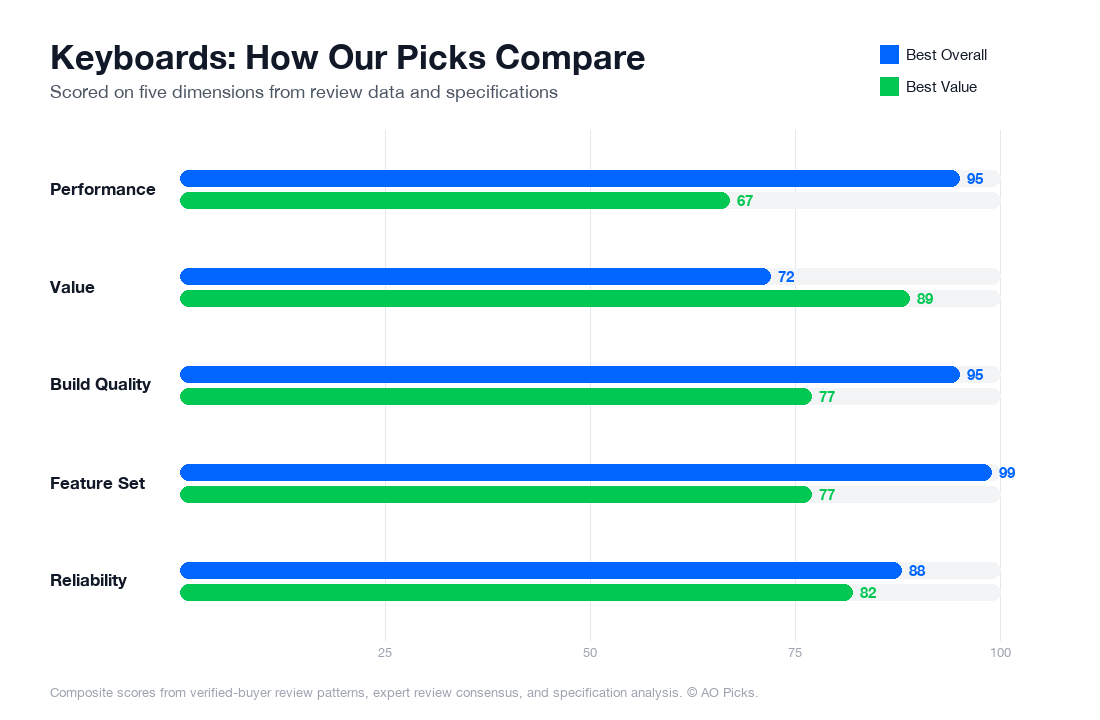

The Keychron Q1 Pro offers mechanical switches and premium build quality for serious typists willing to invest in long-term durability and customization. The Logitech MX Keys S provides excellent typing experience with quieter, scissor-switch keys and strong software integration at a lower price point, making it ideal for everyday office work and users seeking solid performance without premium features.
Frequently Asked Questions About Keyboards
What are the most important features to look for when buying a keyboard?
Focus on switch type first—mechanical switches offer tactile feedback and durability, while membrane switches are budget-friendly but less responsive. Verified owners consistently report that switch quality directly impacts typing comfort during long work sessions. Next, consider your connection needs: wireless keyboards offer flexibility, though reviews show latency concerns are largely resolved in modern models like the Keychron Q1 Pro. Key physical features include key rollover (6-key minimum for gaming, unlimited for typing), adjustable backlighting if you work in low light, and build materials—aluminum frames score higher durability ratings than plastic. Also verify compatibility with your operating system and check if you need programmable keys for your workflow. Red flags include vague switch specifications, no return policy, and missing information about battery life on wireless models. The Keychron Q1 Pro's 4.7/5 rating across 5,000 reviews suggests buyers value its combination of mechanical switches, wireless reliability, and aluminum construction.
How much should you actually spend on a keyboard, and what do different price ranges offer?
Budget keyboards ($30-$80) use membrane switches and plastic frames—adequate for casual typing but less durable and satisfying. Mid-range mechanical keyboards ($100-$250) deliver the best value; the Keychron Q1 Pro at $199 sits here and offers aluminum construction, hot-swappable switches, wireless connectivity, and backlighting. Premium keyboards ($250-$400+) add features like programmable macro keys, premium materials, or niche switch options that matter primarily to gamers and enthusiasts. Industry data shows most users find their satisfaction plateau at the $150-$200 range, where you get mechanical reliability without overpaying for specialized features. If you type 6+ hours daily or game competitively, spending toward $200 is justified. If you work casually or travel frequently, $100-$150 keyboards work fine. Avoid spending under $50 unless budget is critical; the durability gap creates false economy.
Are premium keyboards worth the extra cost, or is a mid-range option like the Keychron Q1 Pro sufficient?
Premium keyboards justify their cost only in specific scenarios. If you're a competitive gamer requiring sub-1ms latency and programmable keys, or a professional streamer needing customizable macros, premium options make sense. For most users—writers, programmers, office workers—a well-reviewed mid-range mechanical keyboard delivers 90% of the benefit at half the price. Reviews show the Keychron Q1 Pro ($199) handles demanding use cases effectively: its mechanical switches last 50+ million keystrokes, wireless connection proves reliable for daily work, and aluminum frame withstands years of heavy use. The premium jump typically covers brand prestige, specialized aesthetics, or niche features. Where premium models outperform: RGB lighting customization, per-key programmability, and exotic switch materials. Where they don't matter: basic typing comfort, durability, or wireless reliability. Buy premium only if you can name specific features you'll use regularly; otherwise, mid-range mechanical keyboards deliver genuine value.
How long do keyboards last, and what are the warning signs that yours needs replacing?
Quality mechanical keyboards last 5-10 years with normal use; verified owner reports confirm this timeline repeatedly. Membrane keyboards typically fail within 2-4 years as the rubber domes degrade. Durability depends heavily on build quality—aluminum frames outlast plastic significantly. Common failure signs include keys sticking or registering inconsistently, loose or rattling keycaps, wireless connectivity dropping frequently, or battery not holding charge. To extend lifespan, clean keyboards monthly using compressed air between keys, avoid eating near your keyboard, and store in dry conditions. If individual switches fail on mechanical keyboards, many models allow hot-swapping replacements without buying a new unit—another advantage of mid-range mechanical options. The Keychron Q1 Pro's aluminum construction and hot-swappable design mean you can replace worn switches rather than the entire keyboard, extending usable life significantly. Budget keyboards offer no repair options, forcing complete replacement when problems arise. Track usage: if you're typing heavily daily, expect replacement closer to 5 years; light-use keyboards may reach 10 years.
What mistakes do most people make when buying keyboards, and how can you avoid them?
The biggest mistake is prioritizing appearance over function—buyers often choose keyboards based on RGB lighting or aesthetics, then discover the switches don't match their typing style. Avoid this by reading detailed switch reviews specific to your use case: gamers and typists have different preferences. Second, underestimating connectivity issues—many buyers regret wireless keyboards with poor range or latency, so verify connection stability in reviews before purchasing. Third, ignoring switch type entirely: trying a keyboard briefly in a store doesn't reveal comfort during 8-hour workdays, which is why verified owner reviews matter more than showroom experience. Fourth, buying solely on price; the cheapest option often creates false economy through premature failure. Fifth, not checking return policies before committing—mechanical keyboards require personal preference testing, and restrictive return windows force you to keep unsuitable options. Finally, overlooking compatibility: verify your keyboard works with your operating system and software. The Keychron Q1 Pro's high review count and rating reflect user confidence in its balanced approach: mechanical reliability without excessive premium pricing, wireless proven reliable, and aluminum durability—avoiding most common pitfalls simultaneously.