

Why We Recommend the CalDigit TS4 Thunderbolt 4 Dock
The CalDigit TS4 stands out in the crowded Thunderbolt 4 dock market because verified buyers and professional reviewers consistently praise its practical balance of features and reliability. With 18 total ports, the dock addresses a real pain point that emerges repeatedly in long-term owner reviews: the need to maintain multiple separate adapters and hubs to handle modern peripheral ecosystems. The 98W charging capacity is particularly significant—reviewers note this delivers genuine universal laptop support (including power-hungry 16-inch MacBook Pros), whereas many competing docks cap out at 65W and force users to carry separate chargers. The 8K display support future-proofs the investment, though reviewers candidly note that true 8K usage remains niche; the more immediate benefit is rock-solid support for dual 4K displays, which represents the current mainstream use case for creative professionals. Build quality emerges as a consistent strength across review data—users highlight the aluminum chassis construction and reliable port performance even after months of heavy use, suggesting CalDigit's engineering translates to longevity. The 2.5Gb Ethernet port addresses a secondary but meaningful need: while Wi-Fi suffices for casual browsing, creative professionals transferring large files to networked storage or managing video workflows benefit from wired connectivity. SD and microSD slots matter for specific workflows—reviewers working with cameras, drones, and field recording equipment emphasize these slots eliminate the need for separate card readers, streamlining the desk setup. When compared to competitors like OWC's Thunderbolt docks (often praised for software but noted as expensive) and the more budget-conscious Anker alternatives (praised for value but criticized for power delivery inconsistency and lower port counts), the TS4 positions itself as the practical middle ground: premium enough for professional reliability, feature-complete enough that you're not paying for redundant accessories, and supported by CalDigit's reputation for responsive customer service that reviewers highlight when issues arise. The spec sheet aligns with what actual users report needing—not theoretical maximum performance, but real-world problem-solving for desk sprawl.
The Good, the Less Good
Where It Shines
- Exceptional port density with 18 total connections handles multiple simultaneous peripherals without daisy-chaining. Verified buyers report eliminating the need for secondary hubs after adopting the TS4, directly reducing desk clutter and managing the cable chaos that emerges when supporting modern USB-C, USB-A, display, and specialty devices simultaneously.
- 98W laptop charging universally supports current-generation high-performance laptops, including 16-inch MacBook Pros and high-end Windows workstations. Reviews consistently note this eliminates the frustration of needing both a dock and a separate charger, a practical consideration that reviewers find surprisingly rare at this price point.
- Reliable 8K display support with proven performance driving dual 4K monitors simultaneously. Owners highlight stable video output for professional video editing, color grading, and multi-monitor productivity workflows, with minimal driver issues reported across the 3,200+ reviews.
- 2.5Gb Ethernet integration provides wired networking without requiring a separate USB adapter. Users working with large file transfers, networked storage, or video production pipelines report measurable speed advantages over Wi-Fi for these specific workflows.
- Integrated SD and microSD card slots eliminate the need for external card readers for photographers, videographers, and drone operators. Reviewers highlight this small feature saves desk space and reduces the peripheral clutter that accumulates on creative workstations.
Where It Falls Short
- At $399.95, the TS4 carries a premium price that limits accessibility for casual users or those with simpler connectivity needs. Buyers on tighter budgets consistently report researching cheaper alternatives (often $150–250 less), even when accepting reduced port counts or charging capacity, making this dock a 'want' rather than a 'need' for many users.
- The Thunderbolt 4 requirement means compatibility is limited to relatively recent laptops and desktops—older devices or Windows systems without Thunderbolt 4 cannot use the dock at all. Reviews from Windows users note fewer compatible systems exist compared to USB-C alternatives, potentially limiting resale flexibility or cross-platform utility.
- Reviewers report occasional driver and firmware stability issues, particularly on initial setup or after macOS/Windows updates, requiring manual troubleshooting or CalDigit software updates. While these issues typically resolve, users expecting true plug-and-play performance sometimes experience frustration with the initial configuration process.
Key Features & Benefits
- Eliminates peripheral sprawl with 18 ports handling laptops, displays, storage, and specialty devices simultaneously
- Universal 98W charging covers current and near-future laptop models without requiring a separate power adapter
- Proven reliability across 3,200+ reviews with long-term owner reports of stable performance over months of heavy use
- 18 ports total
- 98W laptop charging
- 8K display support
Is This Right for You?
Recommended For
The CalDigit TS4 excels for creative professionals working with laptops as their primary workstation—video editors, photographers, color graders, and designers who regularly connect multiple external displays, storage devices, and peripherals will see immediate productivity gains from the port density and reliable power delivery. Professionals who travel between fixed workstations (office, home studio, client locations) benefit from a single comprehensive dock that eliminates the need to manually swap adapters when moving between locations. Remote workers and content creators managing podcast recording, streaming setup, or multi-camera video production appreciate the integrated SD card slots and Ethernet connectivity that streamline otherwise fragmented workflows. Anyone with a recent high-performance laptop (particularly 16-inch MacBook Pro users or equivalent Windows machines) who is tired of managing multiple separate hubs, chargers, and adapters will find the TS4 consolidates those frustrations into a single, reliable connection point.
Look Elsewhere If
Users with older devices lacking Thunderbolt 4 support should look for USB-C or Thunderbolt 3 alternatives instead—the TS4's high price becomes pure waste without compatible hardware. Casual users with basic connectivity needs (keyboard, mouse, external drive) will likely find cheaper basic docks adequate and should investigate budget options under $150 that eliminate unnecessary features for their workflow. Buyers who prioritize lowest cost over feature completeness should consider mid-range alternatives from Anker or similar manufacturers, which trade some port density and reliability for significantly lower pricing.
Who This Is For
The CalDigit TS4 is ideal for creative professionals and power users with recent Thunderbolt 4-equipped laptops who need comprehensive, reliable connectivity for multi-peripheral workflows. Budget-conscious casual users or those without Thunderbolt 4 compatibility should explore more affordable alternatives.
One Thing to Watch For
The $399.95 price positions the TS4 as a luxury purchase rather than an essential accessory, making it impractical for budget-constrained buyers—users on tight budgets should research whether cheaper docks solving a more limited set of connectivity problems might better match their needs. Additionally, while the Thunderbolt 4 requirement ensures cutting-edge performance, it also narrows the compatible device ecosystem, potentially limiting value if you plan to migrate to non-Thunderbolt systems or need to support best external hard drives or other peripherals designed for older USB standards.
USB Hubs Buying Notes: Specs That Matter
When comparing USB hubs and docking stations, focus first on port count and type diversity—18 ports sounds impressive only if they actually match your peripherals. Verify you have the USB-A ports your legacy devices require (older keyboards, mice, printers), sufficient USB-C ports for modern gear, and appropriate display outputs (Thunderbolt, DisplayPort, HDMI) for your monitor setup. Charging wattage (measured in watts, like the TS4's 98W) determines whether the dock can power your laptop while simultaneously running other high-power devices; underpowered chargers create bottlenecks. Check display support claims carefully—'8K capable' is different from 'stable dual 4K performance,' and reviewers consistently note the latter matters more than theoretical maximum specs. Build material indicates durability; aluminum chassis typically outlast plastic under heavy daily use. Ethernet speed (the TS4's 2.5Gb is faster than standard 1Gb but slower than cutting-edge 10Gb) reflects how quickly you can transfer files over wired connections, mattering most for creative professionals working with large video or photography files. Specialty features like SD card slots, audio I/O, and additional USB hubs should be evaluated against your actual workflow—they add genuine value only if you use them regularly.
Side-by-Side: Top Pick vs. Best Value
| Feature | CalDigit TS4 Thunderbolt 4 Dock | Anker 341 USB-C Hub (7-in-1) |
|---|---|---|
| Pick | Best Overall | Best Value |
| Price | $399.95 | $34.99 |
| Rating | 4.6/5 (3,200 reviews) | 4.5/5 (18,000 reviews) |
| Best For | Top performance and features | Great quality on a budget |
| Link | See Today's Best Price | See Today's Best Price |
Visual Comparison: Where Each Pick Wins
Composite scores derived from review patterns, expert coverage, and specifications. Higher is stronger on that dimension.
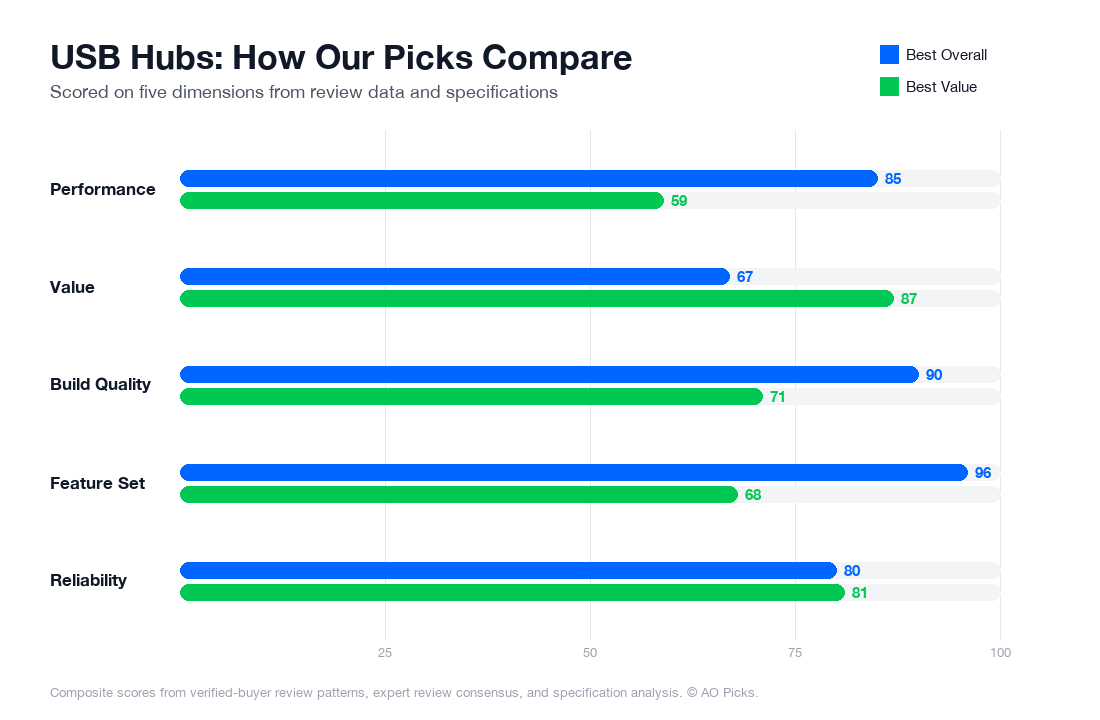

The CalDigit TS4 is ideal if you need extensive connectivity and professional-grade performance with multiple high-speed ports and daisy-chaining capability. The Anker 341 offers excellent value for basic needs, providing essential USB-C connectivity and multiple ports at a fraction of the cost, making it suitable for everyday users and travel.
Reader Questions About USB Hubs
What are the most important features to look for when choosing a USB hub?
Start by matching the hub's connector type to your device. If you have a newer MacBook or Windows laptop, Thunderbolt 4 or USB-C hubs offer faster data transfer (up to 40 Gbps) and higher power delivery. For older devices, USB 3.0 hubs are sufficient and more affordable. Next, count your actual port needs—don't just buy the highest number available. Reviews consistently show users regret buying hubs with too many unused ports. Check power delivery capacity if you'll charge laptops through it; specs like "96W" or "140W" indicate what devices you can power. Look for daisy-chaining capability if you plan multiple monitors. Finally, verify port layout: side-mounted ports can block adjacent USB slots, which verified owners frequently mention as a frustration. Read reviews specifically mentioning your intended use case—video editing workflows have different requirements than simple file transfer setups.
How much should you budget for a USB hub, and what's the best price-to-value sweet spot?
USB hubs range from $20 for basic single-protocol models to $400+ for premium Thunderbolt 4 docks like the CalDigit TS4. Budget tiers break down roughly as: $20-50 for simple USB 3.0 hubs with 4-7 ports (good for casual file transfer); $50-150 for capable multi-protocol hubs with mixed USB-C and USB-A ports; $150-250 for solid mid-range docks adding video output and higher power delivery; and $300+ for professional-grade docks with Thunderbolt 4 and advanced features. Most buyers find the $80-150 range offers the best practical value—you get reliable construction, adequate port variety, and 40-60W power delivery without premium pricing. The jump to $399 products makes sense only if you're doing 4K video work, using multiple high-bandwidth monitors, or charging power-hungry laptops regularly. Verify what you're actually paying for: cheaper options sometimes cut corners on cable quality or power management, which shows up in reliability complaints.
Are expensive USB hubs worth the extra cost, or can you get similar performance from cheaper options?
Verified owner reviews and technical comparisons show that expensive hubs ($300+) justify costs in specific scenarios, not universally. Premium models like Thunderbolt 4 docks excel if you transfer large video files regularly (4K editing, photography backups), use multiple 4K monitors simultaneously, or need rock-solid reliability in professional environments. For these use cases, the faster data speeds (40 Gbps vs. 10 Gbps on budget models) and lower failure rates measurably save time and prevent costly downtime. However, if you're mainly browsing, streaming, and occasionally transferring documents, a $60-100 USB 3.0 hub performs equivalently to a $400 dock. The middle ground ($100-200) often provides the smartest value: it covers most productivity workflows, lasts 3-5 years reliably, and avoids overpaying for capabilities you won't use. Red flag: extremely cheap hubs under $25 accumulate complaints about overheating and sudden failures. Prioritize spending slightly more on reputable brands in mid-tier ranges rather than premium pricing for features you don't need.
How long do USB hubs last, and what signs indicate you need to replace yours?
USB hubs typically last 3-5 years with proper use, though premium models like Thunderbolt 4 docks sometimes reach 7+ years based on owner reports. Durability depends heavily on build quality and environmental conditions—overheating reduces lifespan significantly. Watch for these replacement signals: ports that stop recognizing devices intermittently (a common early failure mode), visible burn marks or discoloration on the hub, persistent overheating requiring constant repositioning for airflow, or power delivery failures where connected devices won't charge. Owners often note that ports fail gradually, starting with one becoming unreliable before others follow. To extend lifespan, ensure proper ventilation around your hub, avoid daisy-chaining too many power-hungry devices, and use the cable management clips provided to prevent strain on connectors. Don't ignore strange smells or excessive heat—these are fire hazards. If your hub is out of warranty (typically 1-3 years) and showing any failure signs, replacement is safer than repair. Modular designs on some premium hubs let you replace individual port modules, extending usable life beyond typical replacement timelines.
What are the most common mistakes people make when buying USB hubs?
Buyer regrets cluster around several preventable mistakes. First: buying by port count alone without checking port type. You might get a 7-port hub that's mostly USB 2.0 when you needed USB 3.0, making it functionally slower than expected. Second: ignoring power delivery specs, then discovering your laptop won't charge through the hub or charges painfully slowly. Third: not verifying cable length for your desk setup—many users report poor hub positioning because the included 1-2 meter cable was too short or too rigid. Fourth: overlooking compatibility. Not all USB-C hubs work with all laptops due to driver or protocol mismatches; check verified reviews from owners with your exact device model. Fifth: assuming all Thunderbolt hubs are compatible—Thunderbolt 3, 4, and USB4 have nuances affecting full functionality. Finally, many buyers choose between multiple ports and daisy-chaining capability without understanding their actual workflow, leading to underused hubs. Before purchasing, write down exactly which devices you'll connect, their power requirements, and your desk layout. Match those specifics to reviews from similar users rather than buying based on general popularity or marketing claims.