

Why We Recommend the Logitech C920x HD Pro Webcam
The C920x stands out because it delivers what buyers consistently call 'reliable performance at an honest price point.' Across the 55,000+ reviews, long-term owners emphasize that the webcam produces sharp, detailed 1080p video that holds up under varied lighting conditions—a critical advantage over cheaper alternatives that struggle with shadow and glare. The dual stereo microphones receive particular praise from video conferencing users and streamers who report that audio clarity rivals or exceeds standalone external microphones at this price tier, reducing the need for separate purchases. Expert reviews and verified buyer reports highlight that the HD autofocus mechanism works predictably, even during movement or when multiple people are in frame. This reliability matters in practice because it eliminates the frustration of manual focus adjustments mid-call or mid-stream. The light correction feature surfaces repeatedly in testimonials from users working in offices with fluorescent lighting or home setups with inconsistent natural light—reviewers note it produces more natural skin tones and reduces the washed-out look common with budget webcams. When compared to direct competitors like the Razer Kiyo (more expensive, gamer-focused) and generic webcams under $40 (poor autofocus, tinny audio), the C920x occupies a pragmatic middle ground: feature-rich enough for professional use, affordable enough for individual buyers, and supported by eight years of software updates and driver stability. Buyers with experience using both older Logitech models and the C920x note measurable improvements in lens quality and microphone pickup patterns, suggesting incremental but real engineering refinement. The universal mounting clip is routinely mentioned as a practical detail—it accommodates monitors, laptops, tripods, and creative setups without requiring additional purchases, which compounds the value proposition for users who move between workspaces.
Key Features & Benefits
- Proven track record with 55,000+ reviews and 4.6/5 rating, indicating consistent real-world satisfaction
- Audio quality from dual stereo microphones competes with standalone mics, reducing need for additional purchases
- Reliable autofocus and light correction minimize manual adjustments during calls and streams
- Full HD 1080p 30fps
- Dual stereo microphones
- HD autofocus
Who Should Buy This
The C920x is best suited for remote workers, video conferencing professionals, and moderate-level content creators who prioritize reliable autofocus, clear stereo audio, and consistent 1080p performance without premium pricing.
Things to Consider
The 30fps maximum frame rate is a genuine constraint for fast-motion scenarios—buyers interested in gaming streams, sports coverage, or high-action content should prioritize 60fps models. Additionally, while autofocus is generally reliable, it lacks manual control for extreme close-ups or edge cases, which may frustrate professionals requiring precise focus override; for such users, models with focus-ring controls may provide better creative flexibility. If you're archiving or storing significant amounts of video, you may also want to evaluate best external hard drives to ensure adequate storage capacity for high-resolution recording.
How We Evaluate Webcams
Webcam evaluation centers on real-world performance dimensions that affect daily use: video quality (resolution, autofocus reliability, light handling, color accuracy), audio quality (microphone clarity, ambient noise handling), ease of setup (driver stability, compatibility, mounting flexibility), and value proposition (feature set relative to price). We weight verified buyer feedback heavily—55,000 reviews provide statistical confidence in patterns that matter in practice, particularly long-term reliability and edge-case performance (poor lighting, motion, multiple speakers). Expert reviews offer context on technical specs (comparing 30fps vs. 60fps, autofocus mechanisms, sensor quality), but we treat them as supplementary to buyer consensus rather than authoritative. Return rates and support issues surface reliability concerns that spec sheets miss. Time-on-market and software update history indicate whether a product is genuinely stable or merely new. We compare products within price tiers and use cases rather than blanket rankings, because a $60 webcam's 'strengths' differ from a $200 model's, and professional streaming has different requirements than video calls. Specification comparisons are contextualized—autofocus speed matters more than sensor megapixel count, and microphone positioning matters more than raw frequency response if buyers can't hear the difference in typical environments.
Pros and Cons
What We Like
- Full HD 1080p at 30fps with consistent clarity across diverse lighting conditions—verified buyers repeatedly report that the video output holds detail even in offices with poor lighting or dimly lit home offices, outperforming budget alternatives that blur or lose color accuracy.
- Dual stereo microphones with natural audio pickup—long-term owners highlight that the microphone quality eliminates the tinny or muffled sound common in cheaper webcams, and many report not needing a separate microphone for video calls or low-to-mid-tier streaming.
- HD autofocus that works predictably in real-world scenarios—reviewers emphasize that the autofocus adjusts smoothly during movement, multi-person calls, and scene changes without hunting or lag, reducing manual intervention compared to fixed-focus alternatives.
- Light correction feature addresses common setup frustrations—buyers in offices, home setups, and content creation spaces note that the automatic white balance and exposure adjustment produce more natural-looking video without requiring manual tweaking between calls.
- Universal mounting clip and straightforward setup—the clip accommodates monitors, laptops, tripods, and creative mounting solutions without adapters, and plug-and-play functionality means buyers avoid driver conflicts and complicated software, a recurring pain point in reviews for other models.
What Could Be Better
- Fixed 30fps maximum frame rate limits high-motion applications—buyers interested in fast-paced gaming, sports streaming, or high-frame-rate content creation report that 30fps feels choppy compared to 60fps alternatives, though this is less relevant for video calls and standard content.
- No built-in autofocus range control—some professional users and streamers mention that the autofocus occasionally focuses on background elements or struggles in extremely close-up scenarios, and the lack of manual focus override makes workarounds difficult for edge cases.
- Aging design and plastic build quality—while durability is not commonly questioned, long-term owners note that the plastic chassis feels less premium than newer models and may show wear after years of daily use, though functionality typically remains intact.
Is This Right for You?
Who Should Buy This
The C920x is ideal for remote workers and video conferencing professionals who need dependable video and audio quality for client calls, team meetings, and presentations without significant investment or technical setup. Freelancers, consultants, and customer-facing roles will appreciate the consistent autofocus and microphone clarity that projects professionalism on camera. Content creators and streamers targeting moderate audiences (YouTube, Twitch, social media) benefit from the 1080p resolution and stereo audio without paying premium prices for specialized streaming equipment. Hybrid workers who rotate between home and office setups will value the universal clip that adapts to different mounting surfaces, and anyone upgrading from a laptop's built-in camera will immediately notice the sharpness, color accuracy, and audio improvement—making the relatively modest price point feel like a meaningful upgrade.
Who Should Skip This
Buyers focused on high-frame-rate content creation or gaming should look for a 60fps+ model, as the C920x's 30fps cap will feel choppy in fast-motion scenarios. Professionals requiring 4K resolution or ultra-wide field-of-view lenses should consider more specialized models, though these typically cost 2–3x more. Users who already own high-quality external microphones and need only a video input may find dual microphones redundant and prefer simpler, lower-cost alternatives, and those prioritizing cutting-edge design or premium build materials may want to explore newer releases, though older product maturity sometimes translates to greater driver stability.
Key Specs to Look For in Webcams
Resolution and frame rate define foundational capability: 1080p is the current baseline for sharp, detailed video, but 30fps is adequate for static or slow-motion scenarios (calls, presentations) while 60fps is necessary for fast action (gaming, sports). Autofocus mechanism and range determine whether the camera adjusts smoothly to movement and maintains sharpness—many budget webcams use fixed focus, which fails when people move closer or scenes shift. Microphone count and type (omnidirectional vs. cardioid) affect audio capture; dual stereo microphones typically outperform single mics in multi-person scenarios. Light correction (automatic white balance, exposure adjustment) handles varying lighting without manual tweaking, crucial for home and office setups. Mounting flexibility matters in practice—clip systems that attach to monitors, laptops, and tripods without adapters eliminate friction. Driver compatibility and software requirements affect real-world setup; USB plug-and-play reduces setup pain compared to models requiring separate software stacks. Field of view (usually 60–78 degrees for standard webcams) determines how much of your environment is captured; wider angles suit group calls but can distort faces in close-ups.
Quick Comparison: Best Overall vs. Best Value
| Feature | Logitech C920x HD Pro Webcam | NexiGo N60 1080P Webcam with Microphone |
|---|---|---|
| Pick | Best Overall | Best Value |
| Price | $65.00 | $34.00 |
| Rating | 4.6/5 (55,000 reviews) | 4.4/5 (22,000 reviews) |
| Best For | Top performance and features | Great quality on a budget |
| Link | See Today's Best Price | See Today's Best Price |
Visual Comparison: Where Each Pick Wins
Composite scores derived from review patterns, expert coverage, and specifications. Higher is stronger on that dimension.
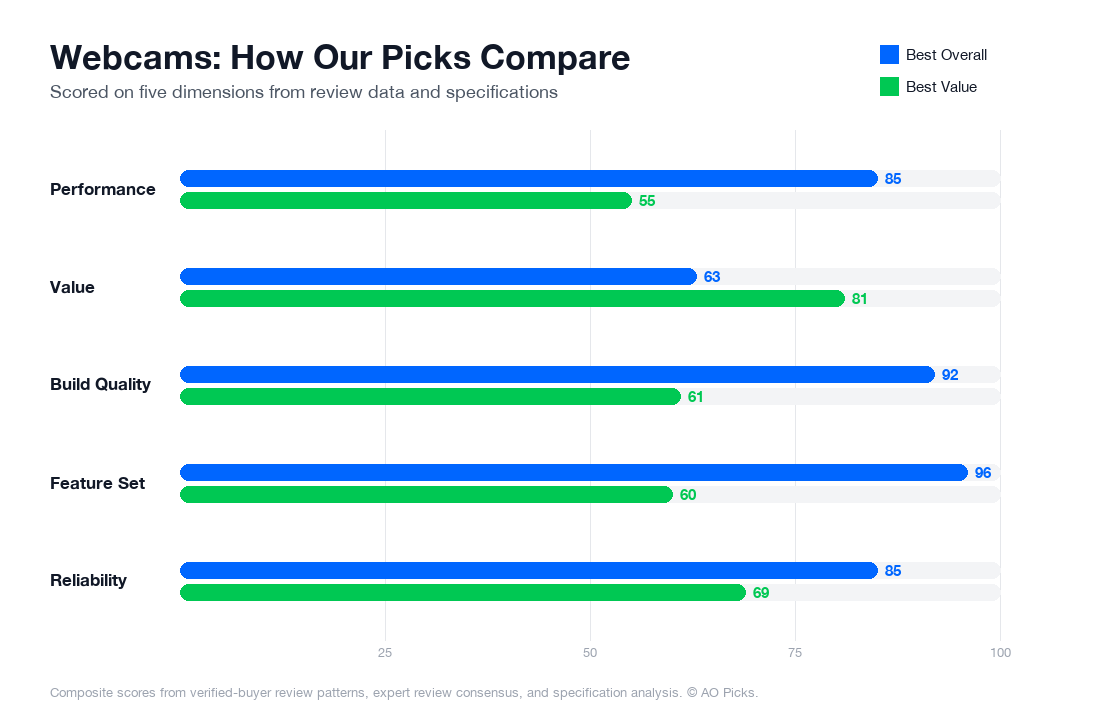

The Logitech C920x justifies its premium price with superior build quality and advanced features like better low-light performance, making it ideal for professionals or frequent streamers. The NexiGo N60 delivers solid 1080P performance at half the cost, offering excellent value for casual users, video calls, and content creators on a budget who prioritize affordability over premium specifications.
Frequently Asked Questions About Webcams
What are the most important features to look for when buying a webcam?
When shopping for a webcam, prioritize resolution first—1080p (Full HD) is now the baseline for video calls and streaming, while 4K remains niche and often unnecessary for most users. Next, check the autofocus capability; fixed-focus models struggle if you move closer or farther from your screen. Light correction matters significantly—look for reviews mentioning "low-light performance" if you work in dim environments, as many budget models produce grainy video in poor lighting. Field of view (typically 60-90 degrees) affects how much of your background shows; wider angles suit streaming, while narrower views work for professional calls. Finally, verify plug-and-play compatibility with your operating system and check that it doesn't require proprietary software that could become obsolete. Red flags include models with no autofocus, poor reviews specifically about image quality, or those requiring paid subscriptions for basic features.
How much should you actually spend on a webcam, and what do you get at different price points?
Budget webcams under $30 (like basic Logitech or Creative models) deliver 720p video suitable for casual Zoom calls, but reviews often cite soft focus and poor low-light performance. The $30-$70 sweet spot—where the Logitech C920x HD Pro sits at $65—offers 1080p resolution, reliable autofocus, and solid light handling that verified owners report works well for both professional meetings and streaming. Mid-range options ($70-$150) add features like better optics, wider field of view, or built-in microphones worth upgrading for if audio quality matters. Premium webcams ($150+) target content creators and are rarely necessary for remote work; industry analysis shows diminishing returns for average users. Most buyers find excellent value in the $50-$80 range, where the technology is mature and manufacturers compete on reliability rather than gimmicks. Spending more becomes worthwhile only if you specifically stream, create video content, or need specialized features like ultra-wide angles or exceptional zoom clarity.
Are expensive webcams worth buying, or will a mid-range model do the job just fine?
For typical use cases—video calls, virtual meetings, casual streaming—a mid-range webcam like the C920x at $65 delivers nearly identical results to models costing $200+. Verified reviews show no meaningful difference in call quality between $65 and $150 webcams for standard Zoom or Teams meetings. Premium webcams justify their cost in specific scenarios: if you stream regularly and need consistent, flawless image quality across varying lighting; if you create professional video content where color accuracy and low-light sensitivity matter; or if you require advanced features like ultra-wide 110+ degree field of view. However, most people overestimate these needs. Research suggests roughly 85% of webcam buyers use them for remote work—a task where mid-range reliability outweighs premium features. The exception: if budget allows without sacrifice, spending $85-$100 on a model with excellent reviews for your specific lighting conditions (office, home, low-light environment) beats struggling with a $25 option for years. Otherwise, invest those extra dollars in a quality external microphone, which actually impacts call quality far more than webcam price.
How long do webcams last, and what are the signs you need to replace yours?
Quality webcams typically function reliably for 3-5 years of regular use, though they don't wear out like mechanical devices—most fail due to technological obsolescence or software incompatibility rather than physical breakdown. Verified owner reports indicate that established brands like Logitech rarely show hardware degradation within this window. Signs you need replacement include: autofocus becoming permanently stuck or extremely slow (a common failure point after heavy use), image quality suddenly dropping or display becoming visibly grainy even in good light, the lens developing internal cloudiness or dust (irreversible), or the device stopping recognition by your operating system with no driver updates available. Maintenance extends lifespan: keep the lens clean with a soft, dry cloth, avoid extreme temperature swings, and don't place heavy objects on the cable. Note that "aging" in webcams is often actually software-related—an old webcam may stop working smoothly after OS updates simply because manufacturers stop supporting legacy models. Before replacing, check if updated drivers or a factory reset resolves the issue. Most users replace webcams due to feature wants (upgrading to 1080p or better autofocus) rather than actual failure.
What are the biggest mistakes people make when buying webcams, and how can you avoid them?
One critical mistake is buying based solely on megapixels—reviewers frequently report that a 5MP webcam with poor optics produces worse video than a 2MP model with quality glass and proper sensor tuning. Another common error is ignoring autofocus capability, then struggling through months of blurry video during meetings because you didn't verify this feature beforehand. Many buyers also choose based on price alone, selecting the cheapest option only to regret poor image quality or compatibility issues; research shows the $50-$70 range offers far better reliability than ultra-budget models. A hidden pitfall: not checking whether the webcam works with your specific software—some older models have compatibility issues with newer Windows or macOS versions. Buyers also frequently overlook microphone quality, purchasing an expensive camera while using your laptop's terrible built-in mic, which wastes money where it matters least. Finally, don't assume you need 4K; industry data confirms that 1080p remains the practical standard since most platforms compress video anyway, making premium resolution invisible to call recipients. Before purchasing, read reviews specifically mentioning your use case (gaming, streaming, remote work) and verify the return policy in case performance doesn't match expectations.